
Lieferung heute & morgen

Qualitätsgarantie

Willkommens-Angebote freischalten: KOSTENLOSE Lieferung | Bis zu 80 % RABATT | Kostenlose 30-Tage-JoyPlus-Testphase
App herunterladen
By a Joybuy Product Recommendation Officer, July 28, 2026
The PC peripheral market is filled with tempting offers, but the search for a new mechanical gaming keyboard is fraught with pitfalls that can easily lead to buyer's remorse. Marketing terms often obscure inferior quality or unsuitable features. Before you make a decision, it's crucial to understand the most common mistakes to find a keyboard that is perfectly tailored to your needs.
Common Pitfalls When Buying a Keyboard:
To make an informed decision, you should examine three core aspects. These parameters are the primary determinants of your future keyboard's performance, longevity, and user comfort.
The heart of any mechanical keyboard is its switches. They define the typing feel and acoustics. The three main types are:
For maximum flexibility, a hot-swap keyboard is a smart choice. This feature allows you to change the mechanical switches without soldering. You can experiment with different switch types or easily replace faulty ones, significantly extending the keyboard's lifespan and providing an entry point into the world of custom mechanical keyboards.
The size of the keyboard, also known as the form factor, should suit your desk space and usage habits.
Regardless of the form factor, compatibility with your regional layout, such as ISO-DE for users in Germany, is critical. Explicitly look for a QWERTZ keyboard to ensure all keys are in their familiar positions.
The quality of materials affects both the feel and the durability.
Here are some recommendations tailored to specific user profiles that meet the quality criteria mentioned above.
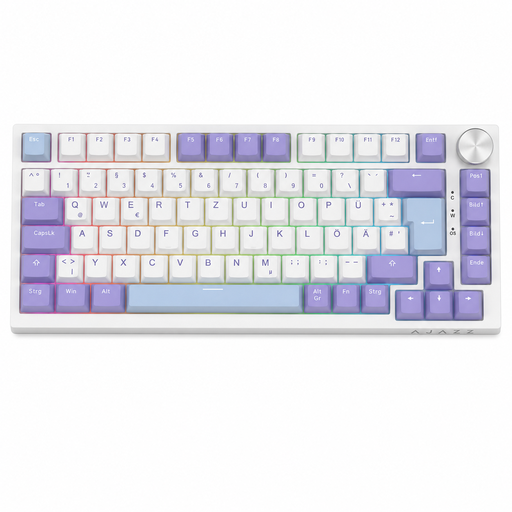
Why This Fits Their Persona: This model offers an accessible entry point into the world of customisable keyboards. It combines a compact 75% format with essential features for gamers and heavy typists in Germany, without breaking the bank.
You get a keyboard with genuine mechanical switches and the correct ISO-DE layout. The hot-swap feature allows you to customise the typing feel later, so you're not locked into a single switch type.
Full hot-swap capability for 3-pin switches; convenient metal rotary knob for volume control.
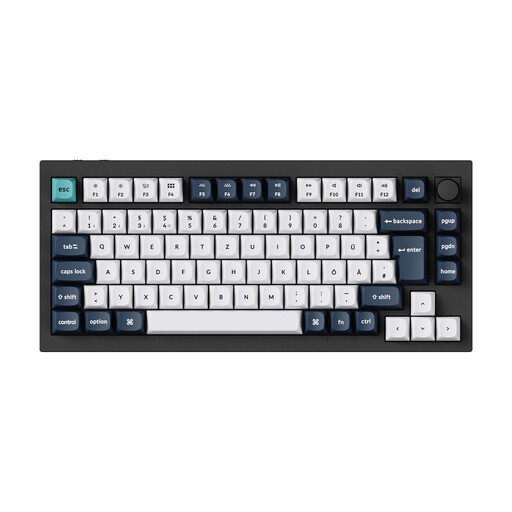
Why This Fits Their Persona: For users who refuse to compromise on materials and performance. This keyboard combines a solid aluminium case with flexible wireless connectivity and a premium typing experience for a top-tier setup.
It sidesteps all pitfalls with an uncompromising feature set: a CNC-milled aluminium keyboard case, high-quality PBT keycaps, hot-swap capability, and a correct ISO-DE layout out of the box.
Tri-mode connectivity (2.4 GHz, Bluetooth, Cable) with 1000 Hz polling rate; double-gasket mount for a dampened, rich sound profile.

Why This Fits Their Persona: Designed for programmers, content creators, and office professionals who need a precise mechanical keyboard without the loud acoustics and flashy aesthetics of gaming models. Ideal for productive environments.
This model is a dedicated quiet mechanical keyboard with low-profile, tactile switches. It avoids the "gaming" trap by focusing on professional features like multi-device connectivity and smart illumination.
Seamlessly switch between up to three devices (Easy-Switch); smart, adaptive key backlighting.
Once you've found the ideal keyboard, the next logical step is to complete your setup with a matching gaming mouse. The precision and ergonomics of a high-quality mouse are just as crucial for performance and comfort.
We've compiled a complete, up-to-date list of products that fully meet these strict selection criteria and safety standards.
The lifespan of a mechanical keyboard is largely determined by its switches. Most mechanical switches are rated for 50 to 100 million keystrokes, which translates to many years of intensive use. Furthermore, keycaps made from PBT are more resistant to abrasion than those made from ABS, ensuring the longevity of the legends and surface texture.
Hot-swap means that the mechanical switches are not soldered to the circuit board (PCB). They can be easily pulled out with a special tool (a switch puller) and replaced with other compatible switches (usually 3-pin or 5-pin MX-style). This allows for easy repairs and customisation of the typing feel without needing technical expertise or soldering tools.
Modern wireless mechanical keyboards are absolutely suitable for competitive gaming. Models that use a 2.4 GHz wireless connection offer a polling rate of 1000 Hz, which corresponds to a 1 ms latency—identical to wired keyboards. Bluetooth connections typically have higher latency and are better suited for typing or casual gaming. Many models offered as a wireless mechanical keyboard provide multiple connection modes, allowing you to switch depending on your needs.