
Lieferung heute & morgen

Qualitätsgarantie

Willkommens-Angebote freischalten: KOSTENLOSE Lieferung | Bis zu 80 % RABATT | Kostenlose 30-Tage-JoyPlus-Testphase
App herunterladen
Finding the right mechanical keyboard can quickly become overwhelming. The market is flooded with technical jargon, marketing promises, and a vast selection of models. Many users invest in an expensive device, only to realise after a few months that it doesn't suit their needs. As your Joybuy Product Recommendation Officer, I'll help you navigate the typical pitfalls and make an informed decision.
Before we dive into the key features, let's look at the three most common mistakes that lead to disappointment and unnecessary expense.
To avoid a bad purchase, focus on the following three core aspects. These fundamentally determine the typing feel, functionality, and longevity of your new keyboard.
The mechanical switch under each key defines the typing feel and sound. The three main categories are:
The size of the keyboard, also known as the form factor, affects your desk space and the availability of keys.
The construction method and connection options are crucial for the user experience.
Here are some models tailored to specific needs that cleverly avoid the pitfalls mentioned.
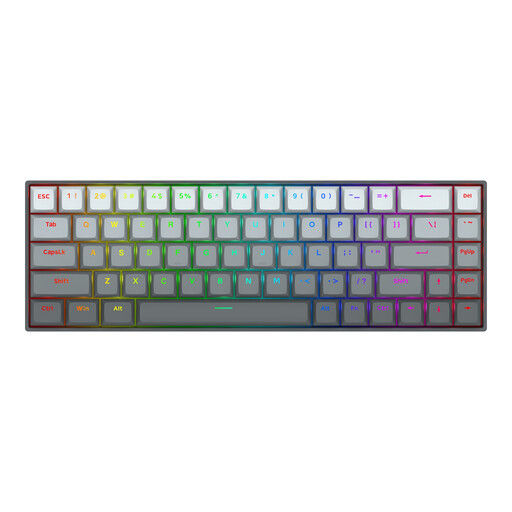
Why This Fits Their Persona: Specifically designed for competitive games like Valorant or CS2, where milliseconds matter. The compact 65% layout creates maximum space for mouse movements.
It bypasses the "gaming" myth with verifiable performance: The magnetic switches with Rapid Trigger and the 8000 Hz polling rate offer a real competitive advantage that goes far beyond mere RGB effects.
The software-adjustable actuation (0.2mm to 4.0mm) and Rapid Trigger function allow for instant key reset, enabling superior in-game movement control.
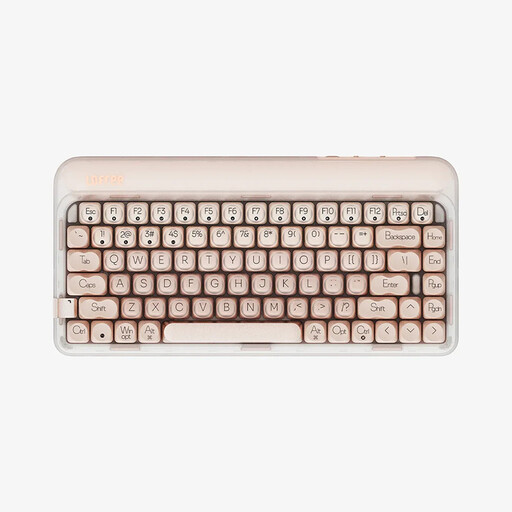
Why This Fits Their Persona: Perfect for users who value a stylish desk setup, a pleasant typing experience, and wireless flexibility. Ideal for work, creative tasks, and daily use.
It avoids the pitfall of choosing the wrong switch by being optimised for a quiet and soft typing feel. The gasket-mount keyboard structure and factory-lubed linear switches are ideal for office environments.
The combination of a gasket structure and multi-layer sound dampening (PORON, IXPE) reduces vibrations and ensures a clean, muted sound profile. Tri-mode connectivity (USB-C, Bluetooth, 2.4G) offers maximum flexibility.

Why This Fits Their Persona: Provides an excellent foundation for modification and personalisation. Ideal for hobbyists who want to fine-tune their keyboard's typing feel, acoustics, and appearance down to the smallest detail.
It sidesteps the "empty promise" trap by being a true hot-swap keyboard. Compatibility with 5-pin switches allows for replacement without soldering, offering maximum freedom for experimentation.
The combination of gasket-mount, hot-swap capability, and a programmable knob makes it a versatile platform. Unique features like the detachable rhythm light bar offer additional room for creativity.
We have compiled a complete, real-time list of products that fully satisfy these strict selection criteria and safety regulations.
The lifespan of a mechanical keyboard is largely determined by its switches. Most mechanical switches are rated for 50 to 100 million keystrokes. With average use, a high-quality mechanical keyboard can last for many years. Furthermore, on a hot-swap keyboard, faulty switches can be easily replaced individually, further extending its lifespan.
Yes, but with some caveats. A wireless mechanical keyboard with a 2.4 GHz wireless connection offers very low latency, which is perfectly adequate for most gamers, even in competitive scenarios. Bluetooth connections tend to have higher latency and are better suited for typing and casual gaming. For professional esports athletes, a wired connection often remains the top choice to eliminate any potential interference.
The keyboards featured here use the QWERTY US layout. This is the standard keyboard arrangement in the United States and many other countries. It differs from other regional layouts, such as QWERTZ (used in Germany) or AZERTY (used in France). If you are used to a different layout, you can still type all the necessary characters by changing your operating system's language settings, but you will need to get used to the keycaps not matching what you type.