
Lieferung heute & morgen

Qualitätsgarantie

Willkommens-Angebote freischalten: KOSTENLOSE Lieferung | Bis zu 80 % RABATT | Kostenlose 30-Tage-JoyPlus-Testphase
App herunterladen
The search for the right mechanical keyboard can quickly become overwhelming. The market is flooded with models that boast impressive features and designs. But all too often, a promising product turns out to be a bad purchase after just a short time. As your Joybuy Product Recommendation Officer, I'll help you identify the common pitfalls and make an informed decision that truly fits your needs.
Before we dive into the key features, let's shed some light on the marketing promises that often obscure more than they reveal.
To avoid a bad purchase, focus on the following technical parameters. They are the primary determinants of your new keyboard's performance, comfort, and lifespan.
Each key on a mechanical keyboard has its own individual switch. Its characteristics define the typing feel. The three main types are:
Some models also offer a hot-swap keyboard feature. This allows switches to be replaced without soldering, enabling you to customise the feel to your personal preferences later on.
The quality of the keycaps is crucial for the feel and durability. PBT (polybutylene terephthalate) is more resistant to wear and, unlike the cheaper ABS (acrylonitrile butadiene styrene), does not develop a shiny finish over time.
When buying online, always pay close attention to the specified keyboard layout. The most common international standard is the QWERTY layout. Be aware of regional variations like the German QWERTZ layout (where the Z and Y keys are swapped), especially when purchasing from international sellers.
The size of the keyboard should match your workspace and your needs.
Here are a few recommendations tailored to specific use cases that meet the quality criteria mentioned above.
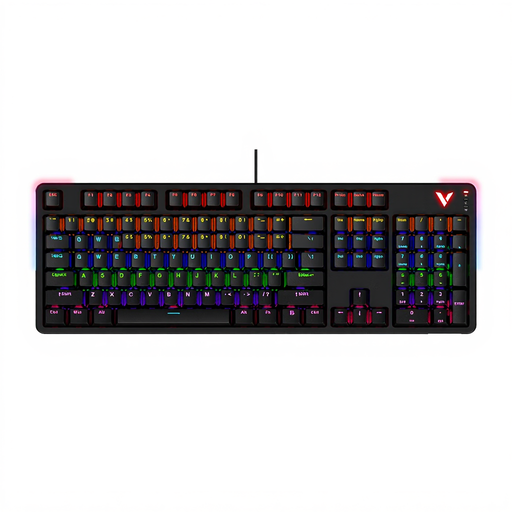
Why This Fits Their Persona: This model is designed for the needs of gamers who value speed and reliability. The linear red switches allow for rapid, repeated keystrokes, while the wired connection ensures latency-free input.
It bypasses the unreliable connection pitfall with a stable USB-C port. The robust construction with an aluminium alloy frame ensures that its looks aren't just hiding a lack of substance.
Full anti-ghosting for all 104 keys in wired mode, allowing for complex key combinations without input errors. The detachable top cover allows you to switch between a low- and high-profile look.
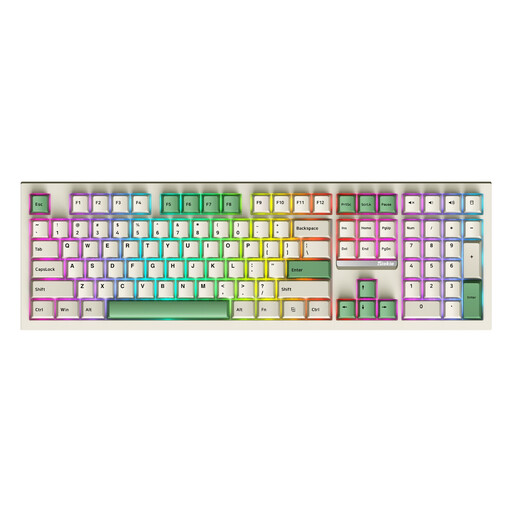
Why This Fits Their Persona: This full-size model offers maximum flexibility. With three connection modes (wired, Bluetooth, 2.4Ghz), it adapts to any work environment. Its hot-swap capability makes it ideal for enthusiasts who want to personalise their typing experience.
It escapes the "one-size-fits-all switch" trap because the switches are replaceable. If you don't like the factory-installed switch type, you can easily swap it for another without having to buy a whole new keyboard.
The hot-swap keyboard feature offers excellent future-proofing and customisability. The 3-mode connectivity makes it a versatile solution for various devices and use cases.
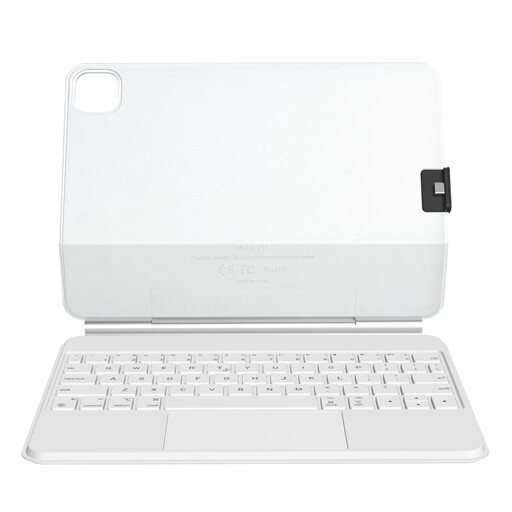
Why This Fits Their Persona: This keyboard case for iPad transforms a compatible iPad into a mobile workstation. It's ideal for students and professionals who want to write, work, and navigate on the go without carrying a laptop.
Instead of being a generic Bluetooth keyboard, this is an integrated solution. The magnetic design ensures a stable connection and an ergonomic viewing angle, all while the case protects the iPad.
The large precision keyboard with trackpad supports multi-gesture controls and provides a laptop-like user experience. The detachable back allows for flexible use of the iPad with or without the keyboard.
We have compiled a complete, up-to-date list of products that fully meet these strict selection criteria and safety standards.
The QWERTZ layout is the standard in Germany and Eastern Europe. The Z and Y keys are swapped compared to the international QWERTY layout. Additionally, the QWERTZ layout features dedicated keys for German umlauts (?, ?, ?) and the ?. For users who regularly type in German, a QWERTZ layout is essential for efficient work.
Regular cleaning extends the life of your keyboard. Turn off the keyboard and disconnect it from your computer. Using a keycap puller (often included), you can carefully remove the keycaps. Dust and crumbs between the switches can be removed with compressed air or a soft brush, such as a specialised air vent cleaning brush. The keycaps themselves can be cleaned in lukewarm, soapy water. Make sure everything is completely dry before reassembling the keyboard.
A hot-swap keyboard can be a very worthwhile investment, even for beginners. It gives you the ability to change the typing feel later on without having to buy a completely new keyboard. If you're unsure whether linear, tactile, or clicky switches are right for you, a hot-swap model allows you to experiment cost-effectively by simply purchasing and swapping in a new set of switches.