
Lieferung heute & morgen

Qualitätsgarantie

Willkommens-Angebote freischalten: KOSTENLOSE Lieferung | Bis zu 80 % RABATT | Kostenlose 30-Tage-JoyPlus-Testphase
App herunterladen
The search for a new mechanical gaming keyboard can quickly become overwhelming. The market is flooded with technical jargon, marketing promises, and a vast array of models. Many users invest in a keyboard that looks good on paper but disappoints in practice—whether due to high latency in wireless mode, the wrong switches for their typing style, or an unsuitable layout.
As a Joybuy Product Recommendation Officer, I see daily which pitfalls lead to the most common purchasing mistakes. Before you make a decision, you should be aware of these three common marketing traps:
To make an informed decision, focus on the technical fundamentals that determine your keyboard's performance and longevity.
The heart of any mechanical keyboard is its switches. They determine the typing feel, noise level, and response speed. The three main types are:
An increasingly important feature is hot-swappable capability. A hot-swap keyboard allows you to change the mechanical switches without soldering. This offers two advantages: you can customize your keyboard's typing feel by trying out different switch types, and you can easily replace defective switches yourself, significantly extending the keyboard's lifespan.
The keyboard layout must match your needs. For users in most English-speaking regions, the QWERTY layout is essential to avoid frustration. Pay close attention to this specification, as many models are offered by default in international formats like the German QWERTZ layout.
In addition to the layout, the form factor is crucial:
The connection type has a direct impact on flexibility and performance.
Here are some models tailored to specific user profiles that meet the criteria mentioned above.
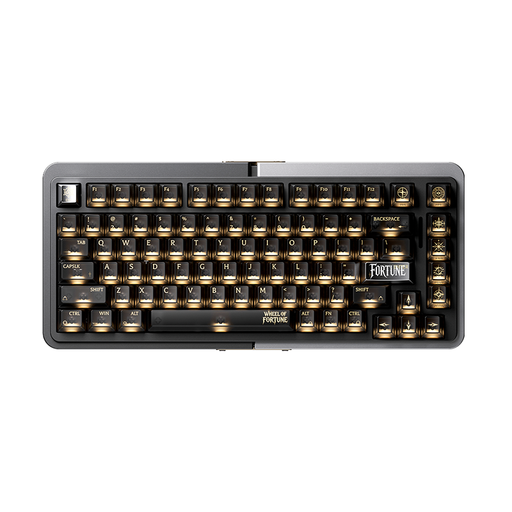
Why This Fits Their Persona: Ideal for FPS players who depend on minimal response times. The compact 75% layout creates maximum space for the mouse, while the magnetic switches allow for extremely fast and customizable actuation. The sturdy aluminum case can withstand even the most intense gaming sessions.
Instead of a vague "gaming" label, this keyboard offers specialized technology (magnetic switches with Rapid Trigger) that provides a measurable advantage in fast-paced games.
Adjustable key actuation point for individual customization to one's playstyle; high-quality aluminum case.

Why This Fits Their Persona: Perfect for users who want a single keyboard for gaming, work, and switching between a PC and Mac. The full-size QWERTZ layout with a number pad is ideal for productivity, while the tri-mode connectivity offers maximum flexibility.
Solves the connectivity dilemma with a full-fledged tri-mode solution (2.4 GHz, Bluetooth, USB-C) and offers a genuine German QWERTZ layout, preventing common purchasing errors.
Hot-swappable for easy customization and maintenance; integrated TFT color screen for status displays and personalization.
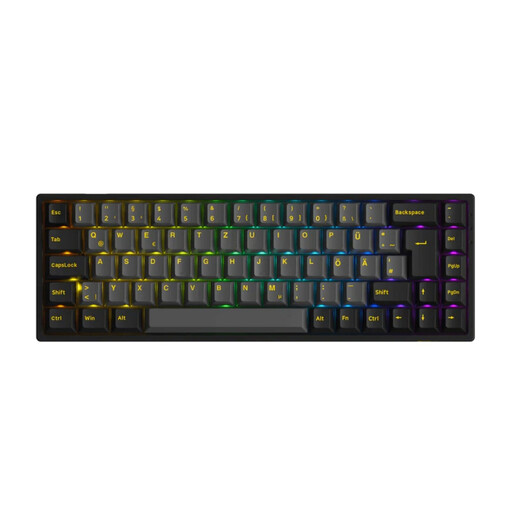
Why This Fits Their Persona: For users who appreciate a clean desk and a premium typing experience. The compact 65% layout in the ISO-DE (QWERTZ) format offers all essential keys, including arrow keys, in the smallest possible footprint. The hot-swap feature and tri-mode connectivity make it a future-proof choice.
Offers true mechanical hot-swap functionality and high-quality PBT keycaps instead of just advertising a "mechanical feel." The correct ISO-DE layout prevents compatibility issues.
Excellent value for money; tri-mode connectivity and hot-swap capability in a compact form factor.
We've compiled a complete, up-to-date list of products that fully meet these strict selection criteria and quality standards.
Hot-swappable means you can replace the mechanical switches under the keycaps without having to desolder the keyboard. Using a special tool, often included with the keyboard, you can simply pull out the switches and insert new ones. This allows you to personalize the typing feel (e.g., switching from linear to tactile switches) or affordably replace a faulty switch.
Yes, as long as it uses the right technology. A wireless gaming keyboard with a 2.4 GHz wireless connection offers latency that is comparable to wired keyboards and is perfectly adequate for competitive gaming. Purely Bluetooth keyboards can have higher latency and are therefore less suitable for fast-paced, reaction-critical games. A tri-mode keyboard offers the best of both worlds.
Maintenance is straightforward. Keep the keyboard away from liquids. Clean it regularly with compressed air to remove dust and crumbs from between the keys. The keycaps can be removed for a thorough cleaning and wiped with a damp cloth. On a hot-swappable keyboard, you can also replace individual, worn-out switches, which further increases its lifespan.