
Lieferung heute & morgen

Qualitätsgarantie

Willkommens-Angebote freischalten: KOSTENLOSE Lieferung | Bis zu 80 % RABATT | Kostenlose 30-Tage-JoyPlus-Testphase
App herunterladen
Finding the right mechanical keyboard can be daunting given the vast array of options, technical terms, and form factors. Many users want a keyboard that not only offers fast response times for gaming but also provides a comfortable typing experience for daily use, all while maintaining a small footprint on their desk.
This article serves as your guide. It explains the most important features to consider when making your choice and presents a selection of models that cater to different needs. The goal is to provide you with an informed basis for your purchase decision.
Three key aspects largely determine the functionality and user experience of a keyboard: the form factor, the switches used, and the connectivity options.
The size of the keyboard, also known as the form factor, directly impacts ergonomics and the amount of space available for your mouse.
For users in Germany, the ISO-DE layout is also crucial. It includes the umlauts (?, ?, ?), the ?, and the typical L-shaped Enter key, ensuring a familiar typing experience.
The mechanical switches under each key define the typing feel and response speed. For gaming, linear switches are particularly popular. They offer a smooth, resistance-free keystroke from top to bottom, enabling fast and repeated inputs without a noticeable tactile bump.
Another important feature is customisation. A hot-swappable keyboard allows you to change the mechanical switches without soldering. This gives you the freedom to try out different switch types or easily replace faulty ones, significantly increasing the keyboard's longevity and personal utility.
The choice of connection method depends on personal preference.
Additionally, for many, an RGB keyboard with customisable lighting is an important aesthetic factor that personalises the gaming setup.
Based on the criteria above, we have compiled a selection of models that stand out for their specific features.
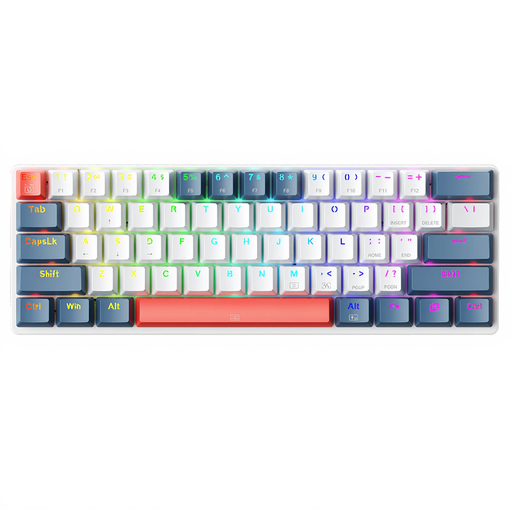
Why It Stands Out: The Machenike K500-B61 is all about minimalism and speed. With its 60% form factor, it maximises desk space, which is especially advantageous in setups requiring large mouse movements. The wired connection ensures stable, low-latency input.
Features:
Who Is It For?: This model is aimed at gamers and users who need maximum desk space and deliberately opt for a minimalist layout. Adjusting to the US layout and using function layers for arrow and F-keys requires a short familiarisation period.
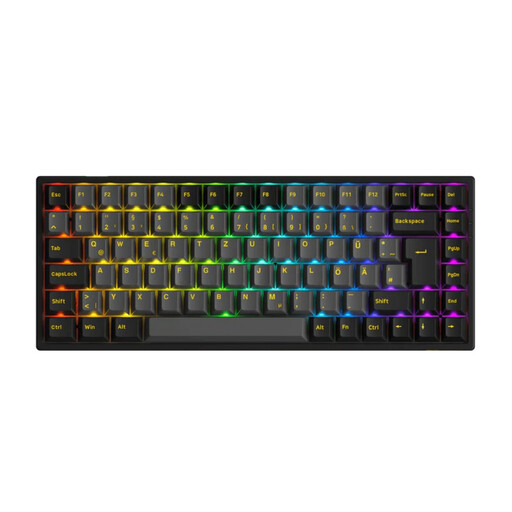
Why It Stands Out: The Akko 3084B Plus is a versatile 75% keyboard that combines compactness with high functionality. It offers flexible connectivity, a German key layout, and is fully customisable thanks to its hot-swap sockets. The high-quality PBT keycaps and pre-lubed switches provide a premium typing experience right out of the box.
Features:
Who Is It For?: Ideal for keyboard enthusiasts and demanding users looking for a flexible, high-quality, and modifiable keyboard. The 75% layout is an excellent compromise for both gaming and productive work without sacrificing essential keys.
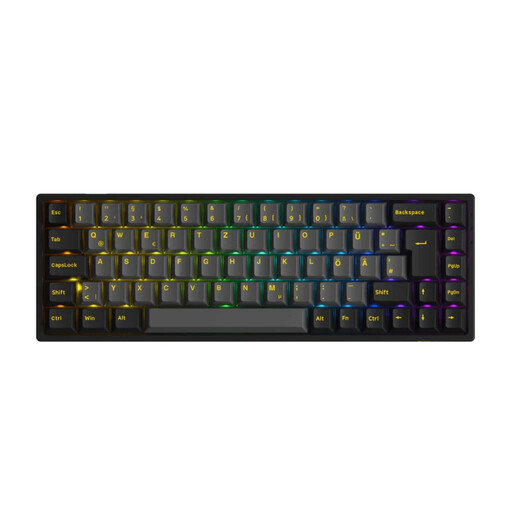
Why It Stands Out: This model shares the premium features of the 3084B Plus but packages them in an even more compact 65% format. It retains the essential arrow keys, making it more practical for many users than a 60% layout, while still saving significant space.
Features:
Who Is It For?: Perfect for users who want a minimalist setup but don't want to give up dedicated arrow keys. The combination of an ISO-DE layout, wireless freedom, and hot-swap functionality makes it an excellent choice for mobile setups or small desks.
A complete gaming or workstation setup consists of more than just the keyboard. While the models presented here use the modern USB-C standard, other peripherals like audio interfaces, DACs, or older printers might use different connectors.
If you need specific connection cables for your setup, for example for audio devices or printers, you can find a selection of USB-B cables here.
Linear switches are characterised by a smooth keystroke without any tactile bump or audible click. This allows for very fast, repeated inputs with minimal effort, which is advantageous in fast-paced games that require quick reactions.
Yes, absolutely. A hot-swap feature greatly simplifies keyboard customisation. It allows users to try out different switch types (e.g., linear, tactile, clicky) to find their personal preference without needing to solder. This makes it a valuable feature for both beginners and experienced modders.
The main differences lie in the shape of the Enter key (L-shaped for ISO, rectangular for ANSI), the position of some special characters, and, most importantly, the key legends. The ISO-DE layout is the standard for the German-speaking world and includes the umlauts (?, ?, ?) and the ? in their familiar positions, which makes typing much easier for German users.