
Lieferung heute & morgen

Qualitätsgarantie

Willkommens-Angebote freischalten: KOSTENLOSE Lieferung | Bis zu 80 % RABATT | Kostenlose 30-Tage-JoyPlus-Testphase
App herunterladen
A mechanical keyboard is an investment in precision, durability, and a superior typing experience. But the market is filled with marketing buzzwords and seemingly endless options, making the choice difficult. Many buyers invest in a model that looks great at first glance but loses its quality after just a few months. As your Joybuy Product Recommendation Officer, I'll help you identify the crucial features and avoid common purchasing pitfalls.
Before we dive into the technical details, let's clear up the most common misconceptions that often lead to a bad purchase.
To make an informed decision, focus on three core aspects that define the quality and functionality of a mechanical keyboard.
The switch type defines the typing feel and acoustics. The three basic types are:
Look for reputable manufacturers like CHERRY, Gateron, or Kailh, whose switches are known for their durability and consistent quality. A lifespan rating, such as "over 100 million keystrokes," is an indicator of high-quality components.
The size of the keyboard affects ergonomics and the amount of available desk space.
For the English-speaking market, a QWERTY keyboard layout is essential to ensure all keys are in their familiar positions.
A hot-swap keyboard allows you to change the mechanical switches without any soldering. This offers two key advantages:
Here are some recommendations tailored to specific user profiles that meet the quality criteria mentioned above.
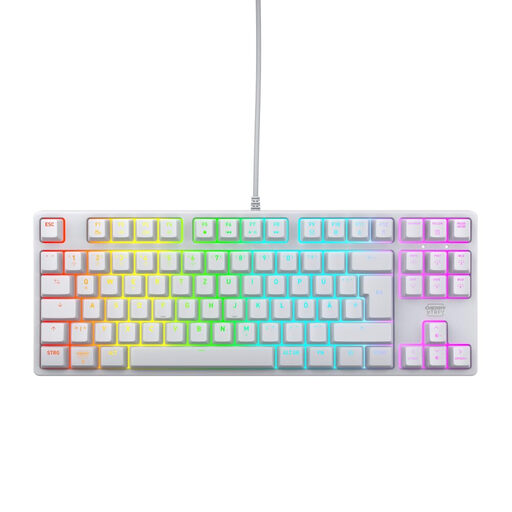
Why This Fits Their Persona: This model focuses on the essentials for competitive gaming: fast, linear switches, a compact TKL layout for maximum mouse space, and a latency-free wired connection. The standard QWERTY layout is ideal for users in this region.
It avoids the "gaming" trap by relying on proven CHERRY MX2A RED switches and a robust build with a metal plate, rather than just flashy aesthetics.
High-quality linear switches with a lifespan of over 100 million clicks; Full N-Key Rollover for flawless inputs.

Why This Fits Their Persona: Perfect for the home office or the workplace. This keyboard combines a professional, understated design with quiet, tactile switches and the flexibility to switch seamlessly between up to three devices.
It resists the trend of loud, flashy gaming keyboards, focusing instead on quiet mechanics and productivity-enhancing features like smart illumination and multi-device connectivity.
Quiet, tactile low-profile switches; wireless connection via Bluetooth or Logi Bolt Receiver; long battery life.
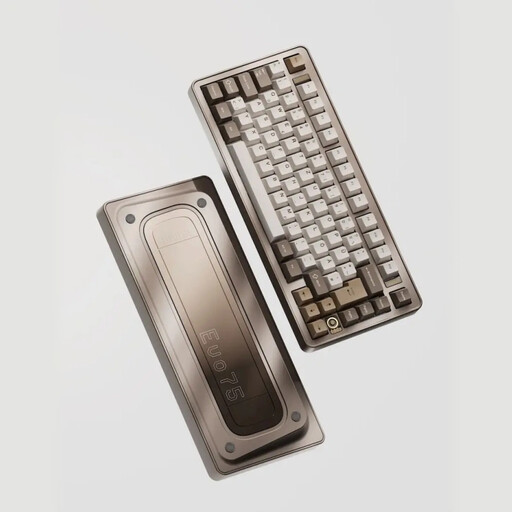
Why This Fits Their Persona: For users who demand ultimate control and a premium experience. This keyboard offers a full aluminum case, hot-swap capability, and a leaf-spring mount for an unparalleled typing feel. VIA compatibility allows for deep customisation.
This model delivers genuine high-end features instead of empty marketing promises. The hot-swap capability and premium construction offer real value for demanding users.
Hot-swappable PCB for easy switch changes; tri-mode connectivity (wireless and wired); robust aluminum case.
If you want to compare more models or discover specific switch types, our full category features a wide selection of products that meet our criteria.
The main difference lies in the technology beneath the keycaps. Mechanical keyboards use an individual, spring-loaded switch for every single key. This results in a more precise, consistent keystroke and a significantly longer lifespan. Rubber-dome keyboards, found in most standard office PCs, use a rubber membrane that wears out over time and creates a mushy typing feel.
Regular maintenance is simple and effective. Disconnect the keyboard from your computer and use a soft brush or compressed air to remove dust and crumbs from between the keys. The keycaps can often be removed and cleaned with mild soap and water (ensure they are completely dry before reattaching them). Avoid letting any liquids get inside the case.
Modern wireless technologies have improved dramatically. A wireless mechanical keyboard with a dedicated 2.4 GHz connection (via a USB dongle) now offers latency that is virtually indistinguishable from a wired connection, making it perfectly suitable for most gamers. Bluetooth connections can have slightly higher latency and are better suited for typing and everyday tasks than for competitive gaming.