Choosing a mechanical keyboard can be a challenge given the vast array of layouts, switches, and features. Whether for demanding gaming, productive work, or a combination of both, the right keyboard can significantly enhance your user experience. This guide is designed to help you understand the technical specifications and make an informed decision that meets your needs. We will outline objective criteria and present a selection of models with different specialisations.
What to Look for When Buying a Mechanical Keyboard
Before you decide on a model, there are a few fundamental characteristics to consider. These are key in determining the functionality and daily typing experience.
1. Keyboard Layout: Compact or Feature-Rich?
The size of the keyboard, also known as its form factor, directly impacts ergonomics and the available space on your desk.
- Full-Size (100%): The standard layout with a numeric keypad, function keys, and a navigation cluster. Ideal for users who frequently enter numerical data.
- Compact Keyboards (e.g., 96%, 65%, 60%): These layouts reduce the footprint by consolidating or removing key clusters. A 96% layout, for example, offers nearly the full functionality of a full-size keyboard in a smaller space. 65% and 60% layouts omit the numpad and often the F-key row, making them a great choice for gamers who need more room for their mouse.
2. The Switches: The Heart of the Typing Feel
Mechanical switches define the tactile and acoustic feedback of every key. Different types have become established for various use cases.
- Linear Switches: These switches offer a smooth, consistent keystroke from top to bottom without resistance. They allow for rapid and repeated keystrokes without a noticeable tactile bump, making them especially popular with gamers.
- Tactile Switches: Produce a noticeable "bump" when pressed, which signals the actuation point without a loud click. They are a good middle ground for both typing and gaming.
- Clicky Switches: Provide both tactile and distinctly audible click feedback. They are popular with prolific typists but can be considered disruptive in office environments or during streaming.
3. Connectivity and Customisation
Modern keyboards offer more than just a wired connection. Features like wireless connectivity and customisability increase flexibility.
- Wireless Keyboard: Models with tri-mode connectivity (Bluetooth, 2.4 GHz wireless, and USB-C cable) allow for seamless switching between different devices like a PC, laptop, or tablet.
- Hot-Swappable Keyboard: This feature allows you to change the mechanical switches without any soldering. This lets users customise the typing feel later on or easily replace faulty switches.
- RGB Keyboard: Customisable RGB lighting is not just for aesthetics; it can also be used to visually organise keymaps or display in-game information.
Recommended Mechanical Keyboards to Consider
Here, we present three models that stand out with different features and are suited for various user profiles. All keyboards featured use the QWERTY US layout.
Machenike KG98 96% Tri-Mode Mechanical Keyboard
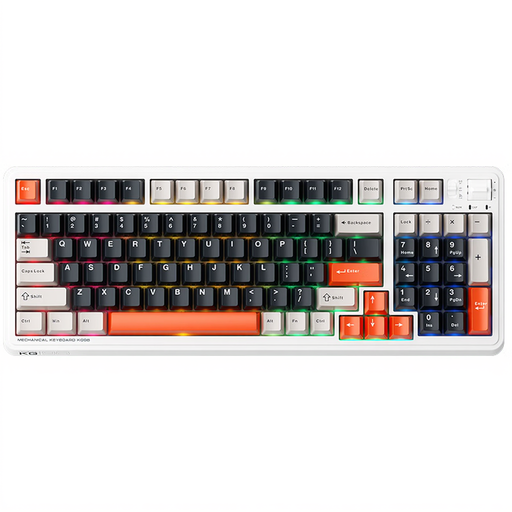
Why it stands out: The Machenike KG98 combines a space-saving 96% layout with 98 keys, which integrates a full numpad, with comprehensive connectivity. It's a versatile option for users who want to both game and be productive.
Pros:
- Tri-Mode Connectivity: Supports Bluetooth, 2.4 GHz wireless, and a wired USB-C connection for maximum flexibility between devices.
- Hot-Swappable Design: Allows for easy switch replacement to customise the typing feel.
- Linear Switches: The pre-lubed Ice Cream Pro Max (Orange) switches provide a smooth and quiet keystroke, optimised for fast-paced gaming.
- Gasket-Mount Structure: A gasket mount with dampening layers improves acoustics and delivers a muted, stable typing experience.
- Broad Compatibility: Works with Windows and macOS and supports plug-and-play in wired mode.
Who is it for? For power users and gamers looking for a compact keyboard who don't want to give up the numpad. Its tri-mode connectivity and hot-swap capability make it a flexible choice for multi-device setups.
MageGee MK-Box 60% Mechanical Keyboard
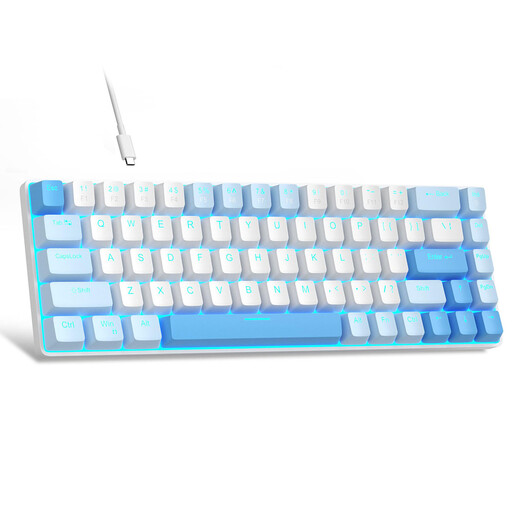
Why it stands out: The MageGee MK-Box is an extremely compact 60% keyboard with 68 keys that focuses on the essentials. Despite its small size, it retains separate arrow keys, which is not a given in this category.
Pros:
- Minimalist 60% Layout: Saves maximum desk space, ideal for gaming setups with wide mouse movements.
- Mechanical Red Switches: As linear switches, they offer a light and smooth keystroke without tactile feedback, supporting quick in-game reactions.
- Full Anti-Ghosting: All 68 keys can be pressed simultaneously without any lost inputs (N-Key Rollover).
- Blue LED Backlighting: Offers 16 different lighting modes for a classic, customisable aesthetic.
- Wide Compatibility: The wired keyboard is compatible with Windows, macOS, and Linux via USB 2.0.
Who is it for? For users looking for a straightforward, wired, and very compact gaming keyboard. Its focus is on functionality and space-saving for a clean setup.
Lofree OE907 65% Mechanical Keyboard
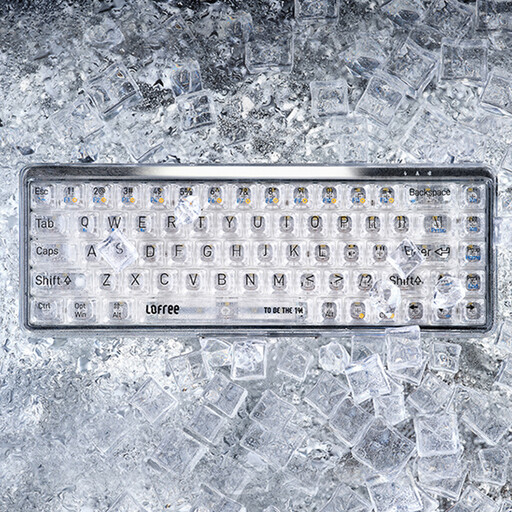
Why it stands out: The Lofree OE907 is distinguished by its unique, transparent design. The combination of clear keycaps and an electroplated chassis makes it a visual highlight on any desk.
Pros:
- Transparent Design: A striking appearance thanks to clear PC keycaps and a high-quality finished chassis.
- Dual-Mode Connectivity: Supports both Bluetooth 5.1 for a stable wireless keyboard experience and a wired connection via USB-C.
- Linear Jellyfish Switches: The MX Jellyfish switches offer an exceptionally smooth and consistent typing feel.
- Compact 65% Layout: Retains dedicated arrow keys and some navigation keys while taking up to 30% less space than a standard keyboard.
- Optimised for Mac and PC: Offers full compatibility with macOS, Windows, iOS, and Android.
Who is it for? For design-conscious users, and especially as a keyboard for Mac and PC, who are looking for a stylish, compact, and functionally impressive keyboard for daily use and occasional gaming.
Looking for More Options?
The models featured cover a broad spectrum. However, if you are specifically looking for more keyboards designed for use with Apple devices, you can find an expanded selection in our dedicated category.
? Discover More Mechanical Keyboards for Mac
Frequently Asked Questions (FAQ)
What is a hot-swappable keyboard?
A hot-swappable keyboard has sockets on its PCB that allow you to change the mechanical switches without soldering. This gives you the freedom to try out different switch types (e.g., linear, tactile, clicky) or easily replace a single faulty switch, which increases the keyboard's lifespan and customisability.
What are the advantages of linear switches?
Linear switches have a continuous, resistance-free keystroke. Since there is no tactile "bump" to overcome, they allow for very fast and repeated key presses. This makes them a preferred choice for many gamers, especially in fast-paced games. Additionally, they are often quieter compared to tactile or clicky switches.
Will a mechanical keyboard with a US (QWERTY) layout work in other regions?
Yes, a keyboard with a physical US (QWERTY) layout works perfectly well in other regions. The characters produced when you press a key (e.g., "Z" or "Y", or special characters like "?", "€", "é") are controlled by your operating system (Windows or macOS). You can simply select your local keyboard layout (like UK QWERTY, German QWERTZ, or French AZERTY) in your system settings. The physical keys will then output the characters for your selected layout, even if the labels on the keycaps don't match. Many users, especially programmers and gamers, even prefer the US layout.


