
Lieferung heute & morgen

Qualitätsgarantie

Willkommens-Angebote freischalten: KOSTENLOSE Lieferung | Bis zu 80 % RABATT | Kostenlose 30-Tage-JoyPlus-Testphase
App herunterladen
A mechanical keyboard is more than just an input device—it's a precision interface between you and your digital work or game. Unlike traditional membrane keyboards, mechanical models offer nuanced tactile feedback, greater durability, and extensive customization options. However, with the vast array of switches, layouts, and features, the selection can be overwhelming.
This guide is designed to provide clarity. As your Joybuy Product Recommendation Officer, I have analyzed market data to give you objective guidance. The goal is to help you make an informed decision that meets your specific needs for gaming, work, or creative projects.
To find the right keyboard, it's helpful to understand a few core features. The following points are crucial for performance, comfort, and functionality.
The switches under each key are the primary determinant of the typing and gaming feel. The three main types are:
Modern gaming keyboards also leverage technologies like Rapid Trigger. This feature, often found in magnetic switches, allows for instant re-actuation of the key as soon as it travels upward, which can reduce response times in games.
The size of the keyboard affects both functionality and the available space on your desk. Common formats include:
The connection type and potential for modification are important considerations. A wireless mechanical keyboard offers more flexibility and a cleaner setup, often with tri-mode connectivity (USB-C, 2.4 GHz, and Bluetooth). For enthusiasts, a hot-swap keyboard is of great interest. It allows you to change the mechanical switches without soldering, so you can customize the typing feel at any time and create a personalized custom keyboard. Structures like Gasket Mount, where the PCB is sandwiched between silicone gaskets, aim to create a softer typing feel and a muted sound. An RGB keyboard also offers customizable lighting options for a personalized aesthetic.
Based on the criteria mentioned, we have curated a selection of mechanical keyboards for various use cases.
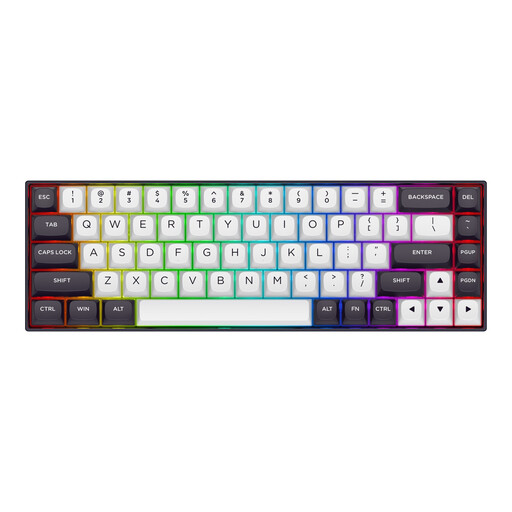
Why It Stands Out: The Redragon M68 is purpose-built for competitive FPS gaming. Its Hall Effect magnetic switches enable the Rapid Trigger function and a software-adjustable actuation distance from 0.2 mm to 4.0 mm. Combined with an 8000 Hz polling rate, inputs are processed with near-zero latency.
Pros:
Who Is It For? Competitive gamers, especially in FPS titles like Valorant or CS2, where every millisecond counts and precise movement control is essential.
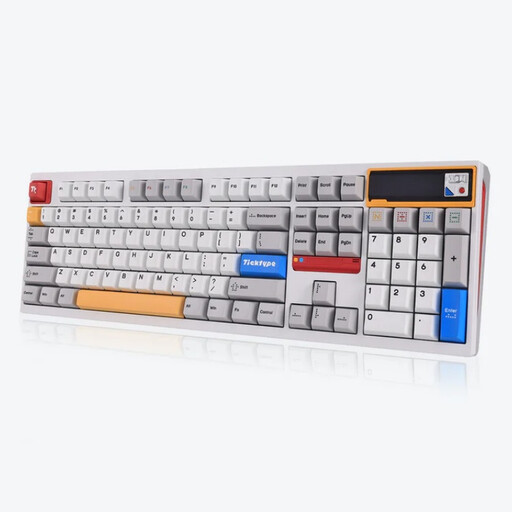
Why It Stands Out: The Ticktype DP104 combines a premium all-aluminum case with advanced custom keyboard features. Its Leaf-Spring-Mount structure provides a flexible and cushioned typing experience. With tri-mode connectivity, a customizable pixel screen, and a massive 8000 mAh battery, it's a versatile and durable choice.
Pros:
Who Is It For? Professionals and enthusiasts who want a high-quality, fully-featured, and customizable keyboard for work and play, and who value robust build quality.
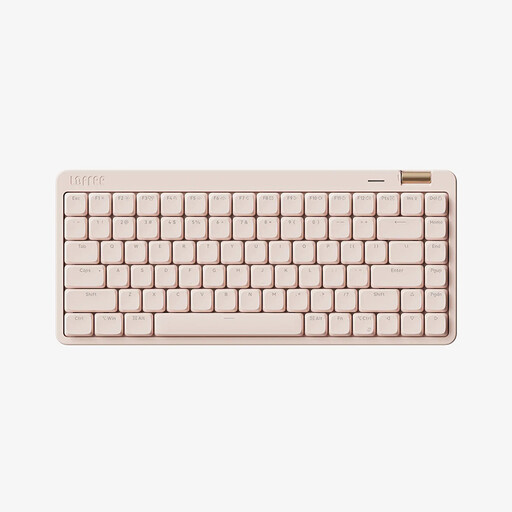
Why It Stands Out: The Lofree OE921 is a sleek low-profile keyboard designed specifically for office or on-the-go use. With its Kailh low-profile linear switches, it offers a quiet and smooth typing feel. The compact 75% layout saves space without sacrificing essential function keys, and the convenient volume knob enhances usability.
Pros:
Who Is It For? Users looking for a stylish and compact keyboard for the office and mobile use who prefer the slim typing feel of a low-profile keyboard.

Why It Stands Out: The KEYSME Lunar 01 is aimed at enthusiasts who prioritize acoustics and feel. Its Gasket-Mount structure with dual silicone dampening creates a deep, resonant sound. Unique design elements like the detachable rhythm light bar and magnetic "rocket" spinners make it a centerpiece on any desk.
Pros:
Who Is It For? Keyboard enthusiasts and creatives who want a keyboard with outstanding acoustics, a high degree of customization, and a unique, playful design.
The selection presented here covers specific use cases. If you're looking for a keyboard with a particularly unique or playful aesthetic, you might find the perfect model in our broader collection.
? Discover our selection of cute mechanical keyboards
Mechanical keyboards use an individual spring-loaded switch for each key. This results in a more precise and consistent typing feel, a faster response time, and a significantly longer lifespan compared to the rubber domes (membranes) in conventional keyboards. Additionally, the typing feel can be customized by choosing different switch types.
A hot-swap keyboard allows you to easily pull out the mechanical switches from the PCB and replace them with others without any soldering. This offers maximum flexibility to change the typing feel and sound of the keyboard or to easily replace faulty switches.
Yes, mechanical keyboards are very well-suited for the office, provided the right switch type is chosen. Models with quiet linear or tactile switches (e.g., Cherry MX Brown, Red, or Silent Red) offer the comfort and ergonomics of a mechanical keyboard without the loud clicking noises that could be disruptive in an office environment. A low-profile keyboard can be an especially good choice here.