
Lieferung heute & morgen

Qualitätsgarantie

Willkommens-Angebote freischalten: KOSTENLOSE Lieferung | Bis zu 80 % RABATT | Kostenlose 30-Tage-JoyPlus-Testphase
App herunterladen
With a vast array of models, switch types, and layouts, the search for a new keyboard can be a daunting task. Compared to traditional membrane keyboards, a mechanical keyboard offers a more precise typing feel, greater durability, and extensive customisation options. This guide will help you understand the key features and presents a selection of models for various use cases and budgets to make your decision easier.
To find the right model for you, it's helpful to be familiar with a few basic criteria. The following points will provide a framework for your selection.
The physical size of the keyboard, also known as the form factor, affects both the space it takes up on your desk and the keys it includes.
For users in English-speaking regions, the QWERTY layout is standard, but it's always wise to check you're buying the correct regional layout to ensure proper key mapping.
The heart of any mechanical keyboard is the switches beneath each key. They determine the typing feel and sound level. The three main types are:
For maximum flexibility, consider a hot-swappable keyboard. On these models, the switches can be changed without soldering, allowing for complete customisation of the typing feel.
The choice between a wired and a wireless keyboard depends on your priorities.
Here is a curated selection of mechanical keyboards that cater to different needs and budgets.
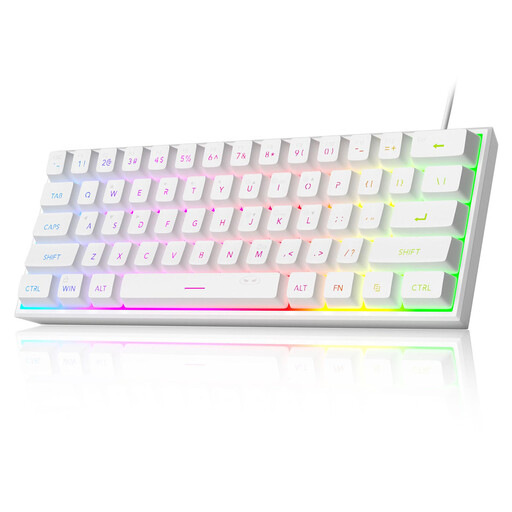
What Makes It Stand Out The MageGee TS91 is an ultra-compact 60% keyboard distinguished by its space-saving design and customisable RGB keyboard lighting. It uses membrane keys designed to mimic a mechanical feel, making it a budget-friendly option for beginners. Please note that this model features a QWERTY US layout.
Pros
Who It's For This model is a great choice for budget-conscious gamers, newcomers to the world of compact keyboards, and users who prefer a minimalist setup with limited space.
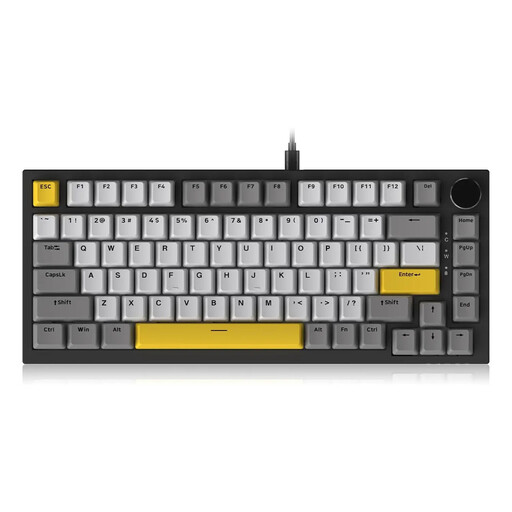
What Makes It Stand Out The AJAZZ AK820 is a hot-swappable keyboard in a 75% layout, aimed at enthusiasts and users who love to customise. Its gasket-mount structure, combined with multiple dampening layers, ensures a softer and quieter typing experience. A standout feature is the CNC-machined volume knob for quick audio adjustments.
Pros
Who It's For Ideal for keyboard enthusiasts, prolific typists, and gamers who value a premium typing experience and want to customise their keyboard by swapping out switches.

What Makes It Stand Out The Logitech MX Mechanical is a high-end wireless keyboard designed specifically for professional use. It combines the precision of mechanical switches with a subtle design and quiet keystrokes. Equipped with Tactile Quiet low-profile switches and a German QWERTZ layout, it is an excellent quiet mechanical keyboard for the office.
Pros
Who It's For Perfect for professionals, developers, and creatives who need a reliable, quiet, and versatile keyboard for productive work across multiple devices like a PC, Mac, or tablet.
A great setup is more than just a keyboard. If you want to complete your work or gaming station, a precise and ergonomic mouse is just as important.
Explore our selection of mechanical mouse to find the perfect counterpart for your new keyboard.
1. What is the advantage of a mechanical keyboard over a regular one? Mechanical keyboards generally offer greater durability, as the individual switches are rated for tens of millions of keystrokes. They provide more precise tactile feedback, which can improve typing speed and accuracy. Furthermore, they allow for extensive customisation through replaceable keycaps and, on hot-swappable models, even the switches themselves.
2. Are mechanical keyboards always loud? No, that's a common misconception. The volume depends entirely on the switch type used. While "Clicky" switches are intentionally designed to produce a loud click, linear and tactile switches are significantly quieter. There are even special "Silent" switches designed for use in noise-sensitive environments like offices. The Logitech MX Mechanical is an example of a quiet mechanical keyboard.
3. How do you clean a mechanical keyboard? For a basic cleaning, first disconnect the keyboard from your computer. Use a keycap puller to remove the keycaps. Dust and crumbs between the switches can be removed with compressed air or a small brush. The keycaps themselves can be cleaned in lukewarm soapy water but must be completely dry before being reattached. The case can be wiped down with a slightly damp cloth.