
Lieferung heute & morgen

Qualitätsgarantie
App herunterladen
Kategorien
Choosing a mechanical keyboard is a decision based on technical parameters and individual use case requirements. Unlike conventional membrane keyboards, mechanical models offer superior precision, durability, and a wide range of customisation options. These characteristics stem from their construction, which features individual mechanical switches under each key. This guide analyses the key criteria to consider when selecting a mechanical keyboard.
The configuration of a mechanical keyboard significantly influences its typing feel, acoustics, and functionality. The following aspects are relevant for making an informed decision.
The size of the keyboard determines the number of keys and the ergonomics of your workspace. Common formats include:
The way the printed circuit board (PCB) is secured within the case has a significant impact on the typing feel and sound.
The switches are the heart of any mechanical keyboard.
A hot-swap keyboard allows you to change switches without soldering. This offers maximum flexibility to adjust the typing feel later or to easily replace faulty switches.
A wireless mechanical keyboard offers flexibility through Bluetooth or 2.4 GHz connections. Tri-mode models also support wired operation. For power users, a programmable keyboard with firmware like QMK or VIA is essential. These open-source solutions allow for full key remapping, macro creation, and the configuration of multiple layers. An RGB keyboard also offers individually customisable key backlighting.
Based on the technical criteria above, we present three models that cover different user profiles.
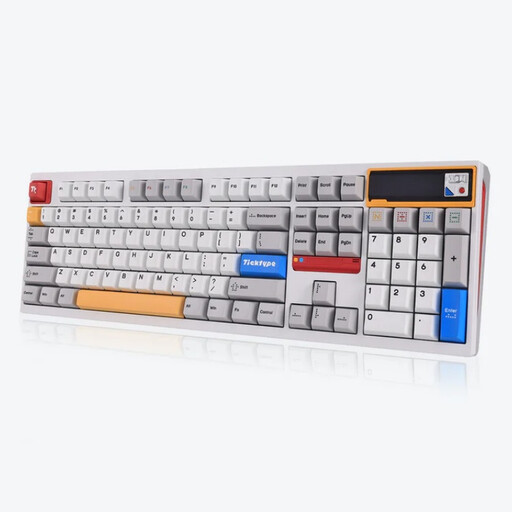
Why We Recommend It The Ticktype DP104 is a full-size keyboard aimed at users who want to make no compromises on functionality. The solid aluminium case, combined with the Leaf Spring Mount structure, ensures a dampened and flexible typing experience. The tri-mode connectivity and 8000 mAh battery provide excellent endurance in wireless mode. The customisable pixel display is a functional detail for showing system information or personalised graphics.
Pros:
Best For: Professionals (e.g., developers, analysts) and power users who require a full key layout and value a solid construction and a flexible typing feel.
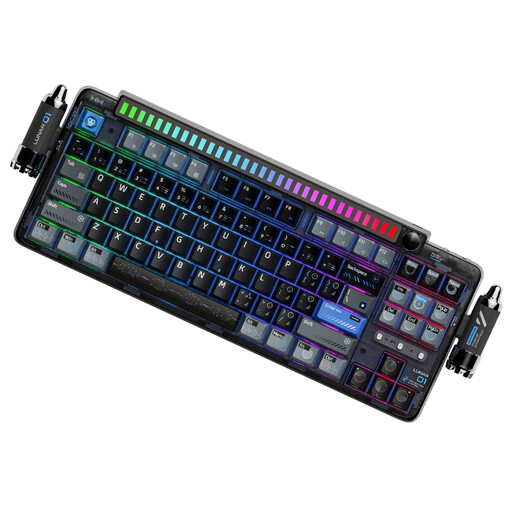
Why We Recommend It The KEYSME Lunar 01 focuses on an optimised acoustic experience through its Gasket Mount structure with dual silicone dampeners. The TKL (80%) layout is a great balance of compactness and functionality. Special features like the detachable, music-reactive rhythm light bar and the magnetic "Rocket Spinners" add a unique character to the design. The use of PBT keycaps and in-house linear switches completes the package.
Pros:
Best For: Keyboard enthusiasts and creative professionals seeking an acoustically pleasing and soft tactile typing experience who value an aesthetically customisable setup.
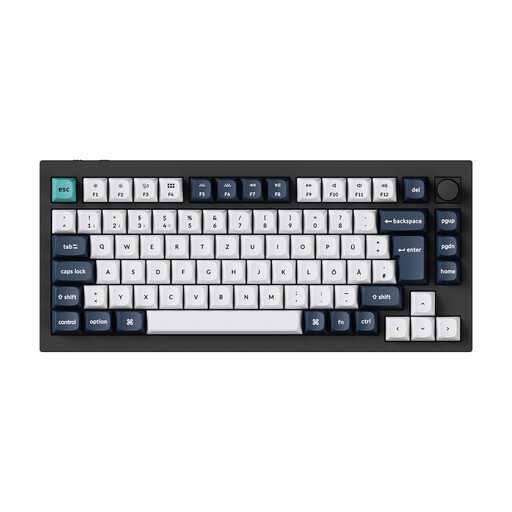
Why We Recommend It The Keychron Q1 Max is a well-engineered aluminium keyboard in a compact 75% form factor, specifically equipped with an ISO-DE layout for the German market. The double-gasket structure and multiple layers of sound-dampening foam optimise its acoustics. With a 1000 Hz polling rate in 2.4 GHz and wired modes, it also excels as a gaming keyboard. Its compatibility with QMK/VIA software offers deep customisation capabilities, making it a powerful tool for developers and power users.
Pros:
Best For: Tech-savvy users in Germany—including gamers, developers, and writers—who want a high-quality, wireless, and fully customisable compact keyboard without forgoing a German layout.
For owners of a hot-swap keyboard, the opportunity exists to further refine the typing experience by swapping out the switches. The market offers a wide variety of mechanical keyboard switches with different characteristics—from light linears to heavy tactile variants. Selecting the right switches is a crucial step on the path to a personalised Custom Keyboard.
1. What is the advantage of a gasket mount keyboard? A gasket mount keyboard isolates the plate/PCB assembly from the case using soft gaskets. This results in a more flexible typing feel, as the plate flexes slightly on keystrokes. It also reduces vibrations and high-frequency sounds, leading to a deeper, fuller, and often more pleasant sound profile.
2. Are linear switches good for typing? Yes, linear switches are also suitable for typing, although preferences are subjective. Their smooth keystroke without tactile feedback allows for fast and fluid typing. However, users who prefer tactile feedback to confirm actuation might find tactile switches more advantageous.
3. What does "hot-swap keyboard" mean? A hot-swap keyboard has special sockets on its PCB that allow mechanical switches to be replaced without soldering. You can simply pull the switches out with a special tool and press new ones in. This makes customising the typing feel and performing repairs significantly easier.