
Lieferung heute & morgen

Qualitätsgarantie

Willkommens-Angebote freischalten: KOSTENLOSE Lieferung | Bis zu 80 % RABATT | Kostenlose 30-Tage-JoyPlus-Testphase
App herunterladen
The search for the right mechanical keyboard can quickly become overwhelming. The market is flooded with technical jargon, marketing promises, and a multitude of models that look very similar at first glance. Many users invest in a supposed premium product, only to find after a few months that the typing feel is harsh, the wireless connection fails at a critical moment, or the layout is impractical for their daily needs.
This guide will help you identify the crucial features and avoid common buyer's remorse. We focus on the technical fundamentals that constitute a high-quality typing experience, deliberately sidestepping exaggerated advertising claims.
Before we dive into the important specifications, you should be aware of three common issues that often lead to disappointment:
To avoid the problems mentioned above, you should focus on a few crucial technical features. These define the quality, feel, and longevity of your future keyboard.
The way the circuit board (PCB) is mounted in the case has the biggest impact on sound and feel. The current standard for a soft and rich typing experience is the Gasket Mount construction.
Modern mechanical keyboards offer a high degree of customisation and flexibility that goes beyond mere typing.
Choosing the right layout and high-quality materials completes the package.
Here are some models that represent a considered choice for different user groups based on the criteria above.
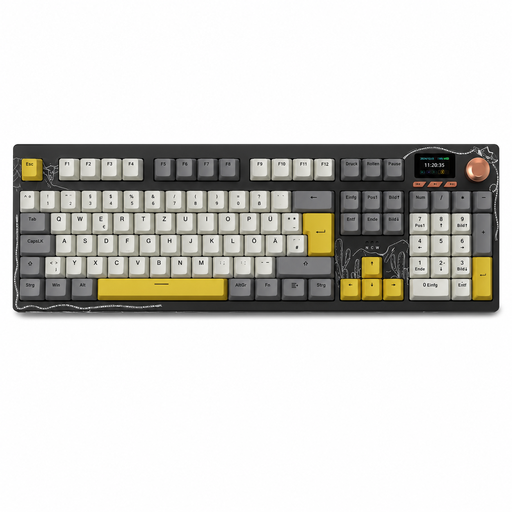
Why This Fits Their Persona: Ideal for users in Germany who need a fully functional keyboard for office work, data entry, and occasional gaming. The full layout with a number pad and multi-device capability make it a flexible workhorse.
Directly solves the layout problem with a native German QWERTZ layout. The Gasket Mount structure prevents the harsh, hollow typing feel of simpler models.
Full 104-key layout with number pad. Integrated TFT color display and Tri-Mode connectivity for maximum flexibility between different devices.
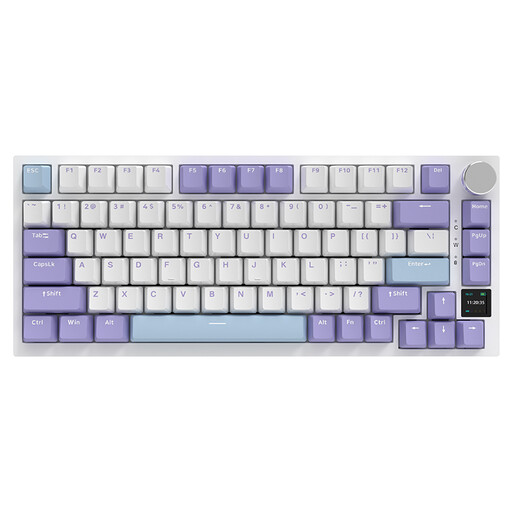
Why This Fits Their Persona: Perfect for tech enthusiasts and gamers who want a compact layout, high customisability, and modern features. The 75% format creates more space for the mouse, while the display and hot-swap capability offer room for personalisation.
The Gasket-Mount structure with multi-layer dampening delivers a rich, high-quality sound profile and avoids any hollow feel. The Tri-Mode connectivity provides a low-latency 2.4 GHz option for gaming.
Combines a compact 75% layout with an interactive TFT display. Fully hot-swappable and equipped with durable PBT keycaps.

Why This Fits Their Persona: For users who value a unique design and a deep, rich sound profile. The combination of acoustic dampening and visual elements like the rhythm light bar makes it a centerpiece on any desk.
The elaborate Gasket-Mount structure with dual silicone dampening is specifically designed to produce a deep, resonant sound profile and eliminate any hollow noise.
Unique detachable rhythm light bar that reacts to music and speech. The Hot-Swap capability and high-quality PBT keycaps offer durability and customisation options.
We've compiled a complete, up-to-date list of products that fully meet these strict selection criteria and safety regulations.
1. What is the difference between Gasket Mount and Tray Mount? In a tray-mount design, the circuit board is screwed directly into the keyboard case. This creates a rigid connection that transmits vibrations and noise, leading to a harsher typing feel. With a Gasket Mount, the board is suspended between flexible gaskets, which dampens keystrokes, improves the sound, and increases typing comfort.
2. Is a hot-swappable keyboard worth it for beginners? Yes, absolutely. A hot-swappable keyboard offers two key advantages for beginners. First, it allows you to experiment with different switch types to find your personal preference without having to buy a whole new keyboard. Second, it greatly simplifies maintenance: if a switch fails after years of use, you can replace it yourself in minutes instead of having to discard the entire device.
3. How long does the battery of a wireless mechanical keyboard last? Battery life depends heavily on the battery's capacity (measured in mAh) and the use of RGB keyboard lighting. Models with large batteries (e.g., 4000 mAh or more) can last for several weeks or even months with the backlighting turned off. With RGB lighting activated, the runtime typically drops to a few days to a week, depending on the brightness and effect. Most models can be used normally via the USB-C cable while charging.