
Lieferung heute & morgen

Qualitätsgarantie

Willkommens-Angebote freischalten: KOSTENLOSE Lieferung | Bis zu 80 % RABATT | Kostenlose 30-Tage-JoyPlus-Testphase
App herunterladen
A mechanical keyboard can offer precise input and plenty of scope for customisation when you’re writing, programming or gaming. However, flashy lighting, a high key count and technical jargon don’t automatically mean you’ve found the right keyboard. If you’re ordering in Germany, pay particular attention to the layout, connectivity and maintenance options.
Many international models have a US QWERTY layout. The key arrangement differs from the German QWERTZ layout, including the positions of Y and Z, umlauts and special characters. You can switch a QWERTY keyboard to German in your software settings, but the keycap legends will remain unchanged.
For writing in German, using office software and programming, a QWERTZ keyboard is usually the more straightforward option. If you prefer a US layout, check that the special characters and keyboard shortcuts you need suit the way you work.
An RGB keyboard offers a range of colours and lighting modes. This can make the keys easier to see in a dimly lit room and complement a gaming setup. However, RGB lighting says nothing about switch quality, noise levels or responsiveness. Check the key specifications first and treat lighting as an extra feature.
Mechanical switches vary considerably in feel, noise and actuation. Linear switches have no pronounced tactile bump, while tactile or clicky options can be more noticeable as you type. If you share your home or work in an open-plan office, consider noise dampening as well as the switch type.
A full-size keyboard with 104 or 108 keys will usually have a separate number pad. It’s well suited to data entry, spreadsheets and applications where you regularly use the arrow, navigation and function keys. The trade-off is that it takes up more desk space.
More compact formats save space, but may leave out the number pad or grouped function keys. Programmers and keen typists should also check whether the Enter, Shift and punctuation keys are in the familiar German ISO layout.
A wired mechanical keyboard sends input without relying on a battery and generally doesn’t need to be paired wirelessly. USB plug-and-play is particularly convenient for desktop PCs and workstations with a fixed setup.
A USB-C keyboard may use a modern, detachable cable. However, USB-C only describes the connector; the keyboard may still work exclusively as a wired model. A wireless mechanical keyboard gives you more freedom to move it around. For Bluetooth keyboards, check that your computer supports Bluetooth. Models with Bluetooth, a 2.4 GHz receiver and USB-C offer several connection options, but require a battery and regular charging.
A hot-swap keyboard lets you replace compatible mechanical switches without soldering. Check the specific compatibility: some models support both 3-pin and 5-pin switches, while others only support one type. The keycap profile and the circuit board also need to be compatible.
PBT keycaps are often chosen for their material properties. With ABS keycaps, the specific finish and legends are important. According to product information, laser-etched legends can help keep keys legible with regular use, but this doesn’t guarantee a particular lifespan.
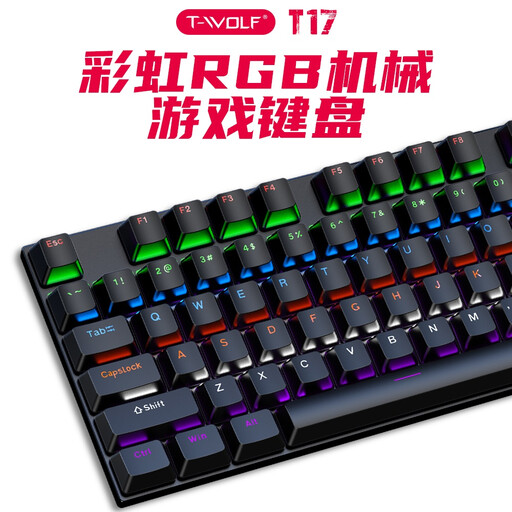
Why this product suits this profile: This wired full-size keyboard has 104 keys, RGB lighting and USB plug-and-play support for Windows and macOS.
The USB connection means there’s no battery to maintain. However, be sure to note the US QWERTY layout before buying.
104 keys, full anti-ghosting according to the product information, RGB lighting and laser-etched keycaps.
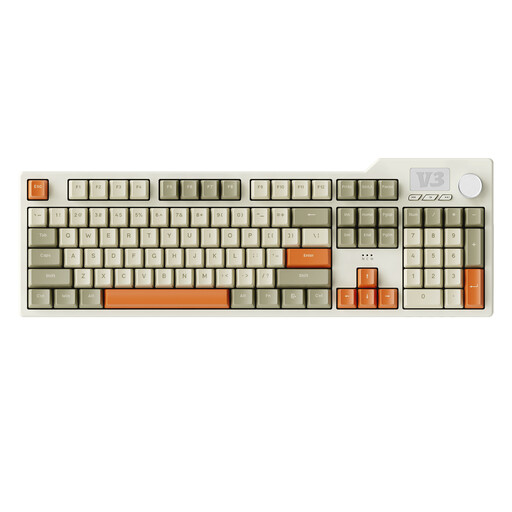
Why this product suits this profile: This full-size keyboard combines hot-swap functionality, PBT keycaps, a gasket mount and a USB-C connection for PC and Mac.
The swappable 3-pin and 5-pin switches make it easier to customise the keyboard later. This model has a US layout, so it won’t reproduce German key legends in full.
104 keys with number pad, five layers of damping as described, PBT keycaps, programmable macros and a volume control.
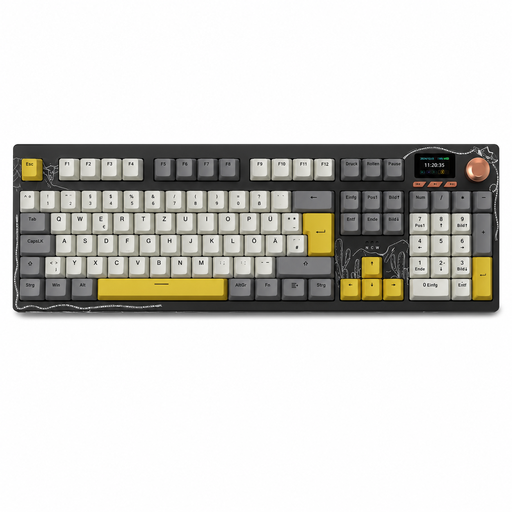
Why this product suits this profile: This wireless mechanical keyboard is designed for users looking to combine a German layout, multiple connection options and customisation.
The QWERTZ layout means less adjustment for everyday use in Germany. Bluetooth, 2.4 GHz and USB-C suit different work setups, but the battery needs charging.
104 keys with number pad, hot-swap, RGB lighting, a colour TFT display and a multifunction control knob.
We’ve put together a complete, regularly updated list of products that meet these strict selection criteria and fully comply with the safety regulations in force in the EU.
For writing in German, a QWERTZ keyboard with an ISO layout is usually the most straightforward choice. You can set the operating system to German when using a US QWERTY model, but the key legends and some special-character positions will still differ.
Lifespan depends on the switch type, how the keyboard is used and maintained, and the manufacturer’s specifications. The Rexsun T17 product description states that it supports several million keystrokes. These figures are technical ratings, not a guarantee for every individual key or the keyboard as a whole. Dust, liquids and excessive force can shorten its lifespan.
Power consumption depends mainly on the lighting, wireless technology and battery capacity. RGB lighting can reduce battery life. A Bluetooth keyboard often uses less power than lighting that’s left on continuously, while a wired mechanical keyboard doesn’t need an internal battery. If you want to keep charging to a minimum, choose a USB model or switch off the lighting when you don’t need it.