Handbook writers
If you write and edit many pages, the feel and sound of the keys may matter when you work from home. Logitech and CHERRY offer different switch variants, so the exact configuration is key.


If you write a lot of text, start by considering how the switches feel and sound as you type. For recurring layout commands, look for customisable keys; for lists of figures, an integrated number pad can be useful. A compact keyboard gives you more desk space, while a wired model may suit a fixed workstation. Check the precise switch and layout configuration, as well as the connection and operating system compatibility: these differences apply to specific models and variants, not entire brands.
If you write and edit many pages, the feel and sound of the keys may matter when you work from home. Logitech and CHERRY offer different switch variants, so the exact configuration is key.
For recurring page layout commands, check whether you can assign keys to suit the programmes you use. Keychron describes customisation options for the Q1 Max, while Logitech offers app-specific profiles for certain keyboards.
A number pad can be useful for club records and lists of figures, while a smaller keyboard may be a better fit for a cramped desk. If you use more than one computer, also check which device-switching features the specific keyboard supports.
First decide whether typing feel, customisable commands, desk space or connectivity matters most for your work. The right option depends on the specific keyboard and variant.
A good fit if: you switch between several devices or need an integrated number pad. Logitech offers the MX Mechanical in a standard size and a smaller Mini.
Worth noting: Check the exact switch configuration. In its review dated 26 August 2026, F.A.Z. Kaufkompass listed the lack of wired operation on the MX Mechanical it tested as a drawback.
A good fit if: customisable layout commands and extra space for your mouse matter more than an integrated number pad. Keychron lists QMK/VIA support for the Q1 Max.
Worth noting: Choose the DE-ISO layout, switches and fully assembled version carefully. The product family also includes other layouts and barebone variants.
A good fit if: you work at a fixed computer and want a wired mechanical keyboard. CHERRY describes the MX BOARD 3.0S as a wired option.
Worth noting: Switches and lighting vary by version. The model name alone does not mean every variant is quiet.
| Buying priority | What to check | Who it's most important for |
|---|---|---|
| Typing feel and sound | The exact switch variant and the typing feel you prefer. A description such as “quiet” does not tell you how loud the keyboard will be at your own workstation. | If you write many pages at home, you'll want a typing feel that suits you and a sound level that's right for your room. This is a priority for around 36 % of consumers. |
| Key customisation | Support for custom key assignments or app-specific profiles, as well as compatibility with your operating system and software. | If you often use the same commands when designing, suitable key assignments can speed up your workflow, although setting them up takes time. Around 29 % of consumers prioritise customisation and shortcuts. |
| Size and number pad | Decide whether you regularly enter figures or need more space next to your keyboard. Check the layout of the specific variant. | A number pad can be handy for club lists, while a more compact keyboard may leave you with more room for your mouse. Around 21 % of consumers prioritise size or a number pad. |
| Connectivity and device switching | Check Bluetooth, a wireless receiver or a cable separately, along with support for the devices you use. | If you switch between computers or work at a fixed workstation, the connection should suit your routine. Around 14 % of consumers prioritise connectivity or device switching. |
Switches and layouts can vary within the same product range. The Q1 Max is also available fully assembled or as a barebone model.
Check the layout, switches and what's included in the specific listing separately.
The documented 75% Q1 Max variant does not have an integrated number pad. A compact design and regular number entry do not necessarily meet the same needs.
Before buying, think about how often you enter membership lists, tables or subscription figures.
The models described here differ: the Q1 Max is listed with wireless connections, the MX BOARD 3.0S is wired, and the MX Mechanical model tested did not support wired operation, according to F.A.Z. Kaufkompass.
Check the connection in the full model and variant details.
Logitech offers the MX Mechanical in a standard size and as a smaller Mini. The standard version has an integrated number pad.
The Q1 Max is a documented 75% option for buyers looking for customisable key assignments.
The MX BOARD 3.0S is a wired mechanical option, with switches and lighting features that vary by version.
This Joybuy selection includes mechanical keyboards for German-language typing, design commands and different workstations, including both wired and wireless models.
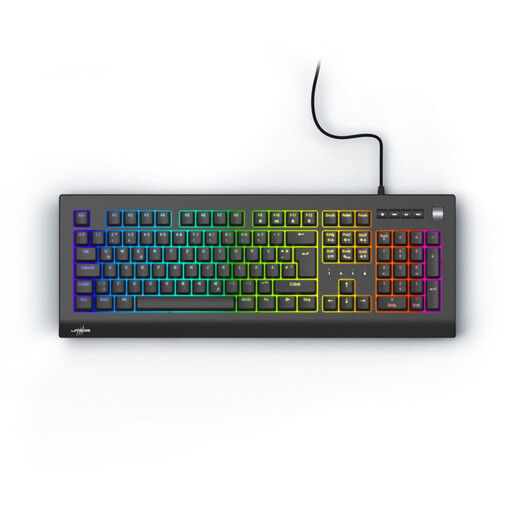 No image available
Could suit German-language typing and a wired workstation.
Mechanical keyboard with Red Switches and a QWERTZ DE layout.
 No image available
Could suit you if you want a compact layout for German-language typing and can manage without an integrated number pad.
Tenkeyless layout without an integrated number pad; hot-swappable switches.
 No image available
Could suit a fixed workstation with a German layout and regular number entry.
Wired; full-size layout with German QWERTZ and linear CHERRY MX2A Red Switches.
 No image available
Could suit German-language typing and different connection options at your workstation.
German QWERTZ layout; Bluetooth, 2.4 GHz and USB-C.
 No image available
Could suit longer writing sessions and switching between devices. Check that the specific version works with your operating system and fits your workflow.
Tactile Quiet switches; Bluetooth and Logi Bolt; Easy-Switch for up to three devices, according to the product description.
It comes down to the feel and sound you prefer. Logitech offers options including Tactile Quiet and Linear, while CHERRY describes MX SILENT RED as linear and damped. Check the exact switch name for the keyboard on offer rather than assuming its typing feel or noise level from the model name alone.
Start by checking which commands your design programme uses and whether the keyboard supports suitable key assignments. Logitech describes app-specific profiles through Logi Options+, while Keychron lists QMK/VIA key assignments and macros for the Q1 Max. Before you buy, check that the setup works with your operating system and software.
An integrated number pad is worth considering if you regularly enter figures in lists or tables. If you mainly write text and want more room next to your keyboard, a more compact layout may suit you better. The documented 75% Q1 Max version does not have an integrated number pad.
For an online consumer contract, you generally have a 14-day right to cancel after receiving the goods; you must notify the retailer that you wish to cancel. The Verbraucherzentrale notes that exceptions or special circumstances need to be assessed for each individual purchase.