
Lieferung heute & morgen

Qualitätsgarantie

Willkommens-Angebote freischalten: KOSTENLOSE Lieferung | Bis zu 80 % RABATT | Kostenlose 30-Tage-JoyPlus-Testphase
App herunterladen
A mechanical keyboard can offer a precise keystroke for gaming, programming and writing. However, a product description doesn’t always make it easy to choose the right one. Terms such as “gaming”, “RGB” or “Rapid Trigger” alone tell you little about whether a model suits your desk, operating system and intended use.
A 60% keyboard saves a lot of space, but usually does away with the function keys, arrow keys and separate navigation keys. These functions are then accessed on a second layer. The extra room for mouse movement can be useful for FPS players. If you regularly work with spreadsheets, programme or use lots of keyboard shortcuts, a 75% keyboard or TKL keyboard will often feel more straightforward.
Before you buy, consider the following questions:
Some compact models use a membrane design that feels mechanical to type on. This may be enough if you’re on a budget, but it doesn’t offer the same maintenance and customisation options as a true mechanical keyboard with individual switches.
If you want to replace the switches later, look specifically for hot-swap support. On a hot-swap keyboard, compatible switches can be replaced without soldering. It’s also important to check whether the PCB supports 3-pin or 5-pin switches. This needs to match the replacement switches you want to use.
A Hall effect keyboard uses magnetic sensors to detect the position of each key. Features such as Rapid Trigger or an adjustable actuation point can be useful for competitive gaming. According to manufacturers, some models offer actuation ranges of 0.1 to 2.0 mm or 0.2 to 4.0 mm, as well as polling rates of up to 8,000 Hz.
These figures are only part of the decision, though. For office and home working, layout, noise, connection type and key legends are often more important. Practical performance also depends on the software, game support, USB connection and settings on your system.
A 75% keyboard typically has a row of function keys, arrow keys and some navigation keys in a compact design. A TKL keyboard usually omits the number pad but keeps a more traditional layout. A 60% keyboard is even smaller and relies more on Fn key combinations.
If you’re choosing a QWERTZ keyboard, check that it actually comes with German keycaps. You can use a US layout with Windows or macOS, but the legends and positions of some special characters will differ. This can take some getting used to when writing in German, programming or entering special characters frequently.
The actual noise level also depends on the case, keycaps, dampening material, stabilisers and typing force. A gasket mount or additional foam layers can affect the sound, but won’t guarantee a particular noise level in every environment.
A wired keyboard doesn’t need a battery and is ready to use as soon as you connect it via USB-C. It’s particularly well suited to desktop gaming PCs and workstations where a consistent connection is important.
A wireless keyboard gives you more flexibility. Bluetooth is often suitable for connecting to several devices, such as a PC, Mac, tablet or mobile phone. Many gaming models use a receiver to connect over 2.4 GHz. Before buying, check the battery capacity, charging port, how you switch between devices and where the receiver is positioned.
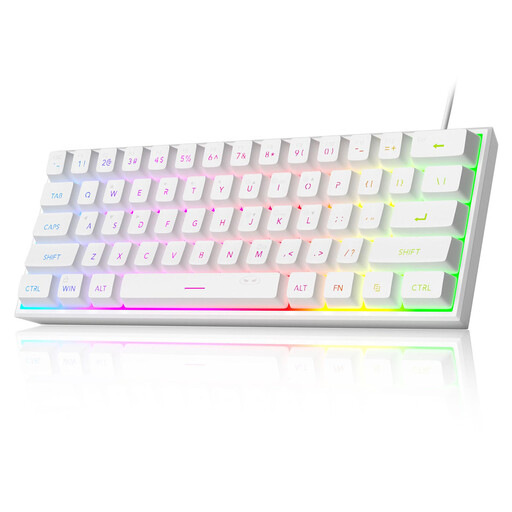
Why this product suits this user type: The 61-key format is designed for people short on desk space who don’t need many features. The wired connection doesn’t need a battery, while the RGB lighting offers several modes.
The product description specifies “mechanical-feel” and a membrane design. So you won’t be getting a traditional hot-swap mechanical keyboard, and should adjust your expectations accordingly.
60% format, RGB lighting, USB connection and a stated IPX4 rating for the PCB. According to the product information, the USB interface itself isn’t waterproof.

Why this product suits this user type: This model combines a German 82-key layout with linear Sea-Salt switches, a gasket mount, hot-swap functionality and a volume knob.
The QWERTZ layout is clearly specified. The hot-swap sockets and support for compatible 3-pin switches make maintenance and customisation straightforward.
82 keys, USB-C cable, RGB lighting, full-key rollover and a rotary control for volume and mute, according to the product description.
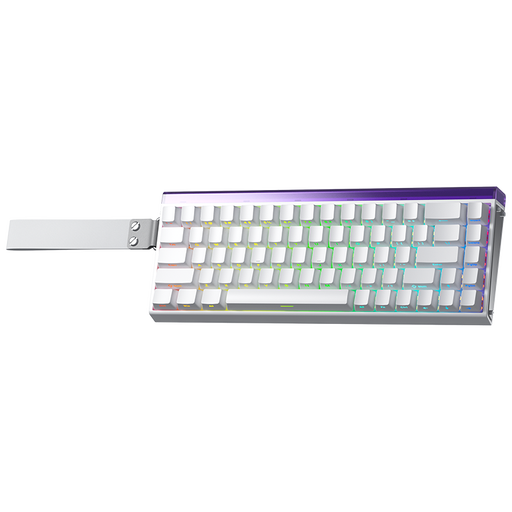
Why this product suits this user type: This 68-key keyboard is designed for gamers who want to make the most of Hall effect switches, an adjustable actuation point and Rapid Trigger.
The key gaming features are clearly listed: Hall effect technology, Rapid Trigger and an adjustable actuation point of 0.01 mm, according to the manufacturer.
68-key layout, RGB lighting, wired connection and a polling rate of up to 8,000 Hz, according to the manufacturer.
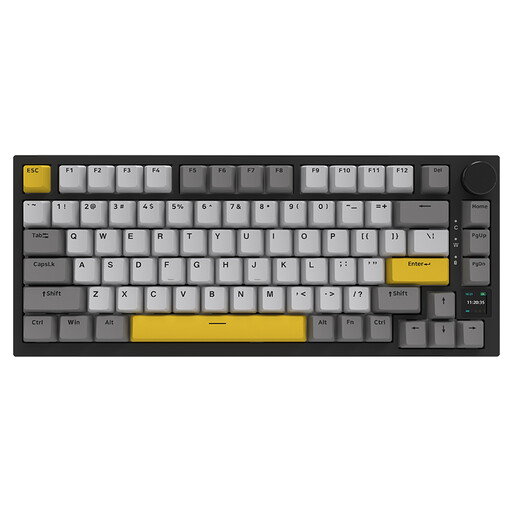
Why this product suits this user type: This model combines a 75% layout, hot-swap functionality, RGB lighting and a TFT display with wired, Bluetooth and 2.4 GHz connections for PC, Mac and other devices.
The connection options are clearly distinguished. Use the USB-C cable for low latency, or Bluetooth and 2.4 GHz to switch between devices.
82 keys, a 4,000 mAh battery according to the product information, a rotary control, hot-swap functionality and status information on the TFT display.
We’ve put together a complete, regularly updated list of products that meet these strict selection criteria and fully comply with the safety regulations in force in the EU.
For writing in German, a QWERTZ keyboard with German legends is usually the simplest choice. You can change the language settings on a US QWERTY model, but the key legends and positions of special characters will still differ.
Lifespan depends on the switches, PCB, case, cleaning and daily use. Some manufacturers, for example, state that certain models can withstand up to 50 million keystrokes. This is a technical figure provided by the manufacturer, not a guarantee of the product’s overall lifespan.
Not necessarily. Linear switches, dampened cases and additional foam layers can affect typing noise. Clicky switches, on the other hand, are usually much louder. If you work in a shared office, take particular care to check the switch type and noise level before buying.