
Lieferung heute & morgen

Qualitätsgarantie

Willkommens-Angebote freischalten: KOSTENLOSE Lieferung | Bis zu 80 % RABATT | Kostenlose 30-Tage-JoyPlus-Testphase
App herunterladen
As your Joybuy Product Recommendation Officer, my mission is to provide you with clear, objective information to help you make an informed purchasing decision. A high-quality mechanical keyboard can transform your typing and gaming experience. This guide is designed to help you understand the key features and find a model that meets your needs for performance, ergonomics, and customisation.
The selection is vast, and the technical specifications can seem complex at first glance. The following points will help you identify the features that are most relevant to you.
At the core of every mechanical keyboard are the switches beneath each key. They determine the tactile and acoustic feedback. The three main types are:
Modern keyboards offer flexible connection options. A wireless keyboard increases flexibility on your desk.
A key advantage of mechanical keyboards is their modifiability.
Based on the criteria above, we have curated a selection of models that cater to different needs and use cases.
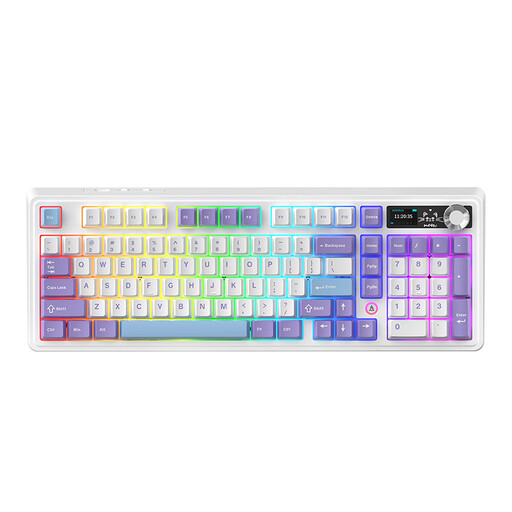
What Makes This Model Stand Out The AJAZZ AK980 V2 is a feature-rich keyboard aimed at power users and gamers. A standout feature is its integrated full-colour TFT screen, which can display system information, connection status, or even custom GIFs. The metal rotary knob allows for quick control of volume, lighting, and other functions. Its gasket-mount structure with multi-layer sound dampening ensures a muted and pleasant typing sound.
Pros
Who Is It For? This model is ideal for tech enthusiasts, gamers, and creative professionals who want a versatile, customisable, and feature-rich mechanical keyboard and value features like a display and a dedicated volume knob.
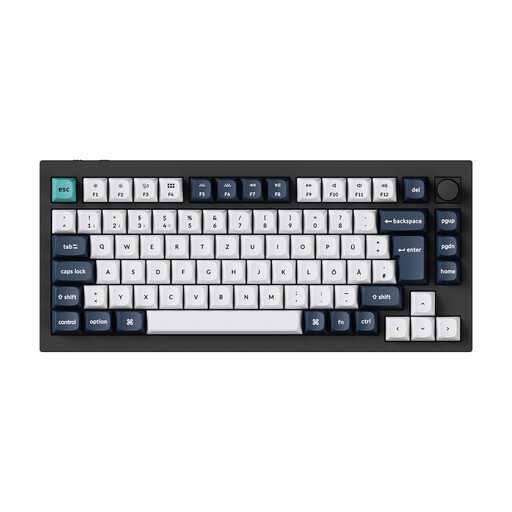
What Makes This Model Stand Out The Keychron Q1 Max is a premium keyboard engineered for superior build quality and an optimised typing experience. Its full body is crafted from 6063 aluminium, which is CNC-machined, polished, and sandblasted. The double-gasket structure, which places silicone pads between the top and bottom case sections, reduces vibrations and enhances acoustics. With a 1000 Hz polling rate in both 2.4 GHz and wired modes, it also caters to demanding gamers.
Pros
Who Is It For? The Keychron Q1 Max is the right choice for enthusiasts, programmers, and anyone seeking a custom keyboard experience with premium materials and maximum customisability. It is an investment in a durable and precise tool for your work.
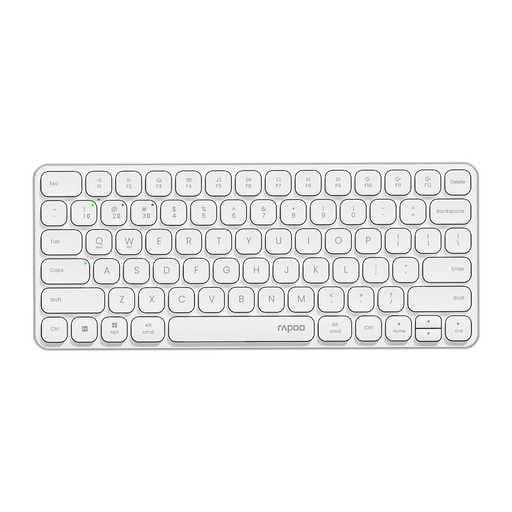
What Makes This Model Stand Out The RAPOO E9050L is an alternative for users who don't require a mechanical feel but value an ultra-slim design, quiet keystrokes, and multi-device capabilities. Instead of mechanical switches, this model uses a scissor-switch mechanism, similar to what is often found in laptops. Its aluminium alloy frame provides stability and a premium look. It can seamlessly switch between up to four connected devices.
Pros
Who Is It For? This model is aimed at home office users, frequent travellers, and anyone in noise-sensitive environments who needs a slim, quiet, and reliable wireless keyboard for multiple devices and prefers the low-profile typing feel of a laptop keyboard.
The models featured here cover specific use cases. If you are looking for different keyboard sizes, specific switches, or other accessories for your setup, you can find a selection of suitable products and peripherals in our Peripherals & Accessories category.
1. What is the advantage of a mechanical keyboard over a conventional one? Mechanical keyboards generally offer greater durability, as individual switches are rated for tens of millions of keystrokes. Furthermore, the variety of switch types allows for more precise and often more pleasant tactile feedback. Another advantage is the high degree of customisation available through swappable keycaps and, on many models, swappable switches (Hot-Swap Keyboard).
2. What does "hot-swap" mean on a keyboard? "Hot-swap" means that the keyboard's mechanical switches can be replaced without needing a soldering iron. The switches are mounted in sockets on the printed circuit board (PCB) and can be easily pulled out with a special tool and replaced with other compatible switches. This allows the user to individually customise the keyboard's typing feel.
3. Are mechanical keyboards suitable for office work? Yes, as long as the right switch type is chosen. Keyboards with linear or tactile switches that don't produce a click are very well-suited for office environments. Some manufacturers also offer special "silent" switches that are additionally dampened. However, models with loud "clicky" switches are less recommended for open-plan offices, as the noise can be considered disruptive.