
Lieferung heute & morgen

Qualitätsgarantie

Willkommens-Angebote freischalten: KOSTENLOSE Lieferung | Bis zu 80 % RABATT | Kostenlose 30-Tage-JoyPlus-Testphase
App herunterladen
A mechanical keyboard can feel noticeably different to type and game on compared to a membrane or scissor-switch keyboard. At the same time, terms like RGB, Tri-Mode, Hot-Swap or "Gaming" don't automatically mean the right features for you. What really matters are the technical details that suit your desk setup, operating system and how you use it.
Many models use a US-QWERTY layout. For users in Germany, this means the positions of "Z" and "Y" are swapped, special characters are placed differently, and there's no German key labelling. If you regularly type in German or use shortcuts, you should specifically look for a QWERTZ keyboard.
The form factor also affects everyday usability:
A wireless mechanical keyboard can connect via Bluetooth, 2.4 GHz or a cable. These options have different uses:
If you use several devices, you should also check how many Bluetooth connections can be stored and whether switching is done via a button or a rotary dial.
An RGB keyboard offers various lighting modes, but says little about the switches, keycaps or software. On wireless models, constantly bright lighting usually reduces battery life. Manufacturer claims about battery life should therefore always be considered alongside the lighting level and connection mode.
A high battery capacity alone doesn't guarantee a specific usage time either. Power consumption, RGB brightness, wireless standard and software settings all play a part.
Mechanical switches determine the actuation feel, resistance and sound. Common categories include:
For an office with several people, a quiet mechanical keyboard with dampened or tactile switches may be more suitable than a loud, clicky model. For gaming, linear switches are often preferred. A low-profile keyboard has shorter key travel and a flatter design; the typing feel is somewhat similar to slim laptop keyboards, but still depends on the specific switch.
A Hot-Swap keyboard allows you to replace compatible switches without soldering. Before buying, check whether the circuit board supports 3-pin or 5-pin switches. Keycap shape and material are also important:
With a keyboard for PC and Mac, it's not enough that the operating system is mentioned. What matters are the supported special functions, software compatibility and the labelling of modifier keys. A US layout can technically work with Windows and macOS, but it doesn't replace German QWERTZ key labelling.
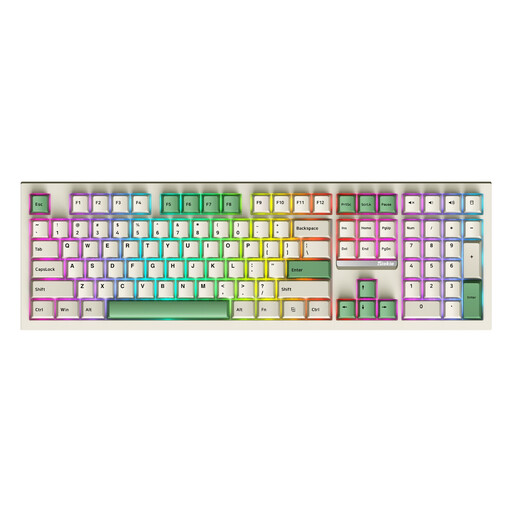
Why this product fits the profile: This full-size keyboard offers 108 keys including a number pad and supports Bluetooth, 2.4 GHz and USB-C. That makes it easy to get started with multiple connection types.
The three connection modes mean you're not limited to Bluetooth or a cable. The Hot-Swap feature allows switch changes later on.
108-key layout, RGB lighting, Hot-Swap and Tri-Mode connectivity according to product specifications.

Why this product fits the profile: The 80% form factor combines a space-saving design with a programmable rotary dial, PBT keycaps, Hot-Swap and a 4,000 mAh battery.
The technical customisation options are clearly specified: 5-pin Hot-Swap, programmable functions and three connection types rather than just RGB features.
Gasket-mount construction, PBT keycaps, programmable software and Bluetooth, 2.4 GHz and USB-C modes according to manufacturer specifications.
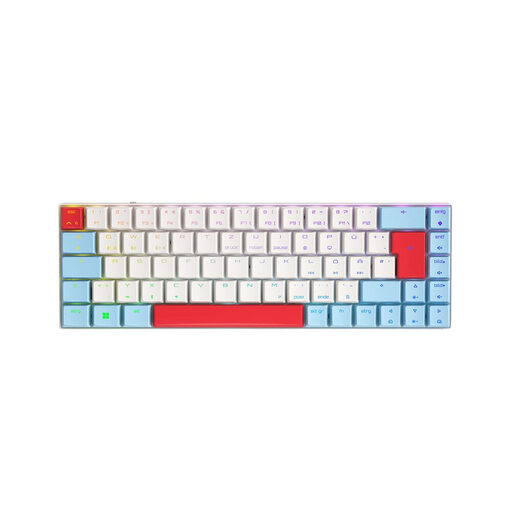
Why this product fits the profile: The compact 65% form factor with a German QWERTZ layout is aimed at users who need more mouse space for gaming but still want wireless operation.
The German layout is explicitly stated. Additionally, 2.4 GHz, Bluetooth and USB-C are available, so the keyboard isn't solely reliant on wireless.
CHERRY MX Low Profile Speed switches, per-key RGB, N-key rollover and a stated battery capacity of 2,800 mAh.
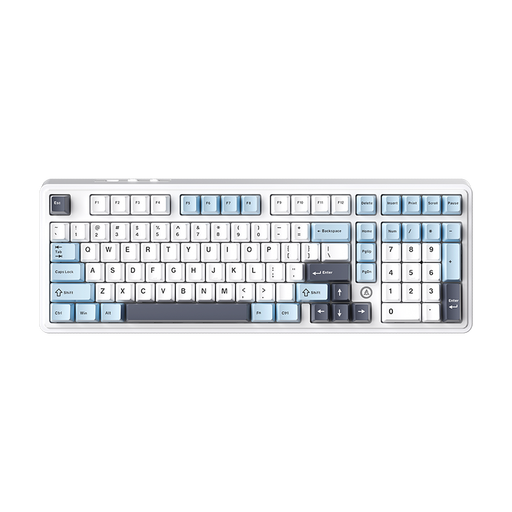
Why this product fits the profile: 97 keys, a number pad, rotary dial and Tri-Mode connectivity make it suitable for productivity, content creation and gaming at a fixed workstation.
This model combines a high key count with Hot-Swap and three operating modes. That means you don't necessarily need to buy a new device for customisation or a connection change.
Gasket structure, Hot-Swap PCB, rotary dial, RGB lighting and, depending on the variant, a stated battery capacity of 4,000 or 8,000 mAh.
We've put together a complete, regularly updated list of products that fully meet these strict selection criteria and the safety regulations in force in the EU.
Yes, as long as the switches and case dampening suit the environment. Linear or tactile, dampened switches can produce less distracting noise than clicky switches. For shared spaces, you should also consider the everyday noise level before buying.
The lifespan depends on the switches, keycaps, usage and care. Manufacturers quote millions of actuations for many mechanical switches. This figure describes the specified lifespan of the switch, not automatically the durability of the battery, case, lighting or wireless module.
Power consumption remains low on many models, but varies with RGB brightness, wireless type and usage time. A USB-C keyboard can be used wired while charging. With lithium batteries, you should follow the safety instructions and stop using damaged or unusually hot devices.