Joybuy Insights

Mechanical Keyboard Buying Guide: How to Choose the Right One

For many PC and Mac users, a mechanical keyboard is more than just an input device—it's a tool for precision, comfort, and longevity. But the market is crowded and full of marketing promises. If you're not careful, you might invest in features that offer no real value or choose a model that's unsuitable for your daily workflow. As your Joybuy Product Recommendation Officer, I'm here to help you identify the crucial features and avoid common buying traps.

This guide focuses on the objective criteria that define a good mechanical keyboard and shows you what to look for before you buy.

The 3 Most Common Buying Traps and How to Spot Them

Before we dive into the technical details, let's look at the most common mistakes that lead to dissatisfaction.

  1. The Wrong Switch Type for Your Environment: A loud, clicky sound can be satisfying for an individual, but it can be disruptive in an open-plan office or during late-night gaming sessions. Many buyers choose mechanical keyboard Blue switches for their distinctive feedback without considering the acoustic impact on their surroundings.
  2. Short-Lived Materials Despite a High Price: Many keyboards advertised as high-end use keycaps made of basic ABS plastic. This material is prone to developing a shine after a few months of intensive use, and the legends can fade. More durable materials like PBT keycaps are often only mentioned upon closer inspection of the product spec sheets.
  3. Superfluous "Gaming" Features: An aggressive RGB keyboard backlight or a flashy design doesn't make a great gaming keyboard. What matters are response time, anti-ghosting, and a layout that allows for quick mouse movements. Many entry-level models use visual effects to distract from mediocre build quality.

Core Features of a Mechanical Keyboard: What Really Matters

To make an informed decision, you should evaluate three central aspects: the switches, the layout, and the build quality.

1. The Switches: The Heart of Every Key

The switches determine the typing feel, volume, and response speed. The three basic types are:

  • Linear Switches (e.g., Red Switches): They offer a smooth, resistance-free keystroke from top to bottom. They are quiet and respond quickly, making them a great choice for gamers and users in noise-sensitive environments.
  • Tactile Switches (e.g., Brown Switches): These switches provide a noticeable but quiet bump upon actuation. They are an all-rounder for typing and gaming, as they provide feedback without producing a loud click.
  • Clicky Switches (e.g., Blue Switches): They produce both a tactile bump and a distinct, audible click. Many prolific typists appreciate this clear auditory and haptic feedback.

2. The Layout: From Full-Size to Compact

The size of the keyboard affects ergonomics and the amount of available desk space.

  • Full-Size (100%): The standard layout with 104/105 keys, including a number pad. Suitable for users who frequently input numbers.
  • TKL Keyboard (Tenkeyless, 80%): This layout omits the number pad, creating more space for the mouse. A popular choice for gamers and users with limited desk space.
  • 60% / 65% Keyboard: These ultra-compact layouts also remove the function keys (F-row) and the navigation cluster. Functions are accessible via key combinations (Fn key). Ideal for minimalists and for portability.

3. Customisation and Quality: Hot-Swap, PBT, and Connectivity

Modern mechanical keyboards offer more than just a good typing feel.

  • Hot-Swap Keyboard: This feature allows you to change the mechanical switches without soldering. It offers maximum flexibility to try out different switch types or to easily replace a faulty switch.
  • PBT Keycaps: Keycaps made from Polybutylene Terephthalate (PBT) are more resistant to abrasion and oils than those made from ABS. They retain their textured surface and won't yellow over time.
  • Connectivity: A wireless mechanical keyboard offers flexibility through Bluetooth or 2.4 GHz connections, often combined with a detachable USB-C cable. Models with multi-device support are practical for users who switch between a PC and Mac or a tablet.
  • Gasket Mount: An advanced mounting method where the circuit board is sandwiched between gaskets. This provides a softer typing feel and a dampened, pleasant sound.

Our Picks: The Right Mechanical Keyboards for Different User Profiles

Here are some recommendations tailored to specific user needs that meet the quality criteria mentioned above.
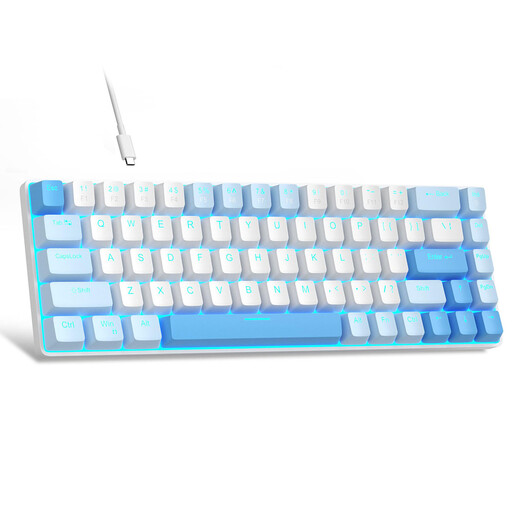
MATCH FOR: BUDGET-CONSCIOUS BEGINNERS
MageGee MK-Box 60% Mechanical Keyboard, QWERTY US layout, MK-Box LED Backlit Compact 68 Keys Mini Wired Office Keyboard with Red Switch for Windows Laptop PC Mac - Sky Blue

MageGee MK-Box 60% Mechanical Keyboard, Red Switch

Why This Fits Their Persona: Ideal for users looking to enter the world of mechanical keyboards without a large investment. The compact 68-key layout saves space, and the linear Red switches are quiet and versatile for office work and casual gaming.

How It Avoids the Trap

This model focuses on the essentials: a solid mechanical typing feel. It forgoes complex RGB effects, instead delivering functional, single-colour backlighting and quiet switches suitable for many environments.

Key Advantage & Pros

The 60% layout with separate arrow keys is a great compromise between compactness and functionality. The detachable USB-C cable enhances durability and portability.

MATCH FOR: ENTHUSIASTS AND POWER USERS
KEYSME Lunar 01 80% Tri-Mode Mechanical Keyboard, QWERTY US layout, Gasket-Mount Keyboard with Rhythm Light, Hot-Swap Switches, Programmable Knob, PBT Keycaps & 4000mAh Battery, White

KEYSME Lunar 01 80% Tri-Mode Mechanical Keyboard

Why This Fits Their Persona: For users who value a premium typing experience, customisation, and flexibility. This keyboard is designed for use with multiple devices and offers features that appeal to both professional users and enthusiasts.

How It Avoids the Trap

It avoids the pitfall of short-lived materials by using PBT keycaps and a solid Gasket Mount construction. The investment here is in tangible quality and longevity rather than just aesthetics.

Key Advantage & Pros

The combination of tri-mode connectivity (wireless mechanical keyboard and wired), Hot-Swap capability, and a programmable knob offers maximum flexibility and future-proofing.
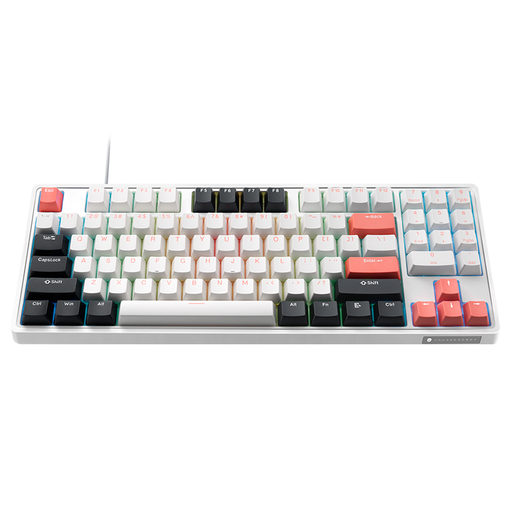
MATCH FOR: COMPETITIVE GAMERS
Thunderobot KG3089 80% Wired Mechanical Keyboard, QWERTY US layout, Home Esports 89-Key Full-Key Anti-Ghosting, Detachable Cable, PBT Double-Shot Keycaps, Red Switches

Thunderobot KG3089 80% Wired Mechanical Keyboard, Red Switches

Why This Fits Their Persona: Designed for gamers who need a fast, reliable, and customisable keyboard. The compact 89-key layout is a variation of the TKL keyboard that saves mouse space while retaining key buttons. The linear Red switches are optimised for rapid response times.

How It Avoids the Trap

This gaming keyboard avoids the marketing trap by focusing on performance-critical features: fast switches, a space-saving layout, and durable PBT keycaps. The lighting is functional, not over-the-top.

Key Advantage & Pros

The Hot-Swap feature allows gamers to customise their switches to match their personal playstyle. The factory-lubed stabilisers ensure a consistent feel on larger keys like the spacebar.

Looking for more options?

We have curated a complete, up-to-date list of products that fully meet these strict selection criteria.

Frequently Asked Questions (FAQ)

How long does a mechanical keyboard last?

The lifespan of a mechanical keyboard is largely determined by its switches. Most manufacturers rate their switches for 50 to 100 million keystrokes each. This is many times the lifespan of conventional rubber-dome keyboards. The quality of the case and keycaps (PBT keycaps have an advantage here) also contributes to its longevity.

Will a mechanical keyboard work with a Mac?

Yes, most modern mechanical keyboards are compatible with both Windows and macOS. Many models, especially a wireless mechanical keyboard with Bluetooth, offer special modes or keycaps for Mac use. Look for explicit for PC and Mac compatibility in the product description.

What does hot-swap mean on a keyboard?

A hot-swap keyboard allows you to change the mechanical switches without any soldering. Using a special tool, the switches can be easily pulled from the circuit board and replaced with new ones. This is ideal for enthusiasts who want to try out different typing feels or to inexpensively replace a single faulty switch.