
Lieferung heute & morgen

Qualitätsgarantie

Willkommens-Angebote freischalten: KOSTENLOSE Lieferung | Bis zu 80 % RABATT | Kostenlose 30-Tage-JoyPlus-Testphase
App herunterladen
A mechanical keyboard can be a great choice for gaming, writing and work. But flashy RGB effects, impressive battery figures or terms such as ‘gasket mount’ don’t automatically mean it has the features you need. What matters is the layout, connectivity, switches and build quality.
Many listings use the US layout. The key positions differ, including Y and Z, special characters and the placement of some punctuation marks. If you regularly write in German, look specifically for a QWERTZ keyboard. Changing the layout in Windows or macOS won’t change the labels on the keycaps.
Some compact keyboards are advertised as having a mechanical typing feel, even though they use a membrane design. A true mechanical keyboard has individual mechanical switches beneath the keys. So don’t assume that terms such as ‘Mechanical-Feel’ mean the keyboard has mechanical switches.
An RGB keyboard can improve visibility and add a personal touch to your desk. But it says little about typing feel, durability or connection quality. On wireless models, lighting also affects battery life. If you mainly use your keyboard for writing, check the layout, keycap material and switches first.
The size determines which keys are included and how much desk space the keyboard takes up:
For office work in German, a QWERTZ keyboard with a full function row is often more practical. If you’re a gamer short on desk space, a compact keyboard may be a better fit. And if you enter lots of numbers, think twice before giving up the number pad for a smaller design.
Linear switches move without a noticeable bump and are often used for fast typing. Tactile switches provide noticeable feedback when activated. Clicky switches also produce a distinct sound. The perceived volume also depends on the keycaps, case and dampening material.
A hot-swap keyboard lets you replace compatible switches without soldering. Before buying, check whether the PCB supports 3-pin or 5-pin switches. Hot-swap sockets make it easy to customise your keyboard, but take care not to insert new switches at an angle or force them into place.
A USB-C keyboard offers a wired connection without needing a battery or pairing. A Bluetooth keyboard is suited to use with multiple devices, while a wireless mechanical keyboard with a 2.4 GHz receiver is often used for PC gaming. Tri-mode models usually combine Bluetooth, 2.4 GHz and USB-C.
Keycap material matters too. PBT keycaps are generally considered more resistant to developing a shine than many ABS alternatives. Actual durability depends on how you use and care for them, as well as the surface texture.
A gasket-mount design suspends the plate inside the case using cushioning elements. This can give the keys a softer feel when pressed. A volume knob is handy for controlling media, while a display or extra light bar is more of a bonus for those who like to customise their setup.

Why this product suits this profile: Its 75% layout with 82 keys, German QWERTZ layout and USB-C cable combine a compact design with a full function row.
The German key labels reduce the risk of ending up with an unsuitable US layout. The wired connection needs neither a battery nor Bluetooth pairing.
QWERTZ layout, hot-swap support for compatible 3-pin switches, RGB lighting and a volume knob.

Why this product suits this profile: Its 80% layout, PBT keycaps, gasket mount and three connection options are designed for users who want flexibility and the freedom to use their keyboard in different places.
The specifications list 5-pin hot-swap support, PBT keycaps and a 4000-mAh battery. This makes it easier to check key features before buying.
Bluetooth, 2.4 GHz and USB-C; a programmable knob and a detachable rhythm light bar.
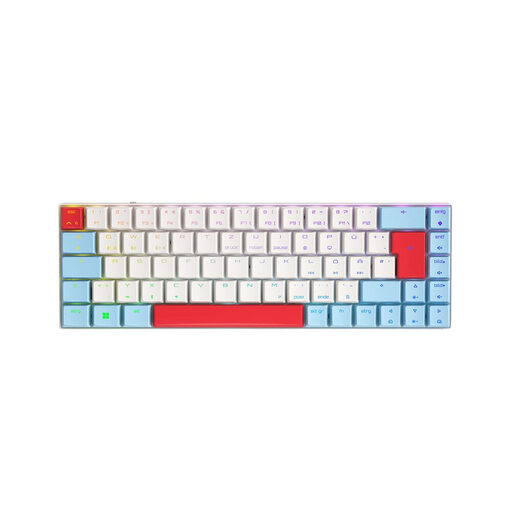
Why this product suits this profile: Its compact 65% design and German QWERTZ layout suit users who want to game and connect multiple devices without taking up much space.
The product details clearly specify QWERTZ, USB-C, Bluetooth and 2.4 GHz. This makes it easier to check the layout and connection options before buying.
CHERRY MX Low Profile Speed switches, per-key RGB, N-Key Rollover and connectivity with up to three Bluetooth devices.
We’ve put together a complete, regularly updated list of products that meet these strict selection criteria and fully comply with the safety regulations in force in the EU.
Each key on a mechanical keyboard has its own switch. This means the typing feel, actuation and sound can vary depending on the type of switch. Membrane or chiclet keyboards, on the other hand, use a shared contact layer or shallower switching mechanisms.
Lifespan depends on the switches, keycaps, electronics, cable and how heavily you use the keyboard each day. Manufacturers sometimes quote several million keystrokes. These figures are technical estimates, not a guarantee of how long the entire device will last. Dust, liquids and incorrectly fitted switches can shorten its lifespan.
When connected by cable, the keyboard draws power over USB. On a wireless mechanical keyboard, power consumption depends partly on brightness, lighting mode, wireless standard and battery capacity. To extend battery life, dim the RGB lighting or switch it off during longer breaks from work.