
Lieferung heute & morgen

Qualitätsgarantie

Willkommens-Angebote freischalten: KOSTENLOSE Lieferung | Bis zu 80 % RABATT | Kostenlose 30-Tage-JoyPlus-Testphase
App herunterladen
For many PC gamers and prolific typists, a mechanical gaming keyboard is a cornerstone of their setup. The precise feedback, durability, and customisation options offer significant advantages over conventional membrane keyboards. But the market is crowded and filled with marketing terms that often obscure more than they clarify. As your Joybuy Product Recommendation Officer, I'm here to help you identify the crucial features and make an informed decision.
Before we dive into the key specifications, let's look at the typical pitfalls that often lead to disappointment. Knowing these will help you search for a suitable model more effectively.
To make the right choice, you should focus on three core technical aspects. These determine the typing feel, functionality, and ergonomics of your new PC gaming keyboard.
The mechanical switches under each key define the typing and gaming experience. Choosing the right switch type is a personal preference that heavily impacts usability.
Another important feature is hot-swap capability. A hot-swap keyboard allows you to change the switches without soldering. This offers maximum flexibility to customise the typing feel or easily replace faulty switches.
The size of the keyboard has a direct impact on ergonomics and the available space on your desk.
Beyond the basics, some features can significantly enhance user comfort. A dedicated volume control, often implemented as a knob or wheel, allows for quick and intuitive volume adjustment without leaving your game or application. The build quality, identifiable by a solid chassis made of aluminium or high-grade plastic, also contributes to durability and stability.
Here are some recommendations tailored to different needs and budgets, taking the previously mentioned criteria into account.
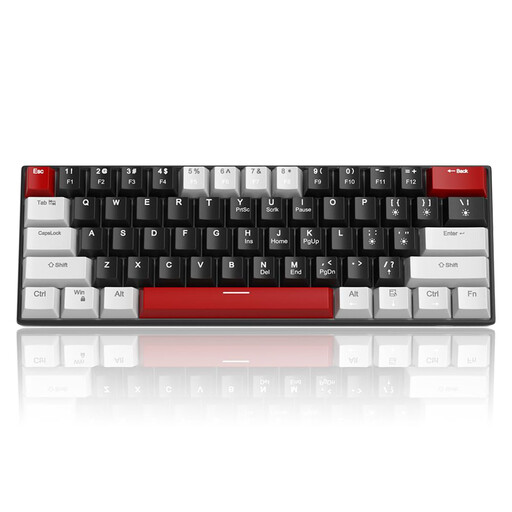
Why This Fits Their Persona: Ideal for gamers who want to try a mechanical keyboard without a large investment. The 60% format is extremely space-saving. Important: This model has a QWERTY layout, which is fine for pure gaming or for users who can adapt, but it represents a compromise for prolific typists in regions that use other layouts.
The product description is transparent about its layout and single-colour blue LED lighting—it doesn't falsely suggest RGB functionality. It also offers N-Key Rollover for reliable input.
The very compact design creates maximum space for mouse movement. Equipped with linear Red Switches, which are well-suited for fast-paced gaming.

Why This Fits Their Persona: This keyboard is aimed at discerning users who value performance, customisability, and a proper regional layout. The 75% format is an ideal compromise between compactness and functionality, as it retains the arrow and function keys.
It directly solves the biggest problem: it is explicitly offered with a German QWERTZ keyboard layout. It also provides true hot-swap capability and programmable RGB keyboard lighting, going beyond empty marketing promises.
Equipped with a practical volume knob, hot-swap sockets, and a gasket-mount structure for a dampened, pleasant typing experience.
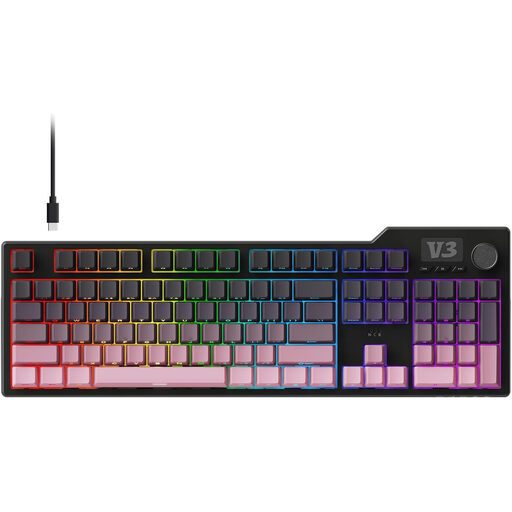
Why This Fits Their Persona: Perfect for users who both game and work productively and don't want to give up a number pad. The gasket-mount design and multi-layer dampening ensure high typing comfort during long sessions.
This model delivers concrete quality features instead of vague promises. The five-layer sound dampening and gasket structure are technical details that make a tangible difference in acoustics and typing feel.
Offers a full-size layout with a number pad, a convenient volume control (slider), and hot-swappable, pre-lubed linear switches for a premium out-of-the-box experience.
We have compiled a complete, up-to-date list of products that fully meet these strict selection criteria and regional requirements.
The main difference lies in the technology beneath the keys. Membrane keyboards use a rubber dome that, when a key is pressed, pushes a contact onto a circuit board. This is cost-effective, but the typing feel is often mushy and imprecise. Mechanical keyboards use an individual, spring-loaded switch for each key. This results in a more precise, consistent typing feel, a faster response time, and a significantly longer lifespan.
The lifespan of a mechanical keyboard is typically determined by the durability of its switches. Most mechanical switches are rated for 50 to 100 million keystrokes. With average use, such a keyboard can last for many years, making it a durable investment compared to membrane models, which often lose their precision after just a few years.
Red Switches are very popular for gaming due to their linear characteristic. They have no noticeable resistance or click, which allows for very fast and repeated keystrokes. This is advantageous in fast-paced games. However, the choice is subjective. Some gamers prefer the tactile feedback of Brown switches to better feel the actuation of an ability. There is no universally "correct" choice; it depends on personal preference and the genres you play.