
Lieferung heute & morgen

Qualitätsgarantie

Willkommens-Angebote freischalten: KOSTENLOSE Lieferung | Bis zu 80 % RABATT | Kostenlose 30-Tage-JoyPlus-Testphase
App herunterladen
A mechanical keyboard can provide different feedback when typing, programming and gaming compared with a flat office keyboard. Models also vary significantly in layout, switches, noise, connectivity and maintenance. Focusing only on RGB lighting or a high key count often means overlooking important details.
Many keyboards are sold internationally. For users in Germany, a QWERTZ mechanical keyboard with German key labels is usually the simpler choice. The ISO-DE layout includes Ä, Ö, Ü and ß, among others. Although a US layout can be changed through software, the printed characters will not then match the actual input.
So check the following before buying:
A wireless mechanical keyboard can connect via Bluetooth, a 2.4 GHz receiver or both methods. Bluetooth is often suitable for tablets, smartphones and multiple devices. A 2.4 GHz receiver can be practical for desktop PCs and gaming. In wired USB-C mode, the wireless connection is disabled completely.
A tri-mode keyboard typically combines USB-C, Bluetooth and 2.4 GHz. You should also check:
A hot-swap keyboard allows compatible switches to be replaced without soldering. This is useful for users who may want to change the key resistance or noise level later. However, you need to check whether 3-pin or 5-pin switches are supported.
RGB lighting mainly affects appearance and visibility. For everyday use, the switch type, key travel, keycaps, case shape and noise levels are usually more important. Descriptions such as “quiet”, “ergonomic” or “particularly comfortable” should be assessed against specific product details.
A full-size keyboard usually has a separate number pad, making it suitable for spreadsheets, accounting or extensive numerical input. A 75% keyboard saves space while often retaining the arrow keys and a function-key row. Compact 60% or 65% models require more key combinations.
If you type for extended periods, you should also consider your hand position. An ergonomic keyboard with a split or curved layout can change the way you work. It is not automatically suitable for every user and often requires an adjustment period.
Mechanical switches are often described as linear, tactile or clicky:
Noise levels are particularly relevant in shared rooms, offices or home offices. Even a dampened construction does not completely eliminate typing noise.
A German keyboard for a PC will not necessarily offer the same special functions on a Mac or iPad. Check the operating system, connection and any software requirements. A multi-device keyboard can be useful if you regularly switch between a work computer, tablet and smartphone.
For travelling, a foldable Bluetooth keyboard or a keyboard with a touchpad may be worth considering. These models save space, but they often use a flatter key mechanism and should not be equated with a traditional mechanical gaming keyboard.
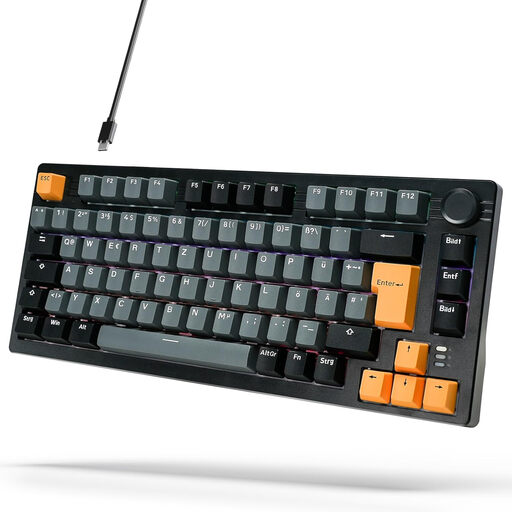
Why this product suits this profile: This wired 75% model combines a German layout with a compact design and is suitable for PC, Windows and Mac.
The ISO-DE layout reduces the risk of mismatched key labels. The USB-C connection eliminates battery and wireless concerns.
75% layout, volume control, gasket-mount construction and 18 listed lighting modes.
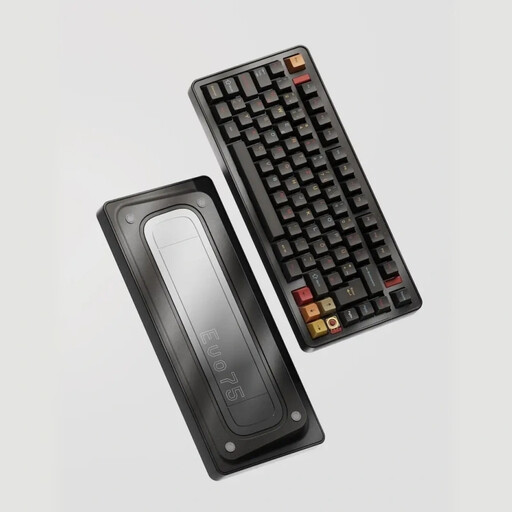
Why this product suits this profile: This model is aimed at users looking for a German layout, flexible connections and customisable components in a compact case.
The product details explicitly list ISO-DE, Bluetooth, 2.4 GHz and USB-C. Hot-swap support makes it possible to replace compatible switches later.
75% layout, aluminium case, leaf-spring mount, 8,000-mAh battery, VIA compatibility and per-key RGB.
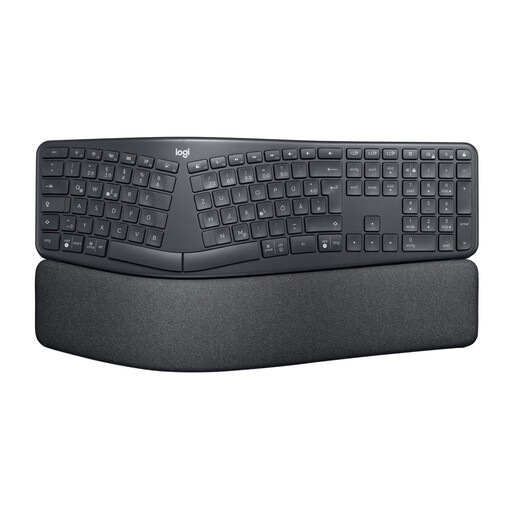
Why this product suits this profile: The split, curved key layout and padded palm rest are designed for extended typing sessions in the office or home office.
The keyboard uses a specified QWERTZ layout and offers three adjustable tilt angles. It connects via Bluetooth Low Energy or a USB receiver.
Split full-size layout, palm rest, three tilt settings and operation with two AAA batteries.
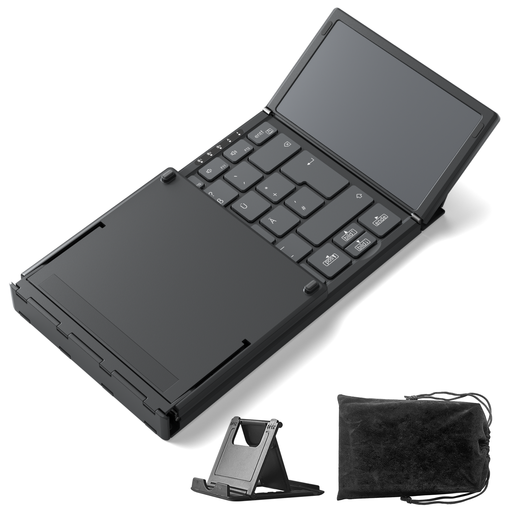
Why this product suits this profile: This foldable Bluetooth keyboard is designed for iPadOS, Android and Windows, and can be stored compactly when travelling.
The product description lists three Bluetooth channels and an integrated touchpad. This means compatible devices do not require a separate input device.
Bluetooth 5.3, switching between three devices, integrated touchpad, 228 g weight and foldable design.
We have put together a complete, regularly updated list of products that fully meet these strict selection criteria and the safety regulations applicable in the EU.
For a home office, a correct QWERTZ layout, moderate noise levels and a comfortable hand position are essential. Linear or tactile switches are often perceived as less noticeable than clicky variants. An ergonomic design can be useful, but you should check its width and the adjustment period before buying.
Its lifespan depends on the switches, keycaps, electronics, usage and care. A hot-swap keyboard can be adjusted more easily if a switch becomes faulty or no longer suits your preferences. Dust, liquids, extreme temperatures and improper cleaning can damage the components. With wireless models, the condition of the battery is another factor.
With a keyboard featuring an integrated battery, the main considerations are charging times and, potentially, replacing the battery later on. Models with AAA batteries require replacement batteries, but can continue to be used without a charging break. A wired keyboard does not need a battery, making it suitable for fixed workstations, while Bluetooth and tri-mode models offer greater flexibility when switching between multiple devices.