
Lieferung heute & morgen

Qualitätsgarantie

Willkommens-Angebote freischalten: KOSTENLOSE Lieferung | Bis zu 80 % RABATT | Kostenlose 30-Tage-JoyPlus-Testphase
App herunterladen
A mechanical keyboard can provide reliable service for gaming, typing and work over many years. However, choosing one is not simply a matter of RGB lighting or switch colour. The key factors are layout, connection type, compatibility, noise levels and the potential for future customisation.
German users in particular often encounter these common buying pitfalls:
A 75% keyboard usually offers the most important function keys, arrow keys and a compact arrangement. It does not have a number pad. An 80% keyboard, also known as a tenkeyless keyboard, is similarly compact and often follows an 87-key layout. Both options create more room for your mouse than a full-size model.
Before buying, check the following:
The KEYSME Lunar 01 is listed with 87 keys in a US layout, while the AJAZZ AK820 is described as a 75% model with a compact key arrangement. On Windows and Mac, the layout and special keys can be adjusted to some extent through the system settings. This does not change the labels on the keycaps, however.
Linear switches move without a tactile bump and are often chosen for gaming and smooth typing. Tactile switches provide noticeable resistance, while clicky switches can also produce a distinct audible signal.
A hot-swappable keyboard allows you to replace compatible switches without soldering them to the PCB. The specified socket standard is important: according to the product details, the KEYSME Lunar 01 supports 5-pin switches. The AJAZZ AK820 is described as having a 3-/5-pin-compatible hot-swap PCB. When replacing switches, the pins must be aligned straight, as incorrectly inserted switches can damage the sockets.
In a gasket-mount keyboard, the plate is held in elastic cushioning elements. Together with foam, silicone or other inserts, this can affect the feel of each keystroke. However, the construction is not a consistent quality standard. You should also pay attention to:
A wired mechanical keyboard transfers data without a battery and generally does not require wireless pairing. A wireless mechanical keyboard is more flexible, but it does need to be charged. A tri-mode keyboard usually offers USB-C, Bluetooth and 2.4 GHz wireless connectivity.
The KEYSME Lunar 01 lists Bluetooth with three channels, 2.4 GHz and USB-C, as well as a capacity of 4000 mAh. The AJAZZ AK820 Pro is also described as offering these three connection types and a 4000-mAh battery. Actual battery life depends on factors including RGB brightness, wireless mode and usage. A specific number of hours should therefore not be inferred from battery capacity alone.
For a keyboard for PC and Mac, it is also important to check whether the configuration software supports both systems. On iOS and Android, input often works via Bluetooth, while macros, firmware updates or RGB adjustments may require a Windows or macOS computer.
PBT keycaps are generally considered more resistant to developing a glossy finish than many ABS keycaps. Durability also depends on material thickness, the lettering process and daily use. Dye-sublimated legends, as specified for the KEYSME Lunar 01, are a specific technical feature, but they do not guarantee unlimited service life.
An RGB keyboard can offer adjustable brightness, colours and effects. For practical use, south-facing LEDs, software support and keycap legibility are more important than the number of lighting effects alone. A programmable volume dial is particularly useful if you often need media controls while gaming or working.
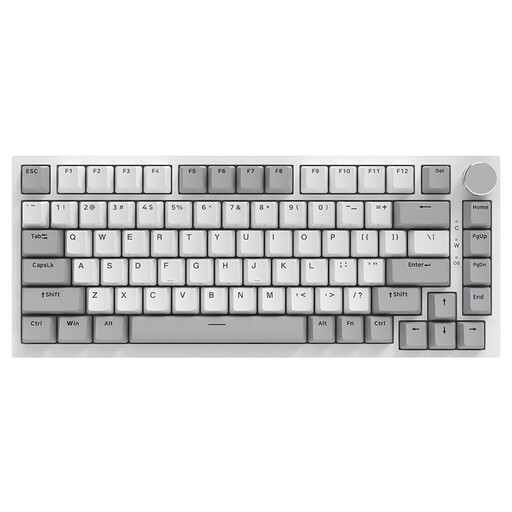
Why this product suits this profile: This wired 75% keyboard is aimed at users looking for a compact mechanical gaming keyboard for PC, Windows or Mac without the need to manage a battery.
The connection is clearly specified as a Type-C cable. Hot-swap, a gasket structure and sound-dampening mats are listed as specific features rather than simply being marketed as wireless convenience.
75% layout, PBT keycaps, CNC volume dial, RGB lighting and support for 3-/5-pin switches.
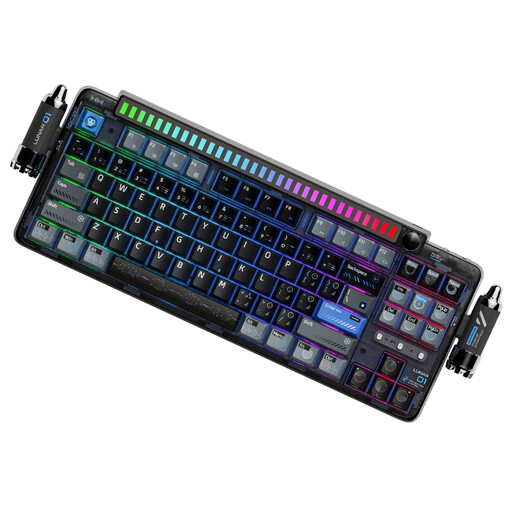
Why this product suits this profile: For prolific typists and custom keyboard enthusiasts, this model offers several connection options, an 87-key US layout and extensive customisation possibilities.
Bluetooth, 2.4 GHz and USB-C are available as separate connection options. The product details also specify hot-swap support for 5-pin switches and a 4000-mAh battery.
Gasket mount with several cushioning elements, PBT dye-sublimated keycaps, programmable dial and software for macros, key mapping and RGB.
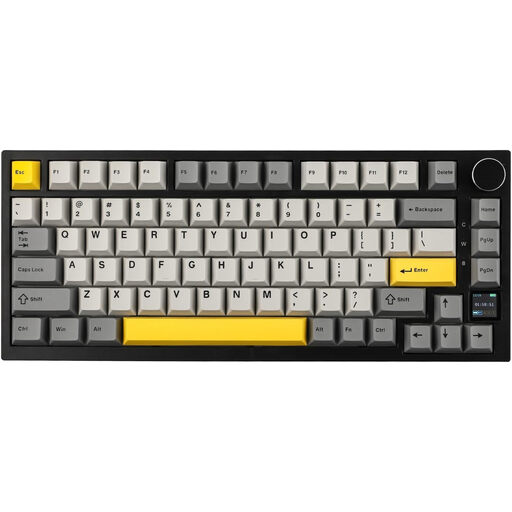
Why this product suits this profile: This model combines a compact layout with tri-mode connectivity, a TFT display and a rotary dial for gaming, office work and use with multiple devices.
According to the product description, the current connection mode and battery level are shown on the TFT display. This keeps important status information visible.
Bluetooth, 2.4 GHz and USB-C, 4000-mAh battery, hot-swap, RGB lighting, PBT keycaps and programmable volume dial.
We have put together a complete, regularly updated list of products that fully meet these strict selection criteria and the safety regulations applicable in the EU.
Yes, provided the switches and noise level are suitable for the working environment. Linear switches are not automatically quiet. Sound-dampening mats, gasket mount and suitable keycaps can influence the sound profile, but they do not replace consideration for others in shared spaces.
Its lifespan depends on the switches, hot-swap sockets, keycaps, cables and daily usage. Manufacturer specifications such as a switch lifespan of 50 million or 600 million actuations apply to individual components and are not a guarantee for the keyboard as a whole. Regular dry cleaning and careful switch replacement can help extend its use.
Models with stated Windows/macOS compatibility are suitable for both systems. With a keyboard for PC and Mac, you should also check the modifier keys, configuration software and preferred layout. If you use several devices, you may want to consider a tri-mode keyboard with Bluetooth, 2.4 GHz and USB-C.