
Lieferung heute & morgen

Qualitätsgarantie

Willkommens-Angebote freischalten: KOSTENLOSE Lieferung | Bis zu 80 % RABATT | Kostenlose 30-Tage-JoyPlus-Testphase
App herunterladen
The search for the right mechanical gaming keyboard can quickly become overwhelming. The market is flooded with models vying for attention with aggressive designs and vibrant colours. But behind the marketing often lie pitfalls that can lead to a bad purchase. As your Joybuy Product Recommendation Officer, I'll help you identify the crucial features and find a keyboard that truly fits your needs.
Before we dive into the important technical details, let's expose the typical marketing traps that often lead to disappointment.
To avoid these traps, focus on three objective criteria that determine the quality and suitability of a mechanical keyboard.
The heart of any mechanical keyboard is its switches. They define the typing feel, volume, and response time. The three main types are:
For maximum flexibility, look for models designated as a hot-swap keyboard. These allow you to change the switches without soldering, so you can customise the typing feel to your preferences later on.
The size of the keyboard directly impacts ergonomics and the amount of available desk space.
Always ensure the model you choose has the correct QWERTY layout for your region to avoid compatibility issues.
The connection type is crucial for performance and flexibility.
Here are some models tailored to specific needs that meet the quality criteria mentioned above.
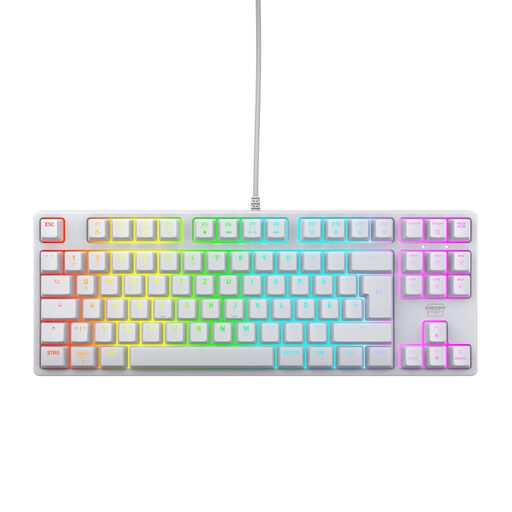
Why This Fits Their Persona: This model focuses on the essentials: fast, reliable performance for competitive gaming. The TKL format frees up space for sweeping mouse movements, while the wired connection ensures minimal latency.
It relies on proven CHERRY MX2A RED switches instead of unknown alternatives and combines this with a practical German TKL QWERTZ keyboard layout—prioritising performance over pure aesthetics.
Durable linear switches (>100 million actuations, according to the manufacturer) and a robust construction with a metal plate ensure reliability during continuous use.

Why This Fits Their Persona: For users who want to personalise their setup down to the last detail. The hot-swap capability allows for switch replacement, while the gasket-mount structure and multi-layer dampening create a premium typing experience.
Instead of just relying on flashy RGB keyboard lighting, this model offers real substance. The hot-swap keyboard functionality and gasket-mount structure are features often found only in more expensive custom keyboards.
Full hot-swap capability for 3-pin switches and a convenient rotary knob for volume control offer a high degree of control and customisation.

Why This Fits Their Persona: Perfect for users who switch between a gaming PC, work laptop, and tablet. The tri-mode connectivity allows for seamless switching between the low-latency 2.4 GHz mode and flexible Bluetooth for multiple devices.
This model is a true keyboard for Mac and Windows. It doesn't force a compromise between wireless freedom and gaming performance, and it also offers a proper German QWERTZ layout in a compact 65% format.
The tri-mode connectivity (wireless gaming keyboard via 2.4 GHz, Bluetooth keyboard, USB-C) and the fast low-profile switches make it extremely versatile and powerful.
We have compiled a complete, up-to-date list of products that fully meet these strict selection criteria and all relevant safety regulations.
No, that's a common misconception. The volume depends on the switch type. Clicky switches (e.g., Blue) are intentionally loud. Linear (e.g., Red) and tactile (e.g., Brown) switches are significantly quieter. A quiet mechanical keyboard often uses linear or tactile switches combined with internal dampening materials like foam or silicone inserts to further reduce noise.
A hot-swap keyboard allows you to easily change the mechanical switches without any soldering. Using a special tool, you can pull out the switches and insert new ones. This provides an excellent way to customise the typing feel and sound of your keyboard or to easily replace a faulty switch.
Mechanical keyboards are known for their durability. The switches are typically rated for 50 to 100 million keystrokes, which far exceeds the lifespan of conventional membrane keyboards. Since components like keycaps—and on hot-swap models, the switches themselves—are replaceable, the lifespan of a high-quality mechanical keyboard can extend for many years with proper care.