Which keyboard suits you?

Prolific writers looking for a quieter workspace

If you draft and edit longer pieces, pay attention to the feedback and sound of the switch actually fitted to the keyboard. Listening to it in a comparable setting can help you decide whether it will suit your workspace.

Writers who need room for notes

If you need space for interview notes and a mouse alongside your keyboard, consider its form factor, number pad and how you arrange your equipment. The BAuA recommends having enough desk space to position your mouse and keyboard flexibly, and to support your hands and arms.

Writers who want room to customise

If you might want to change the typing feel later by swapping the switches, or use more than one device, check the hot-swap feature and connection options for the specific model.

What should you look for when buying?

What matters What to look for Who should pay particular attention
Typing feel for longer pieces The switch type and key height of the specific model; if possible, try the key action before buying. If I’m drafting and editing for long periods, I want the key action to feel controlled. Around 33% of consumers put typing feel first.
Typing noise Check the exact switch variant and, if possible, listen to the keyboard in similar conditions to those in which you’ll use it. If conversations, recordings or other people in the room are a consideration, I want to know what it sounds like to type. Around 25% of consumers give typing noise the greatest weight.
Desk space and key layout Check that it has DE-ISO or the correct German key layout, the number pad you need and the right dimensions for your desk. If I need room on my desk for notes and a mouse as well as my draft, space and a familiar layout matter. Around 25% of consumers put these considerations first.
Connectivity and customisation Check the connection options, supported devices and hot-swap details for the model you’re considering. If I switch between devices, prefer a wired connection or want to change the switches later, the specific features will determine my choice. Around 17% of consumers prioritise connectivity or customisation.

Common misconceptions

  • The model name guarantees a German layout

    The Keychron K8 Pro range includes several ISO layouts for different countries. The model name alone doesn’t tell you which key layout the selected version has.

    Before buying, check the specific layout option and the key map. An unfamiliar layout may take time to get used to.

  • ‘Silent’ means the whole keyboard is silent

    CHERRY describes the MX Silent Red switch as having noise-dampening features. This doesn’t mean every keyboard will be quiet in every setting.

    Check which switch is fitted and, if possible, assess the typing noise in conditions similar to your own workspace.

  • An extended warranty replaces your statutory rights

    Your statutory rights against the retailer are separate from a voluntary manufacturer’s warranty or an additional protection plan.

    Before choosing extra cover, compare it with the rights you already have.

Key brands at a glance

Logitech

The MX Mechanical combines a low-profile mechanical design with wireless use. Logitech offers a standard-size model with a number pad, as well as the smaller Mini.

  • Logitech lists Tactile Quiet, Clicky and Linear switch options for the MX Mechanical.
  • Check which switch option and form factor you’re choosing. ‘Quiet’ doesn’t measure the noise level at your own desk.

Keychron

The K8 Pro ISO range is aimed at writers looking for a more compact keyboard with interchangeable switches.

  • Keychron describes the K8 Pro as hot-swappable, with wired and wireless connectivity. The ISO range also includes DE-ISO.
  • Check the layout and specific switch configuration separately, as options can vary across the range.

CHERRY

CHERRY describes the MX BOARD 3.0S as a wired, gaming-focused mechanical range with a choice of switches and lighting options.

  • According to CHERRY, the MX BOARD 3.0S has a detachable cable.
  • The dampened MX Silent Red can only be considered a feature of a particular keyboard if that version actually comes fitted with it.

Joybuy products for your writing setup

This selection from Joybuy features mechanical keyboards for German-language writing, with a range of form factors, switch options and connection types.

Akko 5087S V1 TKL with Cream Yellow switches and ISO-DE QWERTZ layout

Akko 5087S V1 TKL, Cream Yellow, ISO-DE QWERTZ

The TKL form factor and German layout suit a writing setup where you want to keep some desk space free alongside the keyboard.

Wired; the product listing specifies an ISO-DE QWERTZ layout, Cream Yellow switches, RGB and hot-swap.

View at Joybuy

AJAZZ AK35I V4 with German QWERTZ layout

AJAZZ AK35I V4, German QWERTZ layout

This version combines a German layout with several connection options for a flexible writing setup.

Bluetooth, 2.4 GHz and USB-C; the product listing specifies hot-swap and a 1.14-inch TFT colour display.

View at Joybuy

Akko 3084B Plus in a 75 per cent format with ISO-DE layout

Akko 3084B Plus, 75%, ISO-DE

The 75% format and ISO-DE layout are worth considering if you’re looking for a more compact keyboard with a German key layout.

The product listing specifies tri-mode connectivity, V3 Pro Cream Yellow switches and hot-swap.

View at Joybuy

Logitech MX Mechanical with Tactile Quiet switches and German QWERTZ layout

Logitech MX Mechanical, Tactile Quiet, German QWERTZ

If you use several devices, the wireless MX Mechanical with Tactile Quiet switches could be worth considering. The switch name is no substitute for hearing it at your own desk.

German QWERTZ layout; Bluetooth and Logi Bolt. Logitech says you can switch between up to three devices.

View at Joybuy
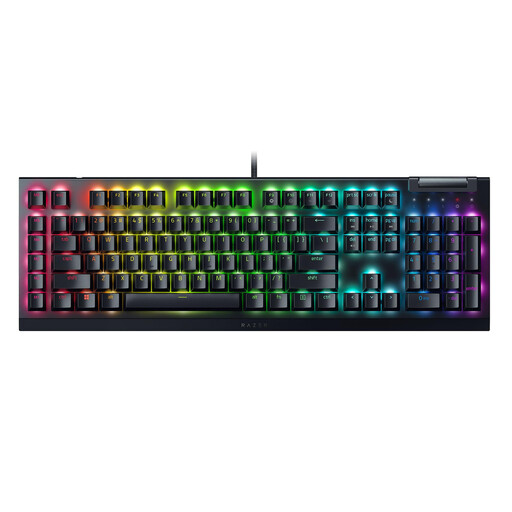
Razer BlackWidow V4 X with Yellow switches and US QWERTY layout

Razer BlackWidow V4 X, Yellow Switch, US QWERTY

This version could suit a permanent writing setup if you specifically want a US QWERTY layout.

The product listing specifies Yellow switches and US QWERTY. If you’re writing in German, this layout may differ from the German one you’re used to.

View at Joybuy

Frequently asked questions

Which key layout should I check for a German-language interview profile?

Check the specific DE-ISO or German QWERTZ version in the product options. Keychron offers several ISO country layouts for the K8 Pro, so the version you select isn’t necessarily DE-ISO.

Does a low-profile mechanical keyboard automatically make your workspace ergonomic?

No. A low-profile design alone doesn’t prove that a keyboard is ergonomic. The BAuA recommends having enough room to position your mouse and keyboard flexibly, and to support your hands and arms. Your desk space and posture also matter.

How should I clean my keyboard between longer writing projects?

Logitech recommends unplugging a wired Logitech keyboard before cleaning it, and switching off a wireless model. For other keyboards, follow the care instructions, particularly before removing any keycaps.

What are my rights if I buy a faulty keyboard in Germany?

For a purchase from a business seller in the EU, you’re generally entitled to a statutory guarantee of at least two years from receiving the goods, as Your Europe explains. This is separate from a voluntary manufacturer’s warranty or an additional protection plan.

Can I return a keyboard bought online if I don’t like the key action?

For an online purchase by a consumer, you generally have 14 days from receiving the goods to exercise your right to cancel. You must notify the retailer. The Verbraucherzentrale recommends checking the details of your specific contract and the rules on handling the goods.