Joybuy Insights

Mechanical Keyboard Buyer's Guide: Key Considerations

The search for the right mechanical keyboard can quickly become overwhelming. Marketing buzzwords make big promises, but they often hide products that fail to meet expectations. Many users invest in a supposed premium product, only to find that the keys start sticking, the software is unreliable, or the typing noise causes friction in the office after just a few months. This guide will help you identify the crucial features and avoid the common pitfalls.

Three Common Pitfalls When Buying a Mechanical Keyboard

Before we dive into the technical details, let's shed light on three prevalent marketing traps that often lead to buyer's remorse.

  1. The "Silent" Trap: Many keyboards are advertised as "silent mechanical keyboards," but this term isn't standardised. The perceived volume depends on the switches, keycaps, case material, and internal damping. A model marketed as silent might still be unsuitable for an open-plan office if it's built on a hollow plastic case.
  2. The "Custom" Illusion: The term "Custom Mechanical Keyboard" is often used loosely. True customisation goes beyond simple RGB keyboard lighting. Many models don't allow you to replace the mechanical switches without soldering, which severely limits your modification options. Only a hot-swap keyboard offers genuine flexibility.
  3. The Material Bluff: A high price doesn't always guarantee high-quality materials. Keyboards with an "aluminium look" are often just painted plastic that wears off quickly. Similarly, thin ABS keycaps are prone to abrasion and quickly develop an unsightly shine, whereas higher-quality PBT keycaps retain their texture and legends for years.

What Really Matters: The Core Parameters for Your Selection

To make an informed decision, focus on the following three technical aspects. These are the primary determinants of your keyboard's performance, feel, and longevity.

1. Hot-Swap Capability and Switch Compatibility

The switches are the heart of any mechanical keyboard. A hot-swap keyboard allows you to change these switches without a soldering iron. This is a game-changing feature for anyone who wants to personalise their typing experience or easily replace faulty switches.

  • Compatibility: Check whether the PCB (Printed Circuit Board) is designed for 3-pin or 5-pin switches. 5-pin compatibility offers a wider selection of custom switches and ensures a more stable installation.
  • Switch Types: Linear switches (e.g., Red) provide a smooth, consistent keystroke with no resistance, making them popular with gamers. Tactile switches (e.g., Brown) give a noticeable bump at the actuation point, ideal for prolific typists. Clicky switches (e.g., Blue) add an audible click. For a silent mechanical keyboard, dampened linear or tactile switches are the top choice.

2. Case Material and Mounting Style

The material and internal construction of the case have an enormous impact on the sound and typing feel.

  • Case: A genuine aluminium keyboard not only offers a more premium feel and stability but also influences the acoustics. It often results in a deeper, fuller sound profile compared to plastic cases.
  • Mounting Style: Advanced models use innovative methods to secure the PCB. A gasket mount, for example, suspends the PCB on silicone gaskets, which absorbs vibrations and creates a softer, more cushioned typing feel. A leaf spring mount uses flexible metal plates for an even bouncier and more flexible keystroke. These systems are crucial for achieving the "thocky" or "creamy" sound profiles coveted by enthusiasts.

3. Layout, Connectivity, and Extra Features

The functionality must match your workflow.

  • Layout: Besides the standard full-size layout, there are more compact form factors. A 75% keyboard is a popular compromise, as it retains the arrow and function keys while having a significantly smaller desk footprint. For users in Germany, an ISO-DE layout with the correct key arrangement and legends (?, ?, ?, ?) is essential.
  • Connectivity: A wireless mechanical keyboard offers more flexibility. Tri-mode models support connection via a USB-C cable, 2.4GHz wireless, and Bluetooth, allowing for seamless switching between multiple devices.
  • Extra Features: A keyboard with a rotary knob can simplify operation by providing quick control over volume, screen brightness, or other programmable functions. Integrated displays can show system information or connection status.

Aligning Picks With User Needs

Here are some models tailored to the needs of different user groups that successfully avoid the pitfalls mentioned.
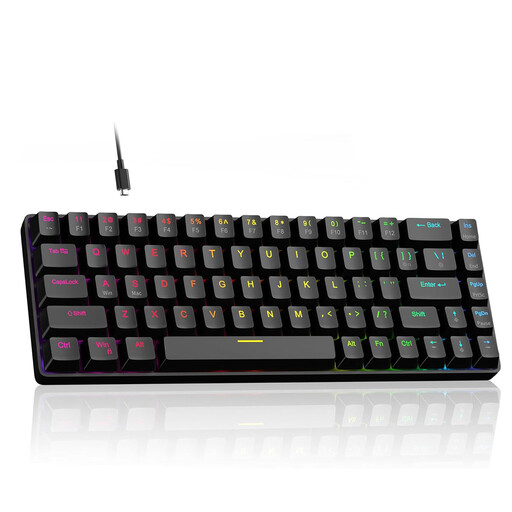
MATCH FOR: Ambitious Gamers & Esports Pros
MageGee 60% Rapid Trigger Gaming Keyboard

MageGee 60% Rapid Trigger Gaming Keyboard

Why This Fits Their Persona: Engineered for maximum speed. The Hall Effect magnetic switches with an adjustable actuation point and Rapid Trigger technology provide a measurable advantage in competitive games where reaction time is everything.

How It Avoids the Trap

Bypasses the "Custom" illusion by offering a specific, performance-oriented adjustment: the actuation point can be digitally fine-tuned from 0.1 mm to 4.0 mm, enabling true personalisation of responsiveness.

Key Advantage & Pros

Rapid Trigger & 8000Hz Polling Rate: Ensures virtually lag-free input. Hot-swappable with 3-pin switches.
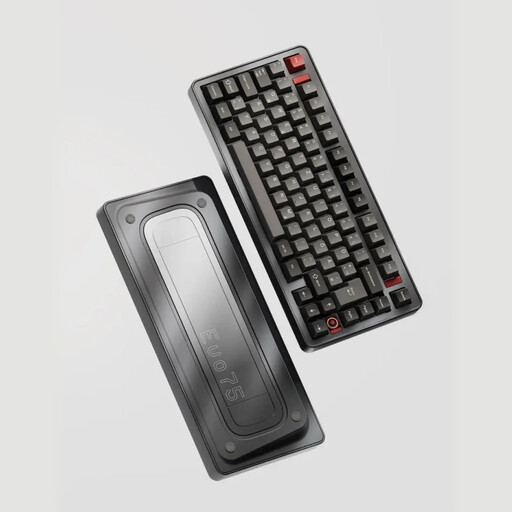
MATCH FOR: Customisation & Aesthetics Enthusiasts
Ticktype EVO75 Custom Tri-Mode Wireless Mechanical Keyboard, ISO-DE Layout

Ticktype EVO75 Custom Tri-Mode Wireless Mechanical Keyboard, ISO-DE Layout

Why This Fits Their Persona: Perfect for German users who refuse to compromise on materials, layout, and flexibility. The solid aluminium case, ISO-DE layout, and hot-swap capability make it the ideal foundation for a personalised setup.

How It Avoids the Trap

Evades the material trap with a full aluminium-milled case and the compatibility trap with its native ISO-DE layout, which requires no cumbersome software tweaks for German umlauts.

Key Advantage & Pros

Full Aluminium Case & Leaf Spring Mount: Delivers a premium typing feel and top-tier acoustics. Tri-Mode Connectivity & 8000mAh Battery for long-lasting wireless use.
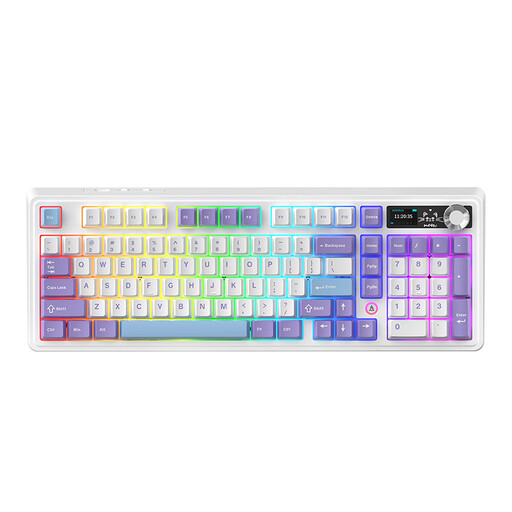
MATCH FOR: Power Users & Prolific Typists
AJAZZ AK980 V2 Wireless Mechanical Keyboard

AJAZZ AK980 V2 Wireless Mechanical Keyboard

Why This Fits Their Persona: A workhorse for users who demand functionality and endurance. The 98% layout includes a number pad in a compact form factor, while the massive battery and versatile extra features streamline the daily workflow.

How It Avoids the Trap

Avoids the trap of superfluous gimmicks. The TFT display and rotary knob are not just for show; they offer practical utility for quickly viewing status information and controlling system functions.

Key Advantage & Pros

10000mAh Battery: Provides exceptionally long runtime in wireless mode. TFT Display & Rotary Knob: Functional enhancements for more efficient operation.

Looking for More Options?

If you want to further personalise your typing experience, choosing the right switches is crucial. We've curated a selection of components compatible with hot-swap keyboards.

Frequently Asked Questions (FAQ)

1. What is the difference between an ISO-DE and an ANSI layout? The ISO-DE layout is the German standard. It is characterised by a two-row Enter key, a short left Shift key, and additional keys for umlauts (?, ?, ?) and the Eszett (?). The ANSI layout is the US standard, featuring a single-row Enter key, and will often lead to compatibility issues when typing special characters in Germany. When purchasing, explicitly look for the "ISO-DE" specification.

2. How long do the switches on a mechanical keyboard last? Most mechanical switches from reputable manufacturers are rated for a lifespan of 50 to 100 million keystrokes. With average use, this equates to many years. Furthermore, with a hot-swap keyboard, you can easily and affordably replace a single faulty switch yourself, significantly extending the entire keyboard's lifespan.

3. How can I make my mechanical keyboard quieter? There are several methods:

  • Switch Choice: Use "silent" switches (e.g., Silent Red/Brown), which are internally dampened.
  • O-Rings: Small rubber rings placed under the keycaps dampen the impact of the cap against the switch housing.
  • Case Mods: Adding damping material (e.g., specialised foam) inside the keyboard case can significantly reduce case resonance.
  • Keycaps: Thicker PBT keycaps often produce a deeper and less shrill sound than thin ABS caps.