
Lieferung heute & morgen

Qualitätsgarantie

Willkommens-Angebote freischalten: KOSTENLOSE Lieferung | Bis zu 80 % RABATT | Kostenlose 30-Tage-JoyPlus-Testphase
App herunterladen
The search for the right mechanical gaming keyboard can quickly become overwhelming. The market is flooded with technical jargon, marketing promises, and an enormous selection. As a Joybuy Product Recommendation Officer, I'm here to help you separate the important information from the noise. This guide highlights the most common pitfalls and what you should look for to make an informed decision.
Many buyers focus on advertised features that have little practical relevance or overlook crucial details. These three mistakes often lead to disappointment:
To make the right choice, you should focus on the following practical features.
Mechanical switches determine the typing feel and acoustics. The three main types are:
The size of the keyboard has a direct impact on ergonomics and the space available for your mouse.
Modern keyboards offer various connection options. A wireless keyboard with Tri-Mode functionality (Bluetooth, 2.4 GHz wireless, and USB-C cable) offers maximum flexibility for PC and Mac. For competitive gaming, a wired or a low-latency 2.4 GHz connection is often recommended.
Another feature of high-quality models is the gasket mount construction. Here, the PCB with the switches is mounted on gaskets, which reduces vibrations and creates a softer, more cushioned typing feel.
Here are some recommendations tailored to different needs and budgets.
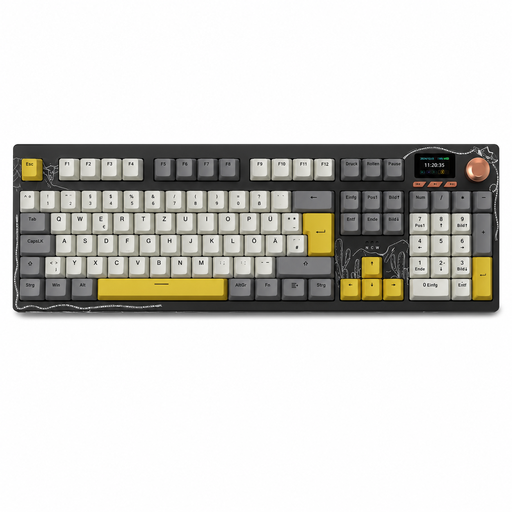
Why This Fits Their Persona: This model is ideal for users in Germany who want a fully functional, customisable keyboard without compromising on localisation. It combines modern features with a layout that is essential for the German market.
Solves the core problem of many imported keyboards by offering a full German QWERTZ layout. This saves users from frustration and the need to adapt to a foreign key arrangement.
Tri-mode connectivity (Bluetooth/2.4G/USB-C), hot-swap functionality for customisation, and a gasket-mount structure for a pleasant typing experience.
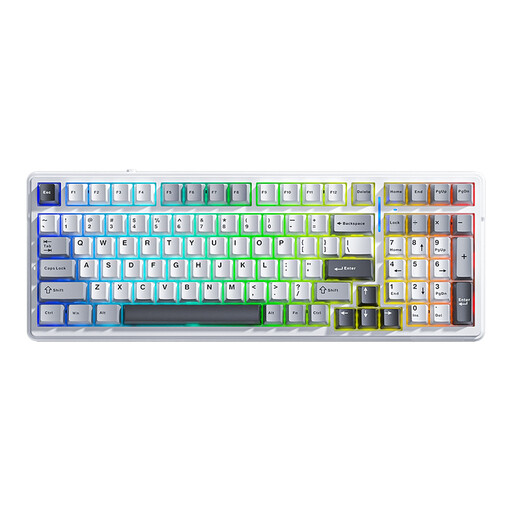
Why This Fits Their Persona: Perfect for users seeking maximum customisation and high-end features. The 99-key layout is a compact compromise that retains almost the full functionality of a full-size keyboard.
Offers hot-swap functionality for users who will actually want and use it. The solid gasket-mount structure and large 8000mAh battery address durability beyond just the switches.
Flexible tri-mode connectivity, hot-swap capability, and a multi-layered, sound-dampening construction for a premium typing feel and acoustics.
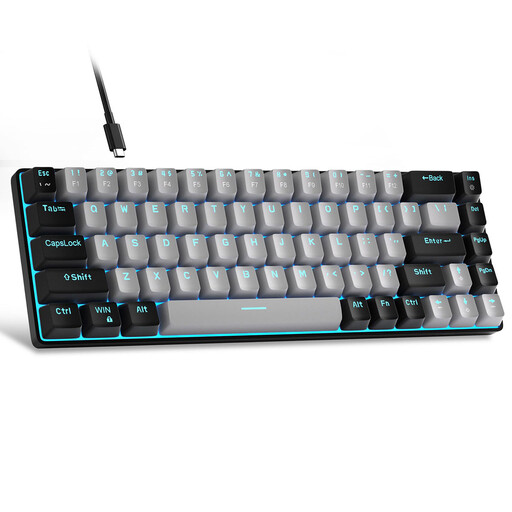
Why This Fits Their Persona: An excellent choice for beginners or users with limited desk space. It offers the mechanical typing experience in an extremely compact and affordable package.
Focuses on the essentials: a solid mechanical feel and a reliable wired connection. It deliberately omits expensive extra features like hot-swap or wireless, which are often unreliable in this price segment.
The 60% layout maximises desk space for sweeping mouse movements. The detachable USB-C cable enhances durability and portability.
We have compiled a complete, real-time updated list of products that fully meet these strict selection criteria and German safety regulations.
What is the difference between QWERTZ and QWERTY? The QWERTZ layout is the standard in Germany and Eastern Europe. The Z and Y keys are swapped compared to the international QWERTY layout. Additionally, QWERTZ provides direct access to German umlauts (?, ?, ü) and other special characters. Using the wrong layout can significantly impair typing speed and accuracy.
Do I need a hot-swap keyboard? A hot-swap keyboard is only worthwhile if you actively plan to try out different mechanical switches to change your typing feel or to easily replace faulty switches. For most users who want to use a keyboard "out of the box," this feature is not necessary and can unnecessarily increase the cost.
How do I maintain a mechanical keyboard? Regular cleaning extends the life of your keyboard. Use a brush or compressed air to remove dust and crumbs from between the keys. On most models, the keycaps can be removed with an included tool (keycap puller) and cleaned separately with a mild soap solution. Be careful not to let any liquid get inside the keyboard.