
Lieferung heute & morgen

Qualitätsgarantie

Willkommens-Angebote freischalten: KOSTENLOSE Lieferung | Bis zu 80 % RABATT | Kostenlose 30-Tage-JoyPlus-Testphase
App herunterladen
For many gamers and power users, a mechanical keyboard is more than just an input device—it's a vital tool for precision, speed, and comfort. But the market is saturated and full of marketing promises that often obscure more than they clarify. The result is frequent buyer's remorse, leading to frustration and unnecessary expense.
As your Joybuy Product Recommendation Officer, I'm here to help you identify the crucial features and navigate the common pitfalls. We'll focus on the facts so you can make an informed decision for your next piece of PC gaming gear.
Before we dive into the technical details, let's highlight the three most common issues that arise when choosing a mechanical keyboard:
To avoid these traps, you should focus on three verifiable core parameters. These fundamentally determine your keyboard's functionality and user experience.
The layout is crucial for ergonomics and desk space. Above all, ensure you're getting the correct layout for your region, such as a QWERTY layout for the US/UK.
The switches define the typing feel and sound profile. The three main types are:
Some features offer real value and should be considered during your selection:
Here are some models tailored to specific user profiles that meet the quality criteria mentioned.
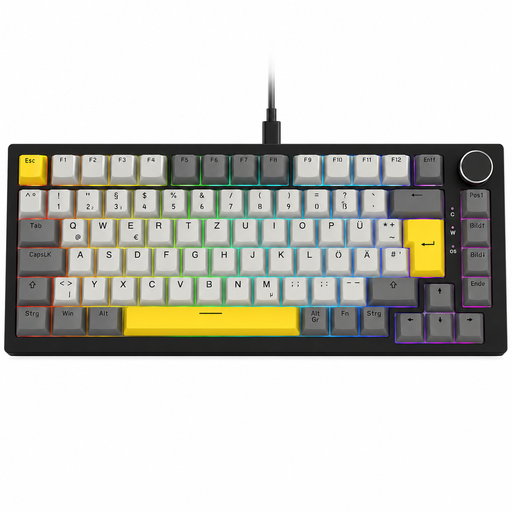
Why This Fits Their Persona: This model combines a compact 75% keyboard layout with features useful for both productivity and gaming. The dedicated volume knob and hot-swap capability offer a high degree of convenience and future-proofing.
It offers a true German QWERTZ layout and full hot-swap functionality that allows for soldering-free replacement of 3-pin switches—no empty promises about customisation.
The combination of hot-swap sockets, a practical volume knob, and multi-layer sound dampening (gasket mount) delivers a premium typing experience.
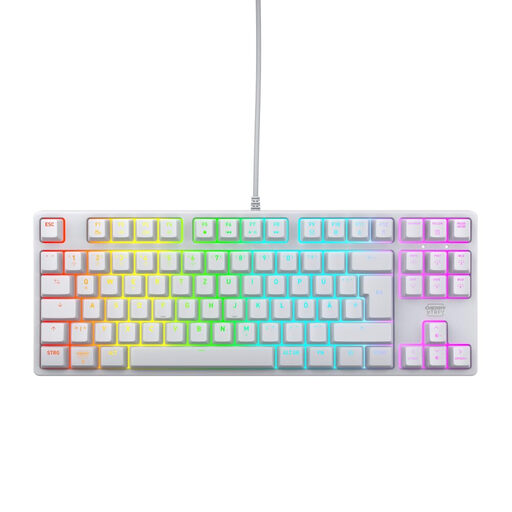
Why This Fits Their Persona: The space-saving TKL keyboard design creates maximum room for wide mouse sweeps. The integrated CHERRY MX2A Red switches are renowned for their linear, fast, and reliable actuation, which is critical in fast-paced gaming scenarios.
It relies on proven, German-engineered CHERRY MX2A switches instead of vague marketing terms. The layout is strictly designed for functionality and the German QWERTZ standard.
High-quality linear switches rated for over 100 million actuations and a robust build with a metal plate for high stability in competitive esports use.

Why This Fits Their Persona: This wireless keyboard is optimised for professional environments. Its quiet, tactile switches enable precise typing without the noise profile of a typical gaming keyboard. The multi-device connectivity allows for seamless switching between up to three devices.
It is explicitly designed as a quiet mechanical keyboard with "Tactile Quiet" switches, thus avoiding vague claims about noise levels. The German QWERTZ layout is built for professional use.
Wireless multi-device connectivity (Bluetooth & Logi Bolt) for a flexible workflow and a high-quality aluminium case for durability and a professional aesthetic.
We have compiled a complete, up-to-date list of products that fully meet these strict selection criteria and all relevant safety standards.
Hot-swap means that the mechanical switches are not permanently soldered to the circuit board (PCB). They sit in special sockets and can be pulled out with a simple tool and replaced with other compatible switches (usually 3-pin or 5-pin). This allows you to change your keyboard's typing feel without buying a whole new one, or to easily replace a faulty switch.
The lifespan of a mechanical keyboard is largely determined by the quality of its switches. Most manufacturers specify a durability rating in millions of keystrokes, with figures between 50 and 100 million being common. With normal use, a well-built mechanical keyboard can last for many years, often significantly longer than conventional rubber dome keyboards.
Linear switches, such as Red switches, are very popular with gamers because they provide a smooth and fast keystroke without any noticeable resistance or click. This is advantageous in games that require rapid, repeated key presses (e.g., in FPS or MOBA games). However, the choice of switch is ultimately a matter of personal preference. Some gamers prefer the tactile feedback of Brown switches even for gaming.