
Lieferung heute & morgen

Qualitätsgarantie

Willkommens-Angebote freischalten: KOSTENLOSE Lieferung | Bis zu 80 % RABATT | Kostenlose 30-Tage-JoyPlus-Testphase
App herunterladen
A mechanical keyboard can feel significantly different from a classic membrane keyboard when gaming, programming, typing or working in the office. However, flashy lighting, multiple connection modes or marketing claims don't automatically lead to the right purchase decision. What really matters are the technical details that make a difference in everyday use.
If you regularly type in German, you'll usually need a QWERTZ keyboard. With a US QWERTY layout, for example, Z and Y are swapped, and umlauts and special characters may be arranged differently. A German operating system can't fully compensate for these differences when the keycaps and physical key positions don't match.
Before you buy, you should check:
A wireless keyboard can connect via Bluetooth or a 2.4 GHz USB receiver. Bluetooth is often suitable for laptops, tablets and smartphones. A 2.4 GHz receiver can provide a direct, low-latency connection with compatible devices. For maximum flexibility, an additional USB-C port is useful, as the keyboard can then be used and charged in wired mode too.
Pay attention to the actual features: does the model support only Bluetooth, or also 2.4 GHz? Is the receiver included in the box? How do you switch between devices? For a gaming keyboard, a wired connection can also be simpler to configure.
An RGB keyboard offers various lighting effects, but on its own tells you little about the typing feel or build quality. Likewise, "PBT keycaps" aren't a complete quality verdict. PBT is considered more resistant to visible wear than many ABS variants, but the profile, labelling method and fit also remain important.
With a hot-swap keyboard, you should also check which switches are supported. Some models accept 3-pin and 5-pin switches, while others are more limited. A hot-swap socket lets you change switches without soldering, but the pins must be inserted straight to avoid damaging the contacts.
The form factor affects both functionality and desk space:
Linear switches move smoothly and are often used for fast inputs. Tactile switches have a noticeable bump at the actuation point. Clicky switches additionally produce a clearly audible sound. However, the volume also depends on the keycaps, case, desk mat and construction.
For a shared office, a loud clicky switch may be unsuitable. When buying, don't just look for terms like "smooth" or "responsive" – check the switch type and, where relevant, the actuation distance.
A gasket-mount keyboard suspends the plate inside the case using elastic elements. Depending on the design, this can create a more cushioned typing feel. Foam layers can reduce resonance, but don't replace an objective measure of actual noise levels.
Ergonomic considerations also include keyboard height, adjustable feet, wrist position and a suitable sitting posture. A mechanical keyboard isn't automatically an ergonomic keyboard. For long working sessions, regular changes of position and a neutral hand posture are advisable.

Why this product fits the profile: The 87-key form factor offers a German layout, RGB lighting and both wired and wireless connections. This makes it suitable for PC workstations, gaming and switching between multiple devices.
The German Layout is explicitly stated. Additionally, the hot-swap socket supports 3-pin and 5-pin switches according to the product description.
80% layout with 87 keys, PBT keycaps, RGB lighting plus Bluetooth, 2.4 GHz and USB-C.
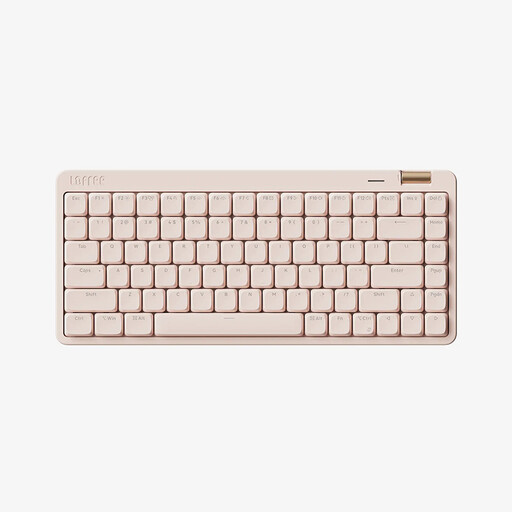
Why this product fits the profile: This 75% model combines 84 keys with low-profile linear switches and three connection types. It's designed for the office, study and changing workstations.
The connection isn't limited to Bluetooth: Bluetooth 5.4, 2.4 GHz and Type-C are available according to the manufacturer's specifications.
84 keys, PBT keycaps, white LED lighting, volume wheel and a 2,000 mAh battery according to the product description.
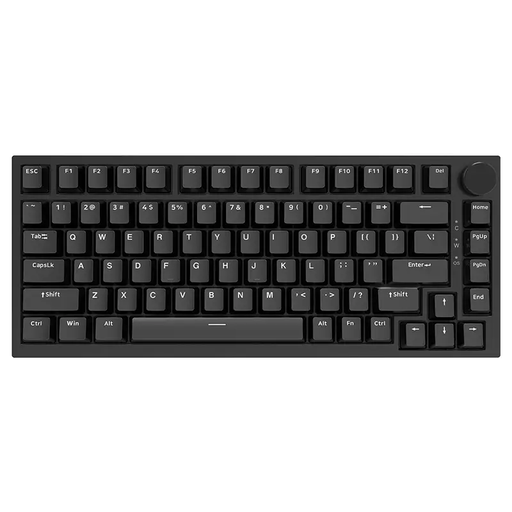
Why this product fits the profile: This wired 75% keyboard is aimed at users who prefer a stable connection, switch swapping and a compact workspace. The model has a US QWERTY layout.
The specifications explicitly mention gasket-mount construction, hot-swap support and USB-C. The US layout is transparently stated and can be taken into account before purchase.
Linear switches, PBT keycaps, volume wheel, RGB lighting and five described damping layers.
We've put together a complete, regularly updated list of products that fully meet these strict selection criteria and the safety regulations in force in the EU.
For the office, a suitable layout, moderate noise level and a reliable connection are more important than lots of lighting effects. Linear or tactile switches can be more appropriate than clicky variants when several people are working in the same room. A 75% or 80% keyboard saves space without completely removing the most important navigation keys.
The lifespan depends on the switches, keycaps, electronics, cleaning and daily use. Manufacturers sometimes quote high actuation figures, but these aren't a guarantee for the entire keyboard. A hot-swap model can be more easily adapted if a switch later fails. Liquids, damaged cables and incorrectly inserted switches can shorten the lifespan.
Power consumption depends mainly on the connection type, lighting and battery capacity. RGB effects generally require more energy than switched-off or simple white lighting. For regular gaming at a fixed PC, a USB-C keyboard without a battery can be more straightforward. If you switch between a laptop, tablet and smartphone, you'll benefit from Bluetooth or a tri-mode model.