What should you look for when buying?
Start with the feel and sound of the switches, then check the German layout, the software keys you need and how much desk space you have. Wireless connections and customisable key layouts only matter if they suit the way you work.
| Feature |
What to check before buying |
Who is it important to? |
| Keystroke noise |
Check the switches and the specific keyboard version; ‘Silent’ doesn’t guarantee a silent keyboard. |
If I want repetitive keystrokes to be as unobtrusive as possible while I write, I pay attention to the switch type. Around 24% of consumers put noise first. |
| Typing feel |
Compare the switches actually available; don’t judge the typing feel by the model name alone. |
During long writing sessions, I want the keystrokes to feel right for me, rather than choosing based only on the brand name. Around 24% of consumers put typing feel first. |
| Layout and software keys |
Check the German keyboard layout and the keys you need for your screenwriting software. Final Draft documents functions for Enter and Tab. |
If I need a familiar layout and the keys required for my writing workflow, I check the specific version. Around 19% of consumers prioritise layout and formatting workflow. |
| Desk space and setup |
Consider the space needed for a number pad alongside your available desk space, and allow room for a mouse and somewhere to rest your arms. |
At a small desk, I want to be able to arrange my keyboard, mouse and paperwork in a way that works for longer writing sessions. Around 19% of consumers say space is their top priority. |
| Connectivity and customisation |
Check which connections you need and what customisation software is available for the specific version. |
If I use several devices or want to customise keys for recurring tasks, I care about whether the features suit my workflow. Around 14% of consumers prioritise switching between devices or customisation. |
Joybuy keyboards for your writing setup
These Joybuy keyboards offer a range of options for writing at home. Pay particular attention to the layout, size and switches: the selection includes everything from compact ISO-DE models to a version with a US layout.
 No image available
Akko 5087S V1 TKL, Black & Gold
An option if you’re looking for a wired keyboard with a more compact TKL format and a German layout.
- ISO-DE/QWERTZ layout
- Akko V3 Pro Cream Yellow switches
- Hot-swappable
Joybuy
 No image available
AJAZZ AK35I V4, German QWERTZ layout
An option if you want a German layout and several ways to connect at your writing desk.
- Bluetooth, 2.4G and USB-C
- Gasket mount
- 10,000 mAh battery
- 1.14-inch TFT colour screen
- Hot-swappable
Joybuy
 No image available
Akko 3084B Plus, 75%, ISO-DE, Black & Gold
An option if you’re looking for a more compact keyboard with a German layout and several ways to connect.
- 75% format, ISO-DE
- V3 Pro Cream Yellow switch
- Bluetooth, 2.4G and USB-C
- Hot-swappable
Joybuy
 No image available
Logitech MX Mechanical Wireless Illuminated Performance Keyboard, Tactile Quiet, German QWERTZ
An option if you want a German layout and Tactile Quiet switches; the name isn’t an independent noise measurement.
- Tactile Quiet switches
- Bluetooth and Logi Bolt
- German QWERTZ layout
Joybuy
 No image available
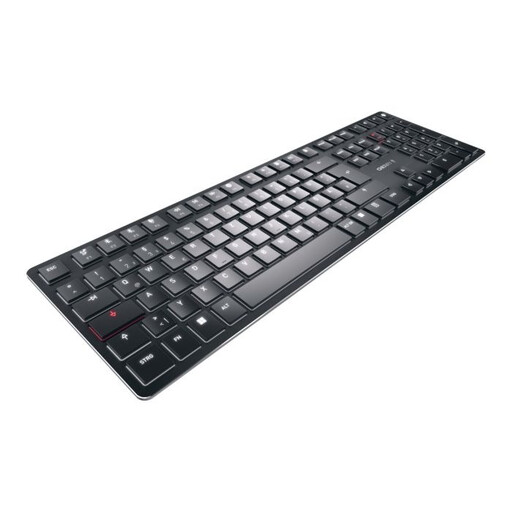
CHERRY KW X ULP, tactile MX switches, US layout
An option if you’re looking for a low-profile keyboard with tactile mechanical switches and are happy to use a US layout.
- Ultra-thin design
- Tactile MX switches
- Bluetooth, 2.4G and USB-C
- US layout (English)
Joybuy
Frequently asked questions
Do I need special keys for screenwriting software?
Start by checking the shortcuts for the software you use. In Final Draft, Enter and Tab are documented for moving between screenplay elements; that doesn’t mean you generally need macro keys.
How should I set up my keyboard and mouse for longer writing sessions?
Allow enough room to position your keyboard and mouse flexibly and rest your arms. The Federal Institute for Occupational Safety and Health describes this as an ergonomic recommendation for computer work; the shape of a keyboard alone can’t guarantee you’ll be free from discomfort.
Who can help if something is faulty after an online purchase?
When you buy from a business seller, EU consumer rules provide a legal guarantee of at least two years from the date you receive the goods. Contact the seller about a fault; this is separate from any manufacturer’s voluntary guarantee.
Can I return a keyboard bought online?
For a distance contract with a business seller, you generally have 14 days from delivery to withdraw from the purchase. Check the specific returns terms and any return postage costs; purchases from private individuals aren’t covered.
Is a CE mark an independent safety certification?
No. The European Commission explains that by applying the mark, the manufacturer takes responsibility for meeting the relevant requirements. It isn’t a 100% guarantee of safety; whether a particular product needs a specific marking must be assessed on a product-by-product basis.


