Considerate writers
You write lengthy interview pieces within earshot of others and want the feel of a mechanical keyboard without causing too much disturbance. CHERRY and Logitech offer different dampened or quiet switch options.


For longer writing sessions at a shared desk, first consider the specific switch type and the sound of the complete keyboard: ‘mechanical’ alone tells you nothing about how loud it is. Then think about how much space it takes up, which keys you need for your writing, and which connection suits your setup. Manufacturers’ descriptions of dampened or quiet switches are no substitute for comparing the finished keyboard while typing in your own style.
You write lengthy interview pieces within earshot of others and want the feel of a mechanical keyboard without causing too much disturbance. CHERRY and Logitech offer different dampened or quiet switch options.
You want room for notes and a mouse beside your keyboard, while keeping familiar navigation and punctuation keys close to hand when editing. Logitech and Keychron offer a range of compact layouts.
You switch between devices while drafting or editing and want to choose a connection and layout that suit your workspace. Logitech and Keychron describe multi-connection options or device switching on selected models.
Start by checking the switch type and typing sound, then consider the layout and form factor. Choose a wired or wireless connection to suit the devices you actually use for work.
| Criteria | What to check when buying | Who should pay particular attention |
|---|---|---|
| Typing sound | Check the exact switch type: Clicky is not the same as Tactile Quiet or Silent Red. | If I write for long periods within earshot of others, I want to assess the specific keyboard using my own typing style. Around 36% of consumers put typing sound first. |
| Typing feel and layout | Match the switch type and German ISO-DE or QWERTZ layout to the way you write and edit. | If familiar keys and feedback that suits German-language typing are important, I check the exact variant. Around 29% of consumers prioritise typing feel and layout. |
| Space requirements | Compare the available space with the specific key layout; Mini and TKL keyboards do not have a number pad. | If there also needs to be room for notes and a mouse on the shared desk, I look for a compact layout that fits. Around 21% of consumers put available desk space first. |
| Connection | Check the ports, wireless options and compatibility with your work devices for the specific variant. | If I regularly switch between computers, I need a connection that works with my devices. Around 14% of consumers prioritise switching between devices. |
The Logitech MX Mechanical and MX Mechanical Mini are available with different switch options, including Tactile Quiet, Clicky and Linear. The model family alone does not determine which switches you get.
Before buying, check the exact switch description for the variant on offer and make sure it matches the typing feel you want.
Choosing the wrong option could mean having to place another order or go through a returns process.
CHERRY describes dampening in the switch, while Keychron describes dampening in the case. Neither gives you a directly comparable sound level for the complete keyboard.
If being considerate of others is important, take the switches, keyboard case and your own typing style into account.
Mini and TKL layouts differ, and the specific variant also needs to offer the layout you need for typing in German.
Check the stated key layout and make sure it includes the keys you rely on for editing.
The MX Mechanical and MX Mechanical Mini are mechanical keyboards designed for low-profile typing. The Mini saves space, while the standard-size version has a number pad.
The KC 200 MX is a wired mechanical keyboard for office use.
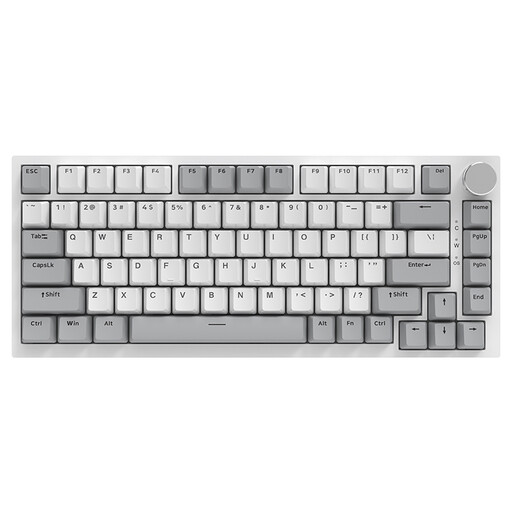
The Q3 Max is a customisable TKL keyboard, also available in a DE-ISO version.
Razer offers the Pro Type Ultra, a mechanical keyboard designed for productivity.
This selection includes compact keyboards, a standard-size model with a number pad, and models with wired or multiple connection options. For writing in German, the specific layout and switch type are key.
 No image available
The TKL format with a German layout is a good option if you want to free up desk space while writing.
ISO-DE QWERTZ; wired; linear Akko V3 Pro Cream Yellow switches; hot-swappable.
 No image available
The compact layout with German keys is worth considering if you want to save space on your desk.
75% layout; ISO-DE; Bluetooth, 2.4 GHz and USB-C; V3 Pro Cream Yellow switches; hot-swappable.
 No image available
The standard-size version with a number pad is a better fit if you use those keys regularly and have room for the extra width.
Tactile Quiet switches; German QWERTZ; Bluetooth and Logi Bolt; switch between up to three devices. The switch description is not a sound measurement.
 No image available
The compact layout may suit a small desk, but the stated US QWERTY layout is not the German layout option.
Wired; linear hot-swappable switches; gasket mount with specified sound-dampening materials.
 No image available
The full-size layout may suit you if you use a lot of keys and have enough room; the US layout is not the German QWERTZ key layout.
Bluetooth, 2.4 GHz or USB-C; hot-swappable; Silent Tactile switches according to the product name.
No. If you mainly write continuous prose, a Mini or TKL layout can free up space. First check that it has the keys you need for editing and the specific DE-ISO layout you want.
Arrange your keyboard and other work equipment so you can work comfortably. The German Federal Institute for Occupational Safety and Health’s ASR A6 covers the design of computer workstations within its scope; it does not prescribe a particular mechanical keyboard or size.
Your statutory rights against the seller and a voluntary warranty are two different things. According to the Verbraucherzentrale, if a product is faulty, repair or replacement may initially be available as part of the seller’s obligation to provide a remedy. Check the terms of any additional warranty separately.
According to the Verbraucherzentrale, online consumer contracts generally come with a 14-day right to cancel, starting when you receive the goods; you must notify the retailer that you wish to cancel. Exceptions may apply, and you should check the terms of your specific purchase.
For certain electronic devices, the Bundesnetzagentur checks factors including CE marking, whether the product can be identified, and the manufacturer’s details. A visible CE mark alone does not prove that a specific product listing has actually been checked.