If you write within earshot of others in your student room, choose a keyboard based on the specific switch variant and the sound of the whole keyboard. A switch labelled “Silent” doesn’t guarantee a quiet space bar or case, and RTINGS notes that clicky switches are among the louder mechanical options. Then compare the German layout, the keys you need and the space on your desk. Hot-swap or wireless device switching is worth considering mainly if you’ll actually use these features.
Which keyboard is right for you?
Considerate writers
If you write within earshot of others, check the switches and the sound of the entire keyboard rather than relying on the “Silent” label alone. RTINGS explains that dampened switches can reduce noise, but this doesn’t tell you how every part of the keyboard will sound.
Those who write a lot in German
When writing longer texts, a familiar key layout and a typing feel that suits your routine matter. Keychron, Logitech and CHERRY offer different layouts and switch variants, so check the details of the specific model you’re considering.
Writers with a small desk
If you need space for other things alongside your keyboard, compare compact designs and consider whether you’d miss the number pad or the usual placement of certain keys in everyday use.
What should you look for when buying?
First, check the sound of the specific switch variant and the whole keyboard, then consider the layout and the space available on your desk. Extra features such as device switching or hot-swap are most relevant if they suit the way you use your keyboard.
| What matters to you |
What to check when buying |
Who is it most important for? |
| Typing noise |
Check the switch variant and the sound of the letter keys and space bar on the complete model. |
If I’m writing in a shared or thin-walled room, I want to disturb others as little as possible. That’s why around 36% of consumers put typing noise first. |
| Typing feel and layout |
Check for DE-ISO or QWERTZ and the switch type you want: linear, tactile or clicky. |
When writing longer texts in German, I need familiar key positions and a typing feel that suits my routine. Around 29% of consumers prioritise typing feel and layout. |
| Desk space |
Compare the space available with the keyboard’s design and the keys you actually need. |
If I need room for papers or other work essentials alongside my keyboard, its width is crucial. Around 21% of consumers put desk space first. |
| Connectivity and customisation |
Check the connection type, the ports you need and whether hot-swap is explicitly confirmed for the model you’ve chosen. |
If you switch between writing devices or want to change the typing feel later, compare these features carefully. Around 14% of consumers prioritise switching devices or customisation. |
Avoid common buying mistakes
-
A quiet switch doesn’t automatically mean a quiet keyboard
The case and stabilisers also affect the sound; a switch label doesn’t describe how the whole keyboard sounds.
Check the exact switch variant and, if possible, listen to larger keys during normal typing too.
-
A German listing doesn’t automatically guarantee the layout you want
A model range may offer several ISO layouts and switch variants.
Before buying, check that the specific version is DE-ISO or QWERTZ. If the layout is different, you may need compatible keycaps or time to get used to it.
-
Don’t choose a compact design without checking the keys
A smaller keyboard may not have a number pad or the usual direct access to other keys.
Compare your typing habits with the layout of the 75% or TKL model you’re considering.
Key brands at a glance
Keychron
The V1 Max is available in the German ISO collection, with a compact 75% layout, wireless connectivity and interchangeable switches.
- Keychron lists sound-dampening foam and hot-swap as features of the V1 Max.
- These claims don’t prove that the keyboard has been independently verified as silent. Check the layout, switches and version separately.
Logitech
The MX Mechanical combines low-profile mechanical keys with device switching, making it suitable for desks with multiple devices.
- Logitech offers Tactile Quiet, Clicky and Linear switch variants.
- The F.A.Z. Kaufkompass recommends the model family for office use; that doesn’t tell you how loud each variant will be in a student room.
CHERRY
The wired MX BOARD 3.0S is available with different switch options.
- CHERRY describes the separate MX Silent Red as having integrated dampening.
- The dampening feature applies to the MX Silent Red, not automatically to every version of the MX BOARD 3.0S. Check the specific variant.
Sharkoon
The PureWriter RGB combines a low-profile mechanical design with wired connectivity.
- Sharkoon lists red and blue Kailh switches, detachable cables and use without additional software.
- According to Sharkoon, the blue variant has a noticeable click point; this doesn’t mean the red variant has been proven quiet.
SteelSeries
The Apex 7 TKL is available as a mechanical keyboard without a number pad and with Red switches.
- The TKL format could suit you if desk space is limited and you don’t need a number pad.
- The display and gaming features aren’t automatically useful for writing; there’s no comparable noise measurement for the specific DE version.
Joybuy keyboards for writing
This selection includes compact wired and wireless models. For each keyboard, pay particular attention to the stated layout and switch variant.
 No image available
Akko 5087S V1 TKL, Cream Yellow Pro, ISO-DE QWERTZ
The TKL design without a number pad could suit you if desk space is limited and you need a German layout.
ISO-DE QWERTZ layout; linear Cream Yellow Pro switches; hot-swap; PBT keycaps; wired.
View at Joybuy
 No image available
Ticktype EVO75, 75%, ISO-DE, Creamy Rye
The 75% layout could suit a small desk if you’re comfortable with its compact key arrangement.
ISO-DE layout; three connection options; hot-swap; Creamy Rye switches; 8000 mAh.
View at Joybuy
 No image available
Akko 3084B Plus, 75%, ISO-DE QWERTZ
The compact design can free up desk space if you don’t need a number pad and are looking for an ISO-DE layout.
75% layout; ISO-DE QWERTZ; Cream Yellow switches; Bluetooth, 2.4 GHz and USB-C; hot-swap.
View at Joybuy
 No image available
Logitech MX Mechanical, Tactile Quiet, German QWERTZ
The low-profile design and device switching could suit you if you work across multiple devices.
Tactile Quiet switches; German QWERTZ; Bluetooth and Logi Bolt; switch between up to three devices. The switch name doesn’t prove how loud the whole keyboard is.
View at Joybuy
 No image available
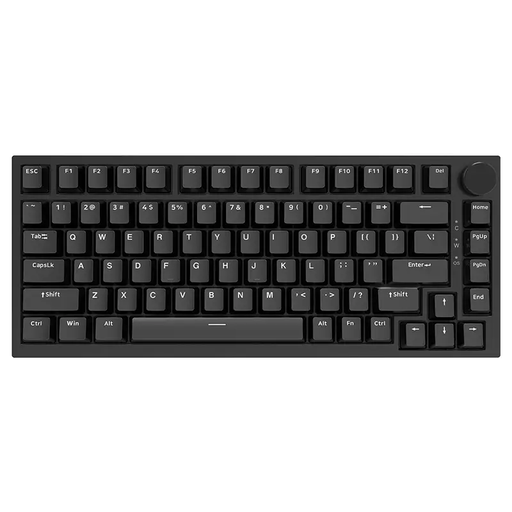
AJAZZ AK820, 75%, US QWERTY, Red switches
The compact design could work well when space is tight; the stated US QWERTY layout differs from the familiar German key legends.
Wired via USB-C; hot-swap; linear Red switches; US QWERTY.
View at Joybuy
Frequently asked questions
How should I set up my keyboard for longer writing sessions?
First, measure the space for your keyboard, mouse and papers, and check the position of the keys you use most often. The Federal Institute for Occupational Safety and Health (BAuA) includes distance from the edge of the desk and a relaxed arm position among the points to consider when setting up a suitable workspace. However, the ASR A6 workplace rule doesn’t automatically apply to a student room used privately.
How do I clean a mechanical keyboard?
Follow the care instructions provided by the manufacturer. Bitkom advises avoiding harsh cleaning products and taking care not to let liquid get into the device.
What if a keyboard bought online isn’t suitable or is faulty?
Consumers in Germany generally have a 14-day right to cancel an online purchase, although conditions and exceptions apply. If a product is faulty, your statutory warranty claims are against the seller and are separate from any voluntary guarantee. For ordinary movable goods, the limitation period under § 438 BGB is generally two years from delivery.
Can an old keyboard go in household rubbish?
No. The German Environment Agency advises that waste electrical equipment must be collected separately. Take it to a recycling centre or a suitable retailer take-back point, for example; removable batteries must be taken out and disposed of separately.


