
Lieferung heute & morgen

Qualitätsgarantie

Willkommens-Angebote freischalten: KOSTENLOSE Lieferung | Bis zu 80 % RABATT | Kostenlose 30-Tage-JoyPlus-Testphase
App herunterladen
A mechanical keyboard can deliver reliable performance for gaming, programming or writing for many years – provided its layout and features suit the way you actually use it. Many disappointing purchases are not caused by individual technical weaknesses, but by overlooked details: an unfamiliar US layout, an unsuitable form factor or a wireless connection that does not work as expected at your desk.
This buying guide explains which specifications matter before you buy and which models suit different user profiles.
A large proportion of the models available feature a QWERTY US layout. The key arrangement differs from the German QWERTZ layout, including the positions of Z and Y. Umlauts and special characters are also not where you would normally expect them to be.
This is often less important for gaming, but it can be inconvenient when writing German text, programming or working from home. So do not just check the language used on the product page. Look specifically for “German QWERTZ” or “ISO-DE”. A German operating system alone will not turn a QWERTY US keyboard into a QWERTZ keyboard.
A compact 75% keyboard usually retains the arrow keys and function-key row, but does without separate navigation keys and a number pad. A 65% keyboard saves even more space, but some functions require key combinations. A TKL keyboard generally has no number pad, while a full-size keyboard or one with a number pad remains more practical for spreadsheets, bookkeeping and data entry.
Consider how you use your keyboard every day. For FPS games, having more room for your mouse can be useful. If you regularly enter columns of figures, you should not sacrifice the number pad for a smaller format.
An RGB keyboard may offer several lighting modes without providing convenient software, key-mapping or brightness controls. With a wireless mechanical keyboard, battery life also depends on the lighting, wireless standard and how the keyboard is used. Manufacturer battery-capacity figures are therefore no substitute for specific runtime figures.
For a reliable connection, a 2.4 GHz keyboard with a USB receiver is often a sensible choice for a gaming setup. A Bluetooth keyboard is particularly suitable for tablets, smartphones and multiple work devices. A tri-mode keyboard combines wired connection, Bluetooth and 2.4 GHz.
Specifications such as actuation force, pre-travel and total travel are useful objective points of comparison. For example, the KEYSME Lunar 01 is listed by the manufacturer with an operating force of 45 gf, 1.9 mm of pre-travel and 4.0 mm of total travel. The actual sound also depends on the case, plate material, dampening and keycaps.
A hot-swap keyboard allows you to replace compatible switches without soldering. Check whether 3-pin and 5-pin switches are supported and whether all keys have hot-swap sockets. This information is more important than the general description “Custom Keyboard”.
The keycaps also affect durability and typing feel. PBT keycaps are less prone to developing a shiny worn surface than ABS keycaps on many models. According to the manufacturer, PBT keycaps are used on the KEYSME Lunar 01 and several AJAZZ models.
A gasket-mount keyboard holds the plate and PCB in the case using dampening elements. This can make the keystroke feel softer. Foam layers, silicone pads or a flexible PC plate alter the sound and flex, but they are not a blanket guarantee of quality.
Also consider:
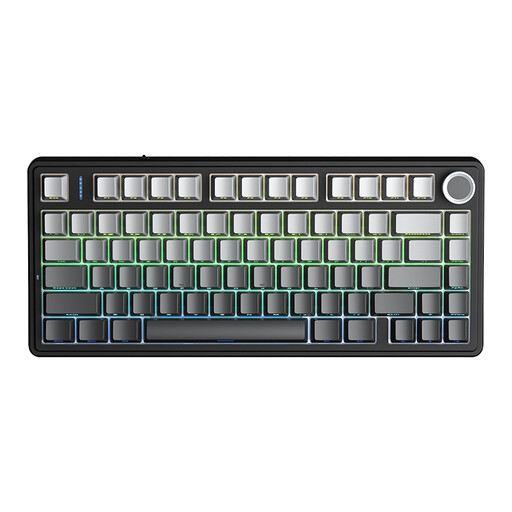
Why this product suits the profile: The 75% form factor includes arrow and function keys while taking up less space than a full-size keyboard. According to the manufacturer, the model supports wired connection, Bluetooth and 2.4 GHz.
The product description specifies all three connection modes as well as hot-swap support for 3-pin and 5-pin switches. This makes later customisation possible without soldering.
75% layout, tri-mode connection and programmable rotary knob according to the manufacturer.

Why this product suits the profile: With its 80% form factor, 87 keys, gasket-mount construction, PBT keycaps and programmable rotary knob, this model is aimed at users who value both typing feel and customisation.
The specifications state that all keys support hot-swap, with 5-pin compatibility and three connection modes. This provides clear information on key buying criteria.
4000-mAh battery, Bluetooth, 2.4 GHz and USB-C; PBT dye-sublimated keycaps according to the manufacturer.
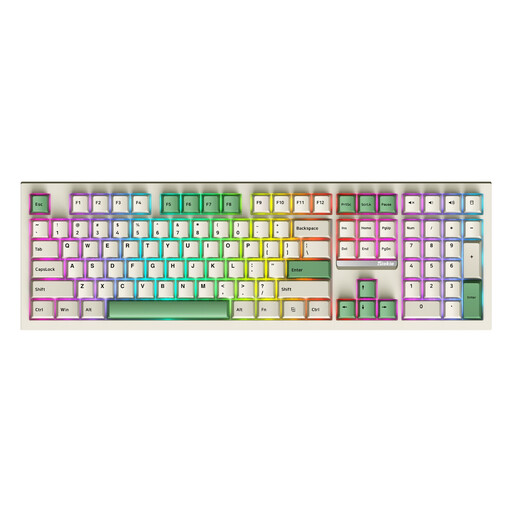
Why this product suits the profile: The full-size format with 108 keys and a number pad is suitable for office work, spreadsheets and users who do not want to access function keys through layers.
The product name explicitly indicates 108 keys, hot-swap, RGB and Bluetooth, 2.4 GHz as well as wired operation. This reduces the risk of choosing a compact layout for data entry.
Number pad, tri-mode connection and RGB backlighting according to the product specifications.
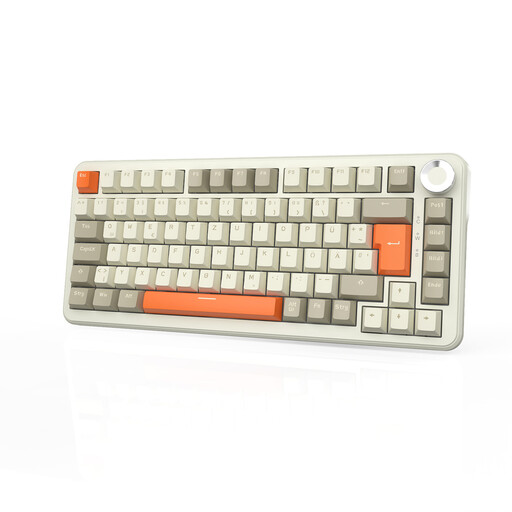
Why this product suits the profile: The product specification explicitly states that it has a German QWERTZ layout. The model combines a compact 75% form factor with wireless and wired operation.
The layout is already identified as German QWERTZ. The product specifications also mention hot-swap, gasket-mount construction and a rotary knob.
German QWERTZ layout, 75% format, tri-mode and up to 8000 mAh battery capacity according to the manufacturer.
We have put together a complete, regularly updated list of products that fully meet these strict selection criteria and the safety regulations applicable in the EU.
For working from home, the layout, volume and connection are all important. Depending on the model, linear or tactile switches can be quieter than clicky variants. A wireless mechanical keyboard with Bluetooth is suitable for use with multiple devices, while a wired connection eliminates charging breaks. If the keyboard is used by several people, you should also consider the noise level and choose a suitable wrist rest.
Its lifespan depends on the switches, keycaps, hot-swap sockets, cable and daily use. Manufacturers often quote millions of actuations, but these figures are technical specifications and do not guarantee the lifespan of the product as a whole. Dust, liquids, heavy use and improper cleaning can shorten its service life.
Power consumption is mainly increased by permanently enabled RGB lighting and frequent wireless transmission. In wired mode, the battery charges while Bluetooth and 2.4 GHz support different usage scenarios. For a realistic assessment, you should check not only the battery capacity but also the manufacturer’s stated runtime, charging time and lighting settings.