Considerate long-form writers
You write longer passages at home and want a mechanical typing feel without automatically opting for an explicitly clicky switch. Logitech offers the MX Mechanical with Tactile Quiet, Clicky and Linear switch options.


When writing a book proposal, first choose the switch type and keyboard layout that suit your writing setup. Then decide between a compact format, a number pad and your preferred connection type. Manufacturer descriptions such as ‘Tactile Quiet’ identify a switch option, but they aren’t independent measurements of noise levels. A compact or low-profile keyboard also doesn’t replace a suitable arrangement of your keyboard, mouse and documents.
You write longer passages at home and want a mechanical typing feel without automatically opting for an explicitly clicky switch. Logitech offers the MX Mechanical with Tactile Quiet, Clicky and Linear switch options.
When editing, you want to make room for a mouse or documents and weigh up whether a TKL or 75% layout has the keys you need. CHERRY offers the KC 500 MX LP in Full-size and TKL versions, while Keychron describes the K3 Max as a 75% model.
You switch between devices while drafting, or want to assign your own shortcuts to frequently used commands. Check the connections and the specific layout and switch options. Keychron lists Bluetooth, 2.4 GHz, wired connectivity and QMK/VIA among the features of the K3 Max ISO collection.
For long writing and editing sessions, it’s worth deciding on the typing feel and layout first, then considering the form factor and connection. Always check the exact version, not just the model range name.
| Priority | What to check when buying | Who is this particularly important to? |
|---|---|---|
| Typing feel and noise | Check the exact switch option and, if possible, try the typing feel for yourself. | If I write for long periods and don’t want to disturb others at home unnecessarily, feedback and noise are my top priorities. Around 36% of consumers put these needs first. |
| Layout and keys | Check for a German layout, as well as the arrow, function and other keys you use frequently. | When moving and correcting sections of text, I want the keys I need to be easy to reach and the layout to feel familiar. Around 29% of consumers prioritise efficient text editing. |
| Desk space and posture | Check the keyboard’s form factor and how your keyboard, mouse and documents fit on your desk. | If I want to keep room for a mouse and documents alongside my book proposal, I still want to be able to find a hand and arm position that suits me. Around 21% of consumers put available space and desk layout first. |
| Switching devices and customisation | Check the connections you need and whether the specific version supports hot-swapping. | If I switch between writing devices or want to assign my own keys, the right connection or customisation options matter most to me. Around 14% of consumers make this their top priority. |
For your desk setup, the Federal Institute for Occupational Safety and Health recommends allowing enough space for your keyboard, mouse and forearm support. A compact design or low profile alone doesn’t prove that a keyboard is ergonomic.
A model range can include different switches and country-specific layouts. The name alone won’t tell you whether a particular version has the typing feel and German layout you want.
Before buying, check the full model name, switch description and stated keyboard layout.
TKL keyboards don’t have a number pad. This could matter when editing if you use one regularly, or rely on other keys being close to hand.
Make a note of the keys you actually need, then compare them with the layout of the specific version.
A single model’s height doesn’t prove that it will reduce strain. The Federal Institute for Occupational Safety and Health also considers your posture and the layout of your entire workstation.
Set up your keyboard and mouse so you have enough desk space and can maintain a comfortable hand and arm position.
A guarantee is an optional extra; your statutory rights have a different basis and are generally against the seller.
Check the terms of any guarantee separately from your statutory rights. The Verbraucherzentrale (German Consumer Advice Centre) clearly distinguishes between statutory rights and guarantees.
Logitech describes the MX Mechanical as a keyboard available with three switch options and in standard and Mini versions.
According to CHERRY, the KC 500 MX LP is available in Full-size and TKL versions.
According to Keychron, the K3 Max ISO collection combines a 75% layout with several connection options and QMK/VIA.
According to Ducky, the One 3 range may suit buyers who want to swap switches themselves.
This selection of Joybuy products ranges from compact wired models to keyboards with several connection options. Layouts, switches and features vary by model and version.
 No image available
The TKL layout could suit you if you’re happy to do without a number pad and want a German layout.
ISO-DE QWERTZ; wired; hot-swappable; RGB. The Akko V3 Pro Cream Yellow switches are described as linear.
 No image available
This model is worth considering if you want a German layout alongside several connection options.
Bluetooth, 2.4 GHz and USB-C; hot-swappable; 10,000 mAh; 1.14-inch TFT colour screen.
 No image available
The 75% layout could be a compact option if the German layout and included keys suit the way you work.
Bluetooth, 2.4 GHz and USB-C; hot-swappable. The Akko V3 Pro Cream Yellow switches are described as linear.
 No image available
This keyboard could suit you if you want to switch between devices and the specific switch and layout options on offer fit your typing habits.
Bluetooth and Logi Bolt; Easy-Switch for up to three devices, according to Logitech. Tactile Quiet is a manufacturer’s description, not an independent measurement of noise levels.
 No image available
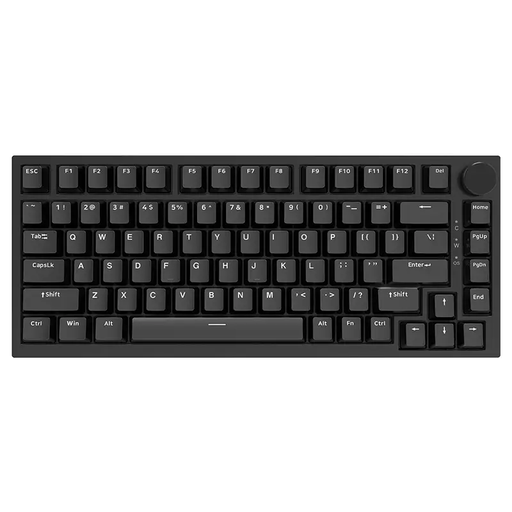
This model could suit you if you want a compact design and the clearly stated US QWERTY layout works for you.
USB-C; hot-swappable; linear switches; US QWERTY. Before buying, check that this layout suits the way you want to type.
No. The Federal Institute for Occupational Safety and Health highlights the arrangement of your keyboard, mouse and forearm support, as well as your posture at your workstation as a whole. Whether you can do without a number pad also depends on the keys you need for your work.
Check the exact switch option and take your writing environment into account. Logitech offers the MX Mechanical with Tactile Quiet, Clicky and Linear switches. Tactile Quiet is a manufacturer’s description, not an independent measurement of noise levels.
Check the layout of the specific version, not just the model name. ISO-DE QWERTZ and US QWERTY are different layout descriptions. Also check that the keys you need are included and easy to reach.
It depends on the model and version. Logitech lists Easy-Switch for up to three devices on the MX Mechanical; Keychron lists Bluetooth, 2.4 GHz and wired connections for the K3 Max ISO collection described here. Check that the connection and specific version suit your devices.
No. The Verbraucherzentrale (German Consumer Advice Centre) distinguishes statutory rights when goods are faulty from a voluntary guarantee. For the relevant claims relating to defects, the standard limitation period under § 438 BGB is two years from delivery for goods. An optional guarantee isn’t a requirement for these statutory rights.