Start by choosing a German layout, then check that the keys you rely on for writing and editing are easy to reach. If space is limited, a 75% model may be a good fit. If other people are working nearby, the specific switch type matters more than the general ‘mechanical’ label. Having two screens doesn’t, by itself, mean you need to switch between devices – this feature is only useful if you actually use multiple computers or other input devices.
Who these keyboards are for
Newsletter writers who do a lot of editing
If you write in German and regularly revise your work, check that the layout and access to the arrow, navigation and editing keys suit the way you work. Logitech, Keychron and CHERRY list different layouts or additional keys for their respective models.
Writers working in a shared space
If other people are working within earshot, both the feel of the keystrokes and the sound of the specific switch type matter. Logitech lists Tactile Quiet switches for the MX Mechanical, while CHERRY offers an MX2A-SILENT-RED version of the KC 200 MX.
Writers short on space for a keyboard and mouse
If you need to fit a mouse and keyboard on a desk with two screens, consider a compact layout and check that the key arrangement suits your usual editing shortcuts. Keychron and Sharkoon each describe a 75% model.
What to look for when buying
Start by checking the layout and the keys you use most often, then consider noise and desk space. Only factor in device switching if you use multiple input devices.
| What matters |
What to look for |
Who it matters to |
| German layout and editing keys |
Check for DE-ISO or German QWERTZ, and the position of the arrow, navigation and number keys you use most often. |
I want familiar keys within easy reach when writing and editing. For around 33% of consumers, this layout is the main consideration. |
| Typing sound and feel |
Compare the specific switch type and, if possible, assess the complete keyboard under your usual typing conditions. |
If other people are working within earshot, I want to take the sound and feel of the specific keyboard into account. Around 27% of consumers prioritise a considerate typing experience. |
| Desk space and layout |
Consider the space available for your keyboard and mouse, as well as the position of the screens at your workstation. |
I need enough room for a keyboard and mouse alongside my screens, without overlooking an unfamiliar key layout. Around 27% of consumers prioritise a suitable size for their desk. |
| Connection and device switching |
First work out how many computers or tablets you actually use, then check the connections available on the specific version. |
If I edit newsletters on multiple devices, switching between them needs to be straightforward. Around 13% of consumers prioritise switching between input devices. |
Common buying mistakes
-
Assuming two screens mean two computers
Device switching is designed for use with multiple input devices. The number of screens alone doesn’t tell you how many computers you’re using.
Before you buy, consider whether you actually switch between multiple computers or an additional tablet.
-
Ordering from a model range without checking the layout and switch type
Different layouts and switches may be available within the same range. With the Keychron K3 Max, for example, choosing the right ISO version is essential.
Check that the specific listing has a German layout and the switch type you want.
-
Taking ‘quiet’ as a fixed measure of noise in your room
Terms such as Tactile Quiet and SILENT RED are manufacturers’ descriptions, not comparable noise measurements of the complete keyboard at your own workstation.
If possible, assess the specific keyboard under your usual typing conditions and check the business seller’s applicable returns policy.
Key brands to consider
Logitech
According to Logitech, the MX Mechanical is available in a standard size with a number pad and as a Mini. The right form factor depends on your available desk space and how often you enter numbers.
- Logitech lists Tactile Quiet, Clicky and Linear switch types, as well as Easy-Switch for up to three devices.
- Check the specific size and switch type. Device switching only matters if you use multiple input devices.
Keychron
The K3 Max is a 75% model. Its DE-ISO version may suit writers looking for a compact layout with German keys.
- Keychron lists wireless, Bluetooth and wired connections, as well as hot-swappable switches on versions specified as supporting this feature.
- Available versions have different layouts. Check that the version you choose is actually DE-ISO.
CHERRY
The KC 200 MX is a wired office keyboard. According to CHERRY, it is available with different switch types.
- CHERRY lists four extra keys for volume and calculator functions, as well as an MX2A-SILENT-RED version.
- ‘Quiet’ is the manufacturer’s description of the SILENT-RED version; it doesn’t replace assessing the noise at your own workstation.
Sharkoon
The SKILLER SGK50 S3 is a wired 75% model for writers looking to consider a compact design and customisable keys.
- Sharkoon lists hot-swap support for mechanical 3- and 5-pin switches, as well as QMK and VIA support.
- Check that the more compact layout suits the editing shortcuts you use most often. A USB cable means the keyboard is wired.
Joybuy products for your writing setup
The models below include German QWERTZ and ISO-DE layouts, in both compact and full-size designs. Compare the specific key layout and check whether you need a number pad.
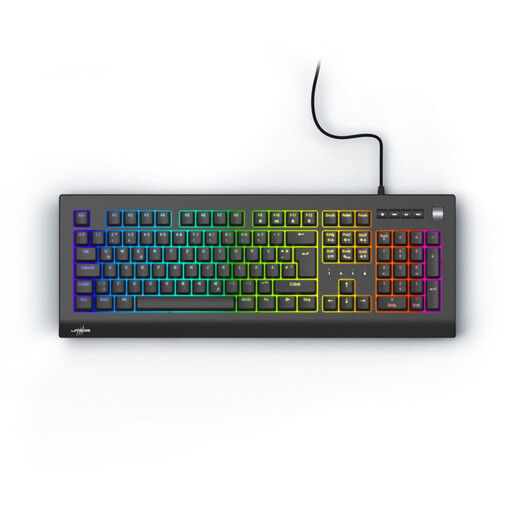 No image available
Exodus 600, Red switches, QWERTZ DE
The full-size version has a German QWERTZ layout and number pad, making it a useful option for writing in German and entering numbers.
Listed features include linear Outemu Red switches, a volume control and four media keys.
View at Joybuy
 No image available
Akko 5087S V1 TKL, Akko V3 Pro Cream Yellow
The ISO-DE QWERTZ layout is suited to writing in German, while the TKL design is worth considering if you don’t need a number pad.
Listed features include wired operation, hot-swap support and RGB lighting.
View at Joybuy
 No image available
CHERRY MX 2.0S, MX2A Red, German QWERTZ
The listed full-size design is a good option for writers who want a German layout and a number pad.
Listed features include MX2A Red switches and wired USB operation.
View at Joybuy
 No image available
Ticktype EVO75, ISO-DE, Creamy Rye
The 75% layout is a compact option if there’s little room for a keyboard and mouse, provided the key arrangement suits the way you work.
Listed features include Bluetooth, 2.4 GHz wireless and USB-C, plus hot-swap support for 3- and 5-pin switches.
View at Joybuy
 No image available
AJAZZ AK35I V4, German QWERTZ, tri-mode
The German QWERTZ layout and full-size design with number pad make this a useful option for writing in German and entering numbers.
Connection options are listed as Bluetooth, 2.4 GHz wireless and USB-C; the description also mentions hot-swap support.
View at Joybuy
Frequently asked questions
Do I need a keyboard with device switching for two screens?
No, not just because you have two screens. What matters is whether you switch between multiple computers or other input devices; only then are features such as Easy-Switch or the K3 Max’s connection to multiple devices relevant.
How should I check the keyboard at my workstation?
Check the position of your keyboard and mouse in relation to your screens and your usual way of working. The Federal Institute for Occupational Safety and Health recommends arranging your work surface, chair, keyboard and screen to support a comfortable ergonomic posture. This doesn’t mean that any one type of keyboard is automatically better for your health.
Can I replace the switches later?
Only if the version you choose supports hot-swap. Sharkoon lists this feature for the SKILLER SGK50 S3 with mechanical 3- and 5-pin switches; it is also specified for certain versions of the Keychron K3 Max. Check that the switches are compatible with the specific version.
What are my rights when buying online from a business seller?
For a qualifying distance-selling contract, you generally have 14 days from delivery to cancel; exceptions and possible return costs may apply. EU law also provides a legal guarantee of at least two years for faulty goods. This is separate from a voluntary manufacturer’s warranty.
Do I have to buy a particular mechanical keyboard for two screens at home?
The German ASR A6 on screen work doesn’t establish a general requirement to buy a particular keyboard for private use. It sets out its scope for screen-based workstations in workplaces and teleworking, and excludes screen use in private settings outside such workstations. The relevant requirements apply to an actual employee or teleworking workstation.


