
Lieferung heute & morgen

Qualitätsgarantie

Willkommens-Angebote freischalten: KOSTENLOSE Lieferung | Bis zu 80 % RABATT | Kostenlose 30-Tage-JoyPlus-Testphase
App herunterladen
Choosing a new keyboard can be a challenge, given the barrage of technical terms like switches, layouts, and connectivity options. The goal of this article is to provide you with clear and objective guidance. As your guide to Joybuy's product recommendations, I've compiled information to help you make an informed decision that meets your needs for typing feel, functionality, and budget.
Before you decide on a model, there are a few fundamental aspects to consider. These criteria will help you narrow down the options and find a product that perfectly suits your use case.
The keyboard layout is crucial for daily use, especially if you frequently type in a specific language.
< > |, and the umlauts (?, ?, ?) in their standard positions. For heavy typists and programmers in Germany, this is often the most practical choice.In addition to the layout, the size (form factor) is important:
Mechanical switches define the typing sound and feel. The three main types are:
A hot-swap keyboard offers maximum flexibility here. It allows you to change switches without any soldering. This lets you experiment with different switch types or easily replace faulty ones.
How the keyboard connects to your device is another key consideration.
Extra features like customisable RGB keyboard lighting are especially popular in the gaming scene and allow for deep setup personalisation.
Here is a selection of models that cover various requirements and budgets.
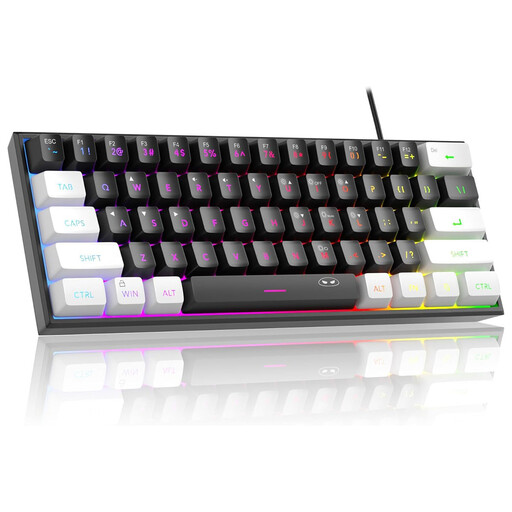
Why It Stands Out: The MageGee TS91 is a membrane keyboard with a special construction that emulates a mechanical typing feel. It's aimed at budget-conscious users who want the aesthetic and compact 60% form factor of a gaming keyboard without the expense of a true mechanical model.
Pros:
Who Is It For? Beginners and casual gamers on a tight budget who are looking for a visually appealing small gaming keyboard with RGB lighting and a QWERTY US layout.

Why It Stands Out: The AJAZZ AK980 V2 is a feature-packed wireless keyboard for demanding users. It combines a 98% layout, which integrates a number pad into a compact frame, with modern features like a TFT display and a rotary knob for controlling volume and other functions.
Pros:
Who Is It For? Keyboard enthusiasts and gamers who appreciate high functionality, hot-swap customisability, and flexible connectivity in a nearly full-size (98% QWERTY) layout.
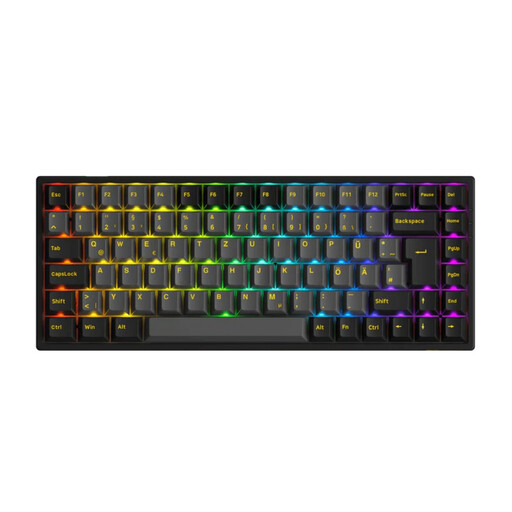
Why It Stands Out: The Akko 3084B Plus is a high-quality mechanical keyboard tailored for the German market. With its 75% ISO-DE layout, it offers an ideal compromise between compactness and functionality, including dedicated arrow and function keys.
Pros:
Who Is It For? Demanding typists, programmers, and gamers looking for a compact yet fully functional gaming keyboard with a German ISO-DE keyboard layout and high-quality components.
A precision input device is only half the battle. To complete your gaming or work setup, a great mouse is just as important. Discover our selection of ergonomic and responsive mice.
? Find our current selection of RGB Gaming Mice here
1. What is the advantage of a mechanical keyboard over a membrane keyboard? Mechanical keyboards generally offer greater durability, as each switch is rated for tens of millions of keystrokes. They provide a more precise and consistent typing feel and, thanks to the variety of switch types, offer a high degree of customisation to suit personal preferences.
2. What does "hot-swap" mean for a keyboard? A hot-swap keyboard has a printed circuit board (PCB) that allows you to simply pull out the mechanical switches and replace them with others, no soldering required. This makes it easy to customise the typing feel and repair individual keys.
3. Which switches are best for gaming? Linear switches are often recommended for gaming because they allow for a fast, resistance-free keystroke all the way down. This can be an advantage in fast-paced gaming situations. However, the choice is highly dependent on personal preference; tactile switches are also popular among gamers.