
Lieferung heute & morgen

Qualitätsgarantie

Willkommens-Angebote freischalten: KOSTENLOSE Lieferung | Bis zu 80 % RABATT | Kostenlose 30-Tage-JoyPlus-Testphase
App herunterladen
By Joybuy Product Recommendation Officer, July 28, 2026
The search for the right mechanical keyboard can quickly become overwhelming. The market is filled with technical jargon, marketing promises, and an enormous variety of products. Many users invest in a model that seems impressive at first glance, only to discover after a short time that it doesn't meet their needs. To help you make the right choice, we'll highlight the most common pitfalls and explain which technical features truly matter.
Before we dive into the crucial parameters, it's important to understand the typical marketing traps that often lead to a poor purchase.
To make an informed decision, you should focus on objective, technical features rather than marketing buzzwords.
The heart of any mechanical keyboard is the switches beneath the keycaps. They determine the typing feel, sound level, and response time. There are three main types:
A crucial feature for enthusiasts is hot-swap capability. A hot-swap keyboard allows you to easily pull out the mechanical switches with a special tool and replace them with others—no soldering required. This offers maximum flexibility to adjust the typing feel and acoustics of the keyboard later on or to replace faulty switches.
The size and material of a keyboard have a major impact on ergonomics and durability.
Based on the criteria above, we have identified a few models that are particularly well-suited for specific user groups.

Why This Fits Their Persona: This model is designed for competitive FPS players where every millisecond counts. The magnetic switches and high polling rate are engineered for maximum response speed.
It bypasses the "gaming" label trap by offering measurable pro-grade features like an 8000 Hz polling rate and Rapid Trigger, rather than just relying on aesthetics.
Adjustable actuation point (0.2mm to 4.0mm) and Rapid Trigger for instant key reset, providing an edge in fast-paced games.
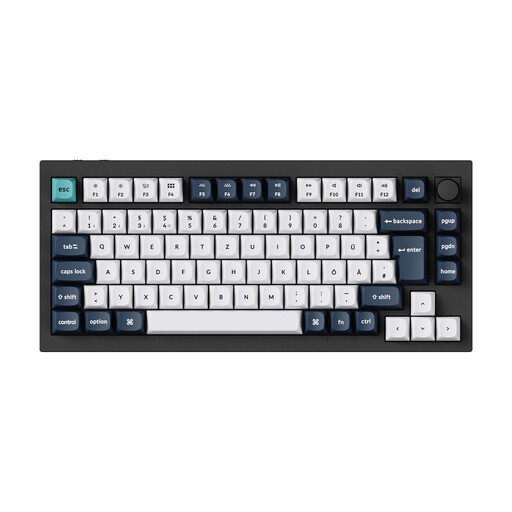
Why This Fits Their Persona: Ideal for users looking to enter the world of custom keyboards. It offers a German QWERTZ layout combined with all the key premium features for comprehensive personalisation.
It counters the false "custom" promise by providing true hot-swap capability for 3-pin and 5-pin switches, plus full programmability via QMK/VIA.
A full metal body made of 6063 aluminium and a double-gasket mount structure deliver a premium typing feel and a rich sound profile.

Why This Fits Their Persona: Designed for professionals, developers, and creatives who need a precise yet quiet mechanical keyboard for the office or home office.
It avoids the pitfall of buying a loud gaming keyboard for work. The "Tactile Quiet" switches provide mechanical feedback with significantly reduced noise levels.
Seamlessly switch between up to three devices via Bluetooth or the Logi Bolt receiver, and benefit from smart, adaptive key illumination for productive work.
We've compiled a complete, up-to-date list of products that fully meet these strict selection criteria and local regulations.
What's the difference between a gasket-mount and a tray-mount keyboard? On a gasket mount keyboard, the plate where the switches are mounted is sandwiched between gaskets made of silicone or Poron within the case. This isolates the plate from the case, reducing vibrations and creating a softer, more cushioned typing feel. In a tray-mount design, the PCB is screwed directly into the case, resulting in a stiffer and more direct typing experience.
Can I make any mechanical keyboard quiet? Complete silence isn't possible, but the volume can be significantly reduced. The most effective method is to choose a model designed from the ground up as a quiet mechanical keyboard with silent switches (e.g., linear or dampened tactile). On a hot-swap keyboard, you can install silent switches yourself after purchase. Additional measures like lubricating the switches (lubing) or adding foam dampeners can also help.
Is a wireless mechanical keyboard suitable for gaming? Yes, modern wireless models are absolutely viable for gaming. A wireless mechanical keyboard that uses a 2.4 GHz radio frequency connection can achieve polling rates of 1000 Hz or more. The latency is so low that it's practically indistinguishable from a wired connection. Bluetooth connections generally have higher latency and are better suited for office work and connecting to mobile devices.