
Lieferung heute & morgen

Qualitätsgarantie

Willkommens-Angebote freischalten: KOSTENLOSE Lieferung | Bis zu 80 % RABATT | Kostenlose 30-Tage-JoyPlus-Testphase
App herunterladen
A mechanical keyboard can be a worthwhile addition for gaming, programming and writing. However, layouts, switches, connectivity and case construction vary considerably. If you focus only on RGB lighting or high polling rates, you could end up with a model that is not well suited to everyday use in the UK.
A QWERTY US keyboard uses a different key arrangement from a German QWERTZ keyboard. Special characters, the Y and Z keys, and the position of certain punctuation marks may differ. The layout is therefore a key point to check when writing German text, programming with frequent special characters or using office software.
A product may also be advertised as “compatible with Windows and Mac” without having a German keyboard layout. Operating system compatibility and key layout are two separate features.
Some compact keyboards use membrane technology with a mechanical typing feel. This is not automatically a disadvantage, but it should be clearly distinguished from a mechanical gaming keyboard with individual mechanical switches. Anyone wanting to replace switches or try different actuation points needs a genuine hot-swappable keyboard with suitable sockets.
With a wireless mechanical keyboard, check whether it really supports multiple connection methods. A tri-mode keyboard typically supports wired operation, Bluetooth and 2.4 GHz wireless. Battery capacity, charging port, receiver and the ability to continue using the keyboard via cable while it charges are also important.
The form factor determines which keys are immediately accessible:
For German users, a QWERTZ keyboard is often the more straightforward choice. If you are considering a QWERTY US keyboard, check before buying whether the different layout suits the way you work.
Linear switches have a consistent keypress with no noticeable tactile bump. They are often chosen for fast gaming inputs and smooth typing. Tactile switches provide feedback at the actuation point. Clicky variants also produce a clearly audible sound and are not always suitable for shared offices.
A hot-swappable keyboard allows compatible switches to be changed without soldering. You must check whether it supports 3-pin or 5-pin switches. Hot-swap sockets do not guarantee that every switch will fit.
A gasket-mount keyboard positions the plate using elastic elements. Depending on the materials and construction, this can create a softer typing feel. Damping mats made from materials such as Poron, IXPE, PET or silicone affect resonance and sound, but they do not replace specific information about the actual volume.
For reliable operation, a USB-C keyboard with a detachable cable is a practical choice. For gaming and demanding applications, a wired connection can be convenient because there is no battery to charge or wireless receiver to set up. An RGB keyboard offers different lighting effects, brightness levels and speeds. This mainly improves visibility and personalisation, however, and says nothing about switch quality or durability.
An integrated volume control is useful when you want to adjust audio without opening a menu. Check whether the control only changes the volume or also supports muting and other media functions.
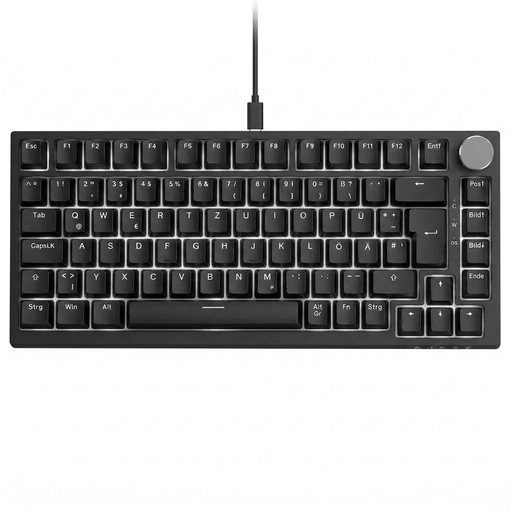
Why It Suits Them: This compact keyboard is aimed at German users looking for a wired solution for PC, office work and gaming.
The German 82-key QWERTZ layout prevents the common mistake of confusing it with US layouts. The USB-C connection requires neither pairing nor a battery.
Hot-swap support for compatible 3-pin switches, gasket mount, RGB lighting and a volume control.
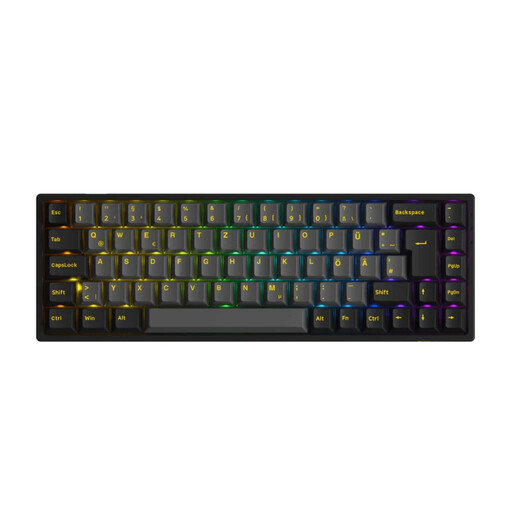
Why It Suits Them: Suitable for users who prefer a customisable keyboard with several connection methods and support for Windows, macOS, iOS and Android.
The product details explicitly specify ISO-DE, hot-swap support for 3- and 5-pin switches, as well as Bluetooth, 2.4 GHz and USB-C.
PBT keycaps, RGB, N-key rollover and a stated battery capacity of 1,800 mAh.
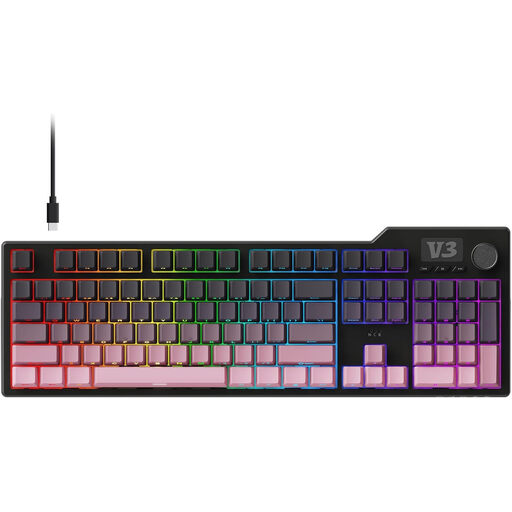
Why It Suits Them: The number pad is practical for figures, spreadsheets and extensive data entry in the office or while programming.
The full-size design avoids the absence of number keys. The wired USB connection reduces reliance on a battery and wireless connectivity.
Gasket construction, five layers of damping, PBT keycaps, hot-swap support for 3- and 5-pin switches, and a volume control.
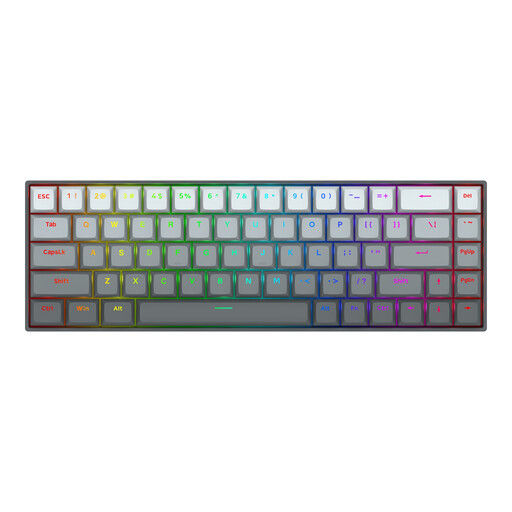
Why It Suits Them: The compact design leaves more room for mouse movements in PC games such as Valorant, CS2 and Apex Legends.
The specifications state an adjustable actuation distance of 0.2 to 4.0 mm and Rapid Trigger. These features should only be selected if they suit your software and playing style.
Magnetic linear switches, 8,000 Hz polling rate, RGB and a detachable USB-C cable.
We have put together a current selection of products that take these selection criteria and relevant safety information into account.
If you regularly write German text, look for QWERTZ, ideally with a German ISO layout. A QWERTY US keyboard can work, but it requires some adjustment and does not provide the same physical key arrangement.
Lifespan depends on the switches, keycaps, hot-swap sockets, cable and usage. Manufacturers’ switch lifespan figures are model-specific values and are not a guarantee of the lifespan of the keyboard as a whole. Dust, liquids and incorrectly installed switches can damage individual components.
Yes, provided the volume, layout and form factor are right. Linear switches and damping materials can help create a more consistent typing feel. If the keyboard is shared, you should also check whether the RGB effects can be switched off and whether it has a convenient USB-C port or multiple connection methods.