What should you look for when buying?
Start by checking the feel and sound of the switches, then consider the layout and desk space. Connectivity and extra features should suit your devices and the way you actually work.
| What matters when buying |
What to check |
Who is it important to? |
| Typing noise and switch feel |
Check the specific switch option and, if possible, judge the sound of the complete model while typing yourself; ‘Silent’ does not mean noiseless. |
If you type in a shared room, you’ll want to disturb others as little as possible while still finding a typing feel that suits you. Around 31% of consumers put noise and keystroke feel first. |
| German layout and text editing |
Look for German QWERTZ or DE-ISO, and check that the navigation and function keys you need are included; ISO alone does not automatically mean a German layout. |
If you edit a lot of German text, familiar key positions and easy-to-reach editing keys matter. Around 25% of consumers prioritise the German layout and text editing. |
| Desk space and hand position |
Compare TKL or mini models with full-size keyboards, and consider whether you need a number pad. Allow room for your mouse and a comfortable layout. The Federal Institute for Occupational Safety and Health highlights the importance of being able to position your keyboard and mouse flexibly. |
If you have limited desk space, you’ll want to position your keyboard and mouse comfortably and decide whether you can manage without a number pad. Around 19% of consumers prioritise desk space and hand position. |
| Connectivity and switching between devices |
Check that Bluetooth, a receiver or wired mode works with the devices you use for writing, and read the specifications for the exact model. |
If you type on several devices, you’ll want a keyboard that connects to your chosen setup. Around 13% of consumers prioritise connectivity and switching between devices. |
| Upfront and ongoing costs |
Check the total price of the layout and switch option you want, as well as any extras you may need, such as replacement switches. There’s no universal price limit without a set budget. |
If you only want to pay for features you’ll actually use, compare the different configurations and any potential extras. Around 12% of consumers focus on upfront and ongoing costs. |
Joybuy products for everyday typing
The models below include compact and full-size mechanical keyboards. Pay particular attention to the German layout, number pad and switch option to find one that suits your desk and the way you type.
 No image available
Akko 5087S V1 TKL, ISO-DE QWERTZ, V3 Pro Cream Yellow
The TKL layout, without a number pad, may suit you if you want to save desk space and type using German QWERTZ.
The product specifications list linear V3 Pro Cream Yellow switches, hot-swap support and RGB lighting. Check that the compact layout suits your number-entry needs.
View at Joybuy
 No image available
AJAZZ AK35I V4, German QWERTZ, 104 keys
The full-size layout with a separate number pad may suit you if you often enter numbers and have enough room for these keys on your desk.
The specifications list Bluetooth, 2.4 GHz wireless and USB-C. Check which connection works best with your devices and setup.
View at Joybuy
 No image available
Logitech MX Mechanical, Tactile Quiet, German QWERTZ
This version may suit longer typing sessions and switching between devices, if German QWERTZ and the specified Tactile Quiet option meet your needs.
The product specifications list Bluetooth and Logi Bolt, with switching between up to three devices. The switch name is no substitute for judging the sound while typing yourself.
View at Joybuy
 No image available
Ticktype DP104, 108 keys, US layout
The product specifications list Silent Tactile switches and a full-size layout with 108 keys. If you type in German, note that this model has a US layout rather than German QWERTZ or ISO-DE.
Connectivity options are listed as Bluetooth, 2.4 GHz and USB-C. Check the layout carefully, especially if you need German key positions.
View at Joybuy
 No image available
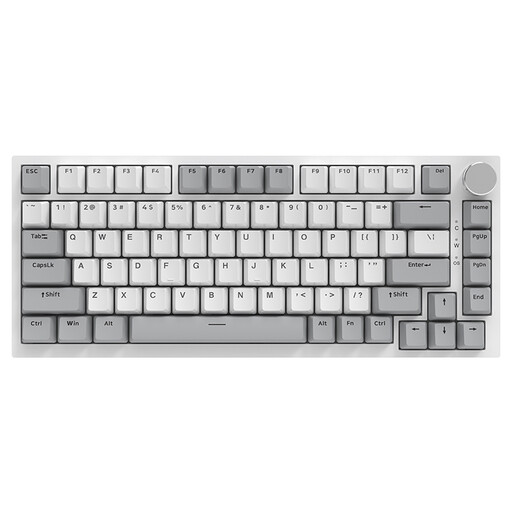
AJAZZ AK820, 75%, US QWERTY, wired
The 75% layout may appeal if you’re looking for a more compact keyboard, but the specified US QWERTY layout differs from German QWERTZ.
The product specifications list linear hot-swap switches and white backlighting. Before choosing, check that the layout and wired connection suit your setup.
View at Joybuy
Frequently asked questions
Is ‘Silent’ enough for a shared room?
No. The label alone doesn’t tell you how loud the complete keyboard will be when you type on your desk. CHERRY describes dampening on the MX2A Silent Red; be quiet! lists sound-dampening materials for a specific TKL model. Neither is a universal measurement of volume. If possible, try the exact configuration while typing.
How should I set up my keyboard for longer typing sessions?
Leave enough room to position your keyboard and mouse flexibly, and aim for a hand and arm position that feels comfortable. The Federal Institute for Occupational Safety and Health considers this an ergonomic factor. Its guidance on legally defined display-screen workstations does not automatically apply to a student room used privately.
How do I clean a keyboard?
For Logitech devices, the manufacturer recommends switching them off or unplugging them before cleaning, using only a small amount of liquid and making sure none gets inside the device. For other brands, follow their own care instructions.
What are my rights when buying online in Germany?
For eligible distance purchases, the European Union generally provides a 14-day period in which you can cancel without giving a reason. Faulty goods are also covered by a statutory guarantee of at least two years. This is separate from a voluntary manufacturer's warranty; terms and any statutory exceptions depend on the circumstances.
What should I check for wireless keyboard product safety?
For certain electrical and radio products, the Federal Network Agency lists aspects of market surveillance including CE marking, manufacturer details, instructions in German and declarations of conformity. A CE mark is the manufacturer's responsibility and is not independent proof that a specific product listing has been checked or that the product is suitable for your needs.


