Prolific writers at shared desks
If you write and edit longer pitch documents, consider how the typing feel you want will sound in your working environment.


When choosing a keyboard for writing a magazine pitch across two screens, focus on typing feel, noise, layout and whether you need a number pad. A quieter switch option may be more suitable for longer writing sessions in shared spaces. If you regularly enter figures, a number pad could be more useful, while a compact keyboard leaves more room for your mouse and papers. Having two screens doesn’t mean you need to connect multiple devices, either. Check the specific layout and switch type for each option.
If you write and edit longer pitch documents, consider how the typing feel you want will sound in your working environment.
If you regularly work with figures or calculations, weigh up the usefulness of a number pad against the extra desk space it takes up.
If you want to assign recurring commands to keys or change the typing feel later on, consider the available customisation options and how much time you’re willing to spend setting things up.
| Consideration | What to check before buying | Who it matters most to |
|---|---|---|
| Typing feel and noise | Check the specific switch type; Tactile Quiet, Linear and Clicky switches are not the same. | If I’m writing long documents at a shared desk, I want the right feel without unnecessarily disturbing others. Around 40 % of consumers focus mainly on typing feel and noise when buying. |
| Desk space and keyboard layout | Check the desk space you have, the keys you need and the layout of the specific version. | If I need to fit a mouse and papers alongside two screens, I could consider a more compact keyboard, as long as the keys I need remain within reach. Around 30 % of consumers prioritise desk space and layout. |
| Number and function keys | Think about how often you enter figures and whether you need a separate number pad. | If I regularly work on budgets or spreadsheets for a pitch, I want to be able to enter figures directly. Around 20 % of consumers prioritise easy access to numbers and functions. |
| Macros and switching between devices | Check whether you want to set up custom key assignments and whether you actually use multiple computers. | If I want to assign recurring commands or switch between several computers, the relevant customisation or switching feature matters. Around 10 % of consumers prioritise customisable commands and switching between devices. |
A product description in German doesn’t guarantee that the version on offer has a DE-ISO layout. The CHERRY KW X ULP version described at Joybuy is specifically listed as having a US layout.
Before ordering, check the layout specified for the exact version rather than assuming it from the language of the page or the product range.
Multi-device features switch between connected devices; they don’t depend on how many screens are connected to a computer.
First, check whether you actually use multiple computers. Only then should you give the switching feature greater consideration.
According to the manufacturer, the barebone version of the Sharkoon SKILLER SGK50 S2 does not include pre-installed switches or keycaps.
If you want to use the keyboard straight away, look for a fully equipped version or allow for the cost of suitable switches and keycaps.
For the barebone version, switches and keycaps must be bought and fitted separately.
Mechanical keyboards can sound different depending on the switches. Logitech describes Clicky as the loudest of the three switch options for the MX Mechanical; this doesn’t indicate the noise level of other models in general.
Check the switch type on the specific version and, if possible, assess its sound in conditions similar to your workspace.
According to Logitech, the MX Mechanical is available in a standard size with a number pad and as a smaller Mini; the range features low-profile mechanical keys.
The V1 Max ISO is a compact 75% keyboard for those who value customisation options more than a number pad.
According to the manufacturer, the KW X ULP is aimed at those looking for mechanical switches in an especially low-profile design, with several connectivity options.
According to the manufacturer, the SKILLER SGK50 S2 combines a 96% layout with options for customising keys and switches.
This selection includes compact mechanical keyboards with a DE-ISO layout, a Logitech MX Mechanical and an especially low-profile CHERRY version with a US layout. Check the layout of each specific version before buying.
 No image available
The compact 75% layout with ISO-DE keys is well suited to writing pitch documents if you’re looking for a smaller keyboard with a German layout.
Tri-mode connectivity: Bluetooth, 2.4 GHz and USB-C. The switches are listed as hot-swappable.
 No image available
The TKL layout with ISO-DE QWERTZ keys is an option if you’re looking for a more compact keyboard for German text without choosing a full-size model.
Wired; the switches are listed as hot-swappable.
 No image available
The 75% layout and ISO-DE keys are suited to compact typing; VIA compatibility is useful if you want to customise key assignments.
Tri-mode connectivity and hot-swappable switches are listed.
 No image available
The version with a German QWERTZ layout and Tactile Quiet switches is worth considering for longer writing sessions if you’re looking for a quieter switch option.
Bluetooth, Logi Bolt and Smart Backlighting are listed in the product name. Logitech describes Easy-Switch on the MX Mechanical as allowing you to switch between up to three devices.
 No image available
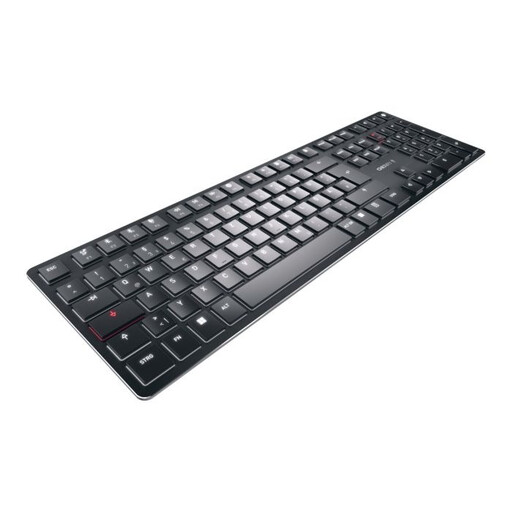
The ultra-low-profile design may suit desks where a low key height matters. However, the layout on offer is US English, not DE-ISO.
Tactile MX switches, white backlighting, and Bluetooth, wireless and wired connections are listed.
No. Having two screens doesn’t mean you need a multi-device feature. It lets you switch between connected devices, so check whether you actually use multiple computers.
First, identify the commands you use repeatedly and check whether the keyboard software works with your computer and work applications. Keychron lists VIA for key assignments and macros on the V1 Max ISO; Sharkoon lists VIA/QMK compatibility for the SKILLER SGK50 S2.
Check the switch type on the specific version and, if possible, try it at your own desk. Logitech describes Tactile Quiet as providing tactile feedback with less noise; this isn’t a general guarantee of quiet operation.
According to the manufacturer, the Sharkoon SKILLER SGK50 S2 Barebone does not include pre-installed switches or keycaps. If you want to use it straight away, look for a fully equipped version or allow for the cost of suitable parts and fitting them.