For writing and layout work at a small desk, a compact 75% layout with arrow and function keys is a good place to start if you don’t need a number pad. The BAuA recommends leaving room for your mouse and keyboard and arranging them flexibly. If you share your workspace, you should also consider how noisy the specific keyboard and switch variant is.
Which keyboard is right for you?
Writing and layout work at a small desk
If you write, proofread and switch frequently between documents and your mouse, look for easily accessible arrow and function keys, as well as enough clear space for your mouse. For screen-based work, the BAuA recommends arranging your mouse and keyboard flexibly, with sufficient room to support your hands and arms.
Yearbook team working in a shared space
If other people are in the same room while you work, consider how noisy the specific keyboard and switch variant is. heise rated the CHERRY KW 300 MX it tested as relatively quiet; you can’t assume the same will apply to other models.
Editors working with lots of figures
If you regularly enter lots of figures, a number pad can be useful. Weigh that benefit against the desk space you need for your mouse and papers; CHERRY describes the KW 550 MX LP as a 96% layout with a number pad.
What should you look for when buying?
When you’re working on a yearbook in a small space, the main things to consider are desk space, typing noise, easy-to-reach navigation keys and whether you really need a number pad.
| What matters |
What to check before buying |
Who is this important to? |
| Desk space and mouse movement |
Measure the space available for your keyboard, mouse movement and papers. Compare keyboard widths and check whether you need a number pad. The BAuA recommends a desk surface that is large enough and can be used flexibly. |
If I need to fit my mouse, keyboard and yearbook materials on the desk at the same time, I want to keep enough room for my mouse. Around 36% of consumers put desk space and mouse movement first. |
| Typing noise |
Compare tests of the specific keyboard and switch variant; a switch name alone doesn’t tell you how noisy it is. |
If I’m working in a team room, I want my typing to disturb others as little as possible. Around 29% of consumers prioritise comfortable typing noise when working with others. |
| Keys for proofreading and layout work |
Check the arrangement of the arrow, function and special keys, and whether it suits the way you work. |
When I’m proofreading, I want to use familiar navigation keys without reaching for the mouse for every action. Around 21% of consumers focus on key layout for navigation and proofreading. |
| Entering figures |
Think about how often you enter columns of figures, and measure the space to the right of your keyboard. |
If I regularly work with lists containing lots of figures, a number pad may be worth the extra space it takes up. Around 14% of consumers say regularly entering figures is their main concern. |
Common misconceptions
-
Assuming a 75% layout is the same as a full-size standard layout
On the Keychron K3 Max tested by ComputerBase, the keys are closer together and there’s no number pad. This can change the way you’re used to working.
Compare the layout with the proofreading and list-based tasks you do, and check whether you really need a number pad.
-
Assuming mechanical or tactile switches are always quiet
Switch variants differ, and test results apply to the specific model and variant tested. heise rated the CHERRY KW 300 MX it tested as relatively quiet; that doesn’t mean all mechanical keyboards are quiet.
Check tests of the complete model and the switch variant you’re ordering, especially if other people will be working in the room.
-
Assuming a barebones version is ready to use straight away
Razer states that the barebones version of the BlackWidow V4 75% doesn’t include switches or keycaps.
Check the exact variant and what’s included before buying. With this barebones version, you may also need to buy switches and keycaps.
-
Assuming wireless means every type of connection you might want
The CHERRY KW 300 MX tested can be used via Bluetooth or cable; according to heise, it doesn’t have a 2.4 GHz wireless connection.
Check which connections your work device supports and what type of connection you need for your workspace.
Brands to consider
Keychron
The K3 Max combines a low-profile 75% layout with cable, Bluetooth and 2.4 GHz connectivity. This may suit writing and layout work in a small space.
- ComputerBase measured the model it tested at 30.6 cm wide and described it as relatively quiet.
- The test was of the Gateron Low-Profile Red variant; the results don’t automatically apply to other switches. ComputerBase also criticised its limited hot-swap options.
CHERRY
The KW 300 MX is a compact option, while the KW 550 MX LP offers a 96% layout with a number pad.
- heise found the KW 300 MX it tested pleasantly quiet. CHERRY describes the KW 550 MX LP as having a compact layout with a number pad.
- For the KW 300 MX it tested, heise lists Bluetooth and cable connectivity, but no 2.4 GHz connection, as well as some software limitations. The information about the KW 550 MX LP comes from the manufacturer and isn’t based on an independent noise test.
Logitech
The MX Mechanical Mini is a compact, low-profile keyboard for people who switch between devices.
- Logitech lists three switch variants and the option to switch between up to three devices.
- Tactile Quiet is the manufacturer’s name for a variant, not independent proof of a particular noise level.
Razer
The BlackWidow V4 75% is a compact hot-swap option if replaceable switches, arrow keys and function keys are important to you.
- Razer states that its socketed PCB supports 3- and 5-pin switches.
- Gaming and RGB features aren’t automatically a reason to choose a keyboard for yearbook work. The barebones version is sold without switches or keycaps.
Joybuy products for compact workspaces
The Joybuy products below are compact 75% keyboards for writing and layout work at a small desk. For each model, check that the stated keyboard layout meets your requirements for typing German text.
 No image available
Ticktype EVO75 Custom, ISO-DE, Creamy Rye Switches
The compact 75% layout is designed for a small workspace, and the ISO-DE layout is explicitly specified.
Tri-mode connectivity: Bluetooth, 2.4 GHz and USB-C. Hot-swap and VIA compatibility are also listed.
View at Joybuy
 No image available
Akko 3084B Plus, ISO-DE, Cream Yellow Switches
The stated 75% layout is suited to a compact workspace, and the product details specify an ISO-DE layout.
Bluetooth, 2.4 GHz and USB-C connectivity, as well as hot-swap, are listed.
View at Joybuy
 No image available
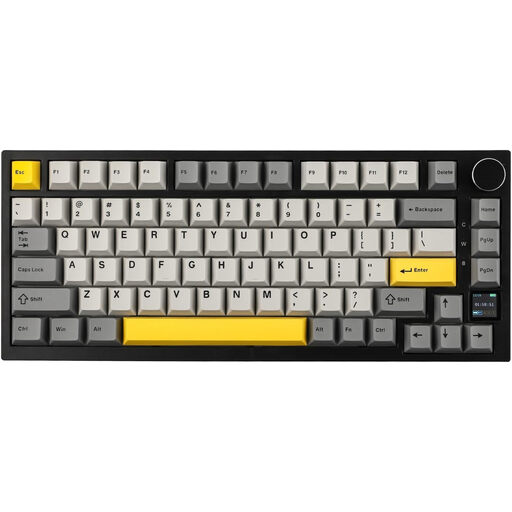
AJAZZ AK820 Pro, QWERTY US
The compact 75% layout has 82 keys and is described as suitable for a small desk.
The product name specifies QWERTY US, with wired, Bluetooth and 2.4 GHz operation. Check the layout if you need a German keyboard arrangement.
View at Joybuy
 No image available
AULA F75, QWERTY US, Glacier Blue/Reaper Switch
The compact 75% layout is suited to a small desk, and the product description says it still includes function keys.
The specified layout is QWERTY US, not German QWERTZ. The listed connections are cable, Bluetooth and 2.4 GHz.
View at Joybuy
 No image available
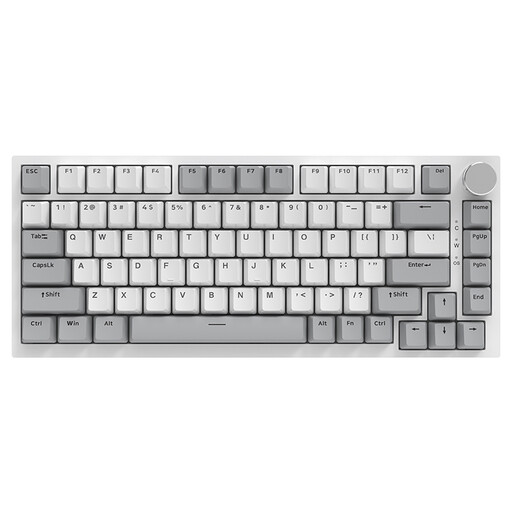
AJAZZ AK820, wired, QWERTY US, Grey White
The compact 75% layout is described as suitable for a small workspace.
This model is wired and, according to its product name, has a QWERTY US layout. Hot-swap and linear switches are also listed; check the layout before buying if you need a German keyboard arrangement.
View at Joybuy
Frequently asked questions
Which keys are useful for proofreading and design work?
Check the position of the arrow, function and special keys if you often navigate through text and pages. On the Keychron K3 Max tested by ComputerBase, the arrow and function keys are retained but sit closer together.
How should I arrange my keyboard and mouse in a small space?
Leave enough room beside your keyboard to move your mouse and support your hands and arms comfortably. The BAuA recommends a desk surface that can be used flexibly for screen-based work; this doesn’t mean you’re obliged to buy a particular setup for personal yearbook work.
Can I keep using the keyboard while it’s charging?
It depends on the model. CHERRY says the detachable cable for the KW 550 MX LP is used for data transfer and charging, and that you can type while it’s charging. Check this feature separately for other models.
What are my rights in Germany if a product is faulty or I buy online?
In certain circumstances, § 437 of the German Civil Code (BGB) provides for remedies including the right to have a faulty product repaired or replaced. Under § 312g BGB, consumers generally have a right to cancel distance contracts, subject to statutory exceptions and the specific circumstances of the contract.
Can I put an old keyboard in household waste?
No. The German Environment Agency says that waste electrical equipment must be collected separately. You can take an old keyboard to a suitable local collection point; removable batteries must be disposed of separately.


