
Lieferung heute & morgen

Qualitätsgarantie

Willkommens-Angebote freischalten: KOSTENLOSE Lieferung | Bis zu 80 % RABATT | Kostenlose 30-Tage-JoyPlus-Testphase
App herunterladen
A mechanical QWERTZ keyboard should combine German special characters, a suitable key layout and a comfortable typing feel. In practice, unclear layout descriptions, unsuitable switches and feature lists packed with extras often lead to the wrong purchase. Gamers, frequent typists, programmers and office users should check a few technical details before buying.
A keyboard described as German is not automatically a German mechanical keyboard. What matters is the actual key labelling. On a German layout, Z and Y are in different positions from QWERTY, and the keys for Ä, Ö, Ü and ß should also be present. The shape and position of the Enter key may differ too.
Some international models simply include German keycaps or let you change individual characters in the software. This can lead to incorrect symbols and an unsuitable key mapping in everyday use. So check the product images, layout information and operating system support together.
Gaming keyboards often advertise high polling rates, Rapid Trigger or particularly short actuation distances. These features can matter for certain games, but they tell you little about typing feel, noise or everyday usability.
Linear switches feel smooth as you press them and are suited to fast input. Tactile switches have a noticeable bump. Clicky switches also produce a distinct sound, which may not be suitable for shared offices. If you write long passages, don’t focus only on RGB lighting or response times.
A 75% keyboard usually keeps the function keys, arrow keys and some navigation keys, while taking up less space than a full-size model. A 60% keyboard, by contrast, often leaves out the function row and arrow keys. This saves space, but means using more key combinations.
A number pad can be useful for spreadsheets, office software or programming environments. In that case, a full-size keyboard or a 98% layout may be more practical. So always compare the term ‘compact’ with the actual number of keys.
Look for:
A keyboard for PC and Mac may need different function keys or mode switches. With a Bluetooth keyboard, you should also consider pairing, range and power supply.
Mechanical switches can be replaced if the keyboard has hot-swap sockets. Check whether it supports 3-pin or 5-pin switches. Some models with magnetic Hall effect switches only accept compatible magnetic switches. Standard mechanical switches must not be used in them.
Sound-dampening mats, a gasket mount and multiple layers of foam can reduce resonance inside the case. However, they won’t automatically make a keyboard quiet. Noise still depends on the switch type, keycaps, how firmly you type and your surroundings.
A wired keyboard with USB or USB-C doesn’t need a battery and provides a consistent connection. This is often a straightforward choice for desktop gaming PCs and workstations. A wireless keyboard with Bluetooth or a 2.4 GHz receiver gives you more freedom to move, but needs to be charged or have its batteries replaced.
Tri-mode models are worth considering if you use different devices, as they combine USB-C, Bluetooth and 2.4 GHz. Check that the wireless mode you want actually works with your device.

Why this product suits this profile: The 82-key layout combines a compact design with function keys, arrow keys and navigation keys. Its USB-C connection is ideal for a permanent workstation without the need to manage a battery.
The stated German QWERTZ layout is paired with a specific number of keys and a wired connection. This makes it easy to check the layout and connection before buying.
Mechanical Sea-Salt switches, hot-swap support for compatible 3-pin switches, RGB lighting and a volume control.
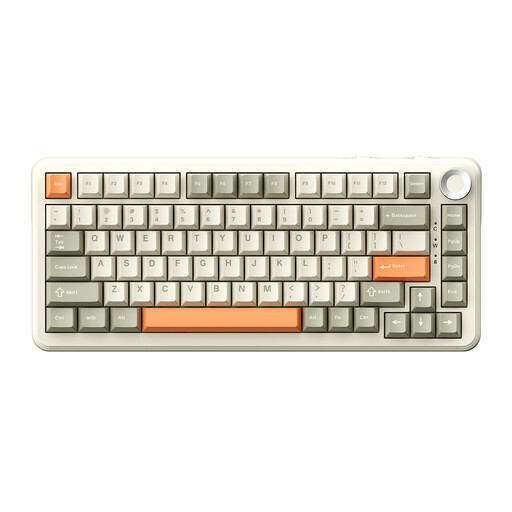
Why this product suits this profile: This 75% keyboard combines a German layout with several connection options and a volume control. It’s designed for users who switch between gaming, office work and different devices.
You’re not limited to a single wireless standard: according to the product description, USB-C, Bluetooth and 2.4 GHz are all available. This lets you choose the connection that suits your device.
Hot-swap support for 3-pin and 5-pin switches, RGB lighting, a 75% layout and an integrated volume control.
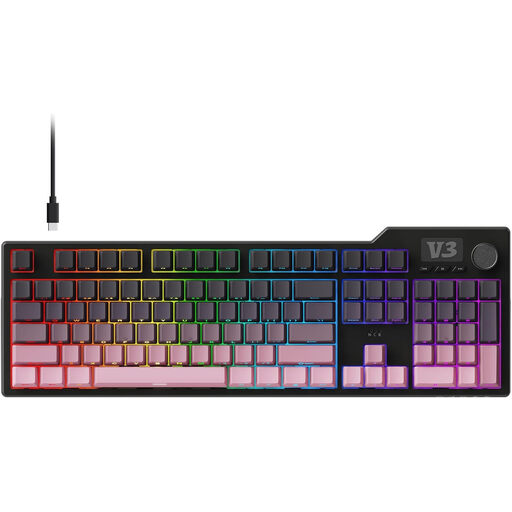
Why this product suits this profile: The full-size design, with 104 keys and a number pad, is made for programmers, frequent typists and anyone who works with lots of spreadsheets or enters a lot of numbers.
If you need a number pad, you don’t have to settle for a compact keyboard with missing keys. The product details specify 104 keys, a USB-C connection and adjustable feet.
Gasket mount, five layers of sound dampening, PBT keycaps, hot-swap support for 3-pin and 5-pin switches, plus macro and volume controls.
We’ve put together a complete, regularly updated list of products that meet these strict selection criteria and fully comply with the safety regulations in force in the EU.
Open the language settings and select German (Germany) as your keyboard layout. If you have a physical German QWERTZ keyboard, its key labels should match the operating system setting. Otherwise, characters such as Y, Z or special characters may appear in different positions.
Lifespan depends on the switch type, how often you use the keyboard, dust, liquid spills and the quality of the case. Manufacturers’ key lifespan figures are estimates, not a guarantee for every individual component. With a hot-swap keyboard, you can replace compatible switches when needed without having to replace the whole keyboard.
RGB lighting uses more power than having the lighting switched off. Actual battery life depends on brightness, wireless standard, battery capacity and how long you use the keyboard. A wired USB-C keyboard is a more predictable choice for a permanent workstation; a Bluetooth keyboard offers greater flexibility if you use several devices.