
Lieferung heute & morgen

Qualitätsgarantie

Willkommens-Angebote freischalten: KOSTENLOSE Lieferung | Bis zu 80 % RABATT | Kostenlose 30-Tage-JoyPlus-Testphase
App herunterladen
A mechanical wireless keyboard can make your desk, gaming setup and mobile working arrangements more flexible. But product names such as “Gaming”, “Pro” or “Tri-Mode” don’t automatically mean a keyboard has the features you need. The important details are often hidden in the small print: the layout, the actual connection options, the switch type and the power supply.
This buying guide explains what to check before choosing a wireless mechanical keyboard, and which models suit different needs.
Some keyboards work exclusively via Bluetooth. That’s handy for a tablet, smartphone or work laptop, but certain desktop PCs may need a compatible adapter. A tri-mode keyboard, on the other hand, usually offers three connection options:
For PC gaming, 2.4 GHz is often preferred, while Bluetooth can save power on mobile devices and connect without a receiver. Before buying, also check whether a USB receiver is included.
Many compact models use a US QWERTY keyboard. The key arrangement differs from the German QWERTZ layout, including the positions of Y and Z and some special characters. You can set your operating system to German, but the keycap labels won’t change.
If you regularly write in German, make sure you choose between US QWERTY and QWERTZ deliberately. For a keyboard that works with both PC and Mac, it’s also worth checking whether the keys are labelled for both operating systems or can be programmed.
An RGB keyboard may offer lighting effects, brightness levels or software-based customisation. But RGB says nothing about battery life, switch feel or wireless stability. It can also increase power consumption, so always compare battery-life claims with how you plan to use the lighting.
A 75% keyboard usually keeps the arrow keys and a function row, but omits the separate number pad. It’s a good choice for small desks, working from home and gaming if you don’t often need to enter numbers.
A compact mechanical keyboard with 65 or 68 keys takes up even less space, but you’ll need to use Fn key combinations more often. If you work with spreadsheets, accounts or lots of figures, a 96% or full-size model may suit you better. Checking the exact number of keys is more reliable than relying on the percentage alone.
Mechanical switches mainly differ in how they actuate, how loud they are and how much force they need. Linear switches move without a noticeable bump, while tactile switches provide feedback when they actuate. If you share a room, consider the noise level of the specific switch.
A hot-swap keyboard lets you replace compatible switches without soldering. You’ll often see 3-pin and 5-pin switches listed. Before swapping them, check that the replacements are mechanically and electrically compatible with the sockets.
PBT keycaps are less prone to developing a shiny finish with wear than many ABS options. That’s a material feature, not a guarantee of overall quality: build quality, stabilisers and case construction also affect how a keyboard feels to type on.
Don’t assess a built-in battery’s capacity in mAh in isolation. Lighting, wireless standard and frequency of use all affect actual battery life. Being able to use the keyboard while it charges is handy day to day.
For a multi-device keyboard, it’s not just the number of devices it can remember that matters, but also how you switch between them. Bluetooth keyboards that can connect to three or four devices can work well with a laptop, tablet and smartphone. For Windows and macOS, check compatibility and the layout of the Alt, Windows and Command keys.
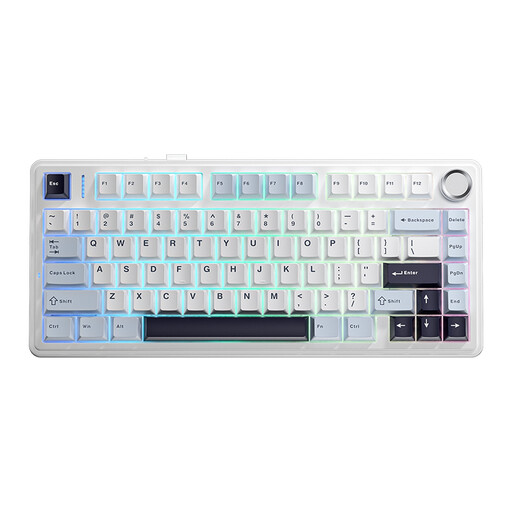
Why it suits this user: The 75% layout combines arrow and function keys with a space-saving design. It connects via cable, Bluetooth or 2.4 GHz wireless.
The three connection options mean you’re not limited to Bluetooth. The US layout is clearly specified, so check that it suits your typing habits before buying.
75% layout and tri-mode connectivity; can be used as a mechanical keyboard with a PC, laptop and mobile devices.
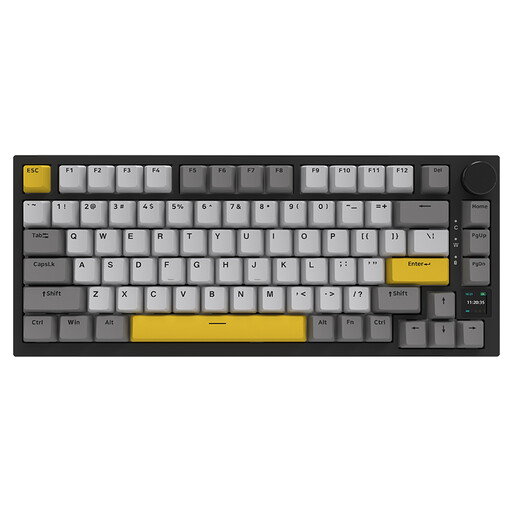
Why it suits this user: This model combines 82 keys, hot-swap switches, RGB lighting, a TFT display, PBT keycaps and a volume control in a compact case.
There’s more to the feature set than RGB marketing: hot-swap switches, three connection options and a status display are all clearly specified features.
Bluetooth, 2.4 GHz and USB-C; programmable display and rotary control for media or volume.
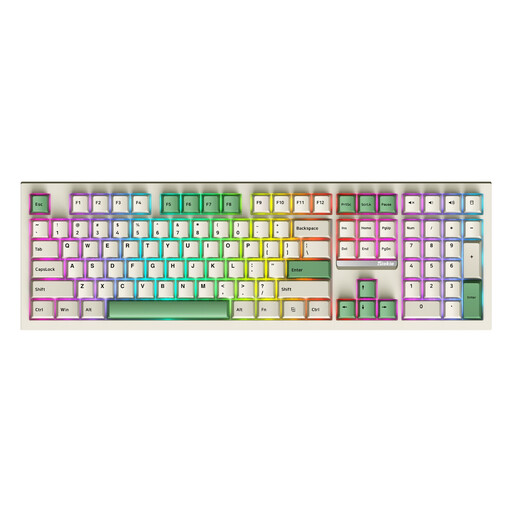
Why it suits this user: This full-size model has 108 keys, a number pad, hot-swap switches, RGB and tri-mode connectivity. That makes it suitable for extensive data entry and PC or Mac workstations.
The 108-key design helps you avoid choosing a compact keyboard if you regularly need a number pad. Hot-swap capability and removable switches are explicitly listed.
Full-size layout with number pad; Bluetooth, 2.4 GHz and wired connection for flexible use.
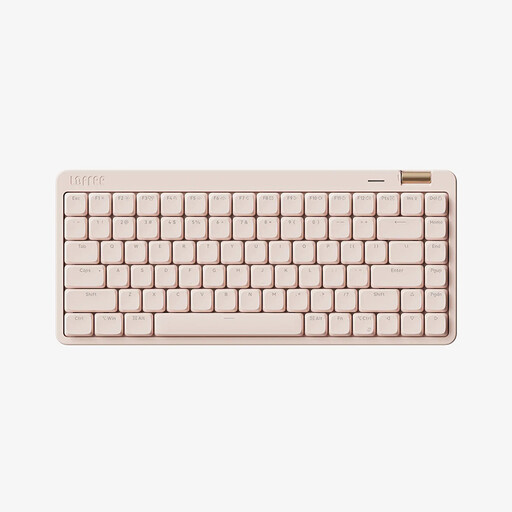
Why it suits this user: Its 84-key layout, low-profile switches and three connection options make it well suited to studying, working from home and switching between workspaces.
The low-profile design is specified in detail, with Kailh linear switches. The white backlighting is adjustable and can be switched off to save battery power.
Bluetooth 5.4, 2.4 GHz and USB-C; volume control and a 2,000 mAh battery, according to the product details.
We’ve put together a complete, regularly updated list of products that meet these strict selection criteria and fully comply with the safety regulations in force in the EU.
Yes, provided it supports a stable 2.4 GHz mode or a wired USB-C connection. Bluetooth latency can vary depending on the device and surroundings. For competitive gaming, also check the technical specifications for polling rate, anti-ghosting and N-key rollover.
Battery life depends on battery capacity, RGB use, wireless standard and how intensively you type. Manufacturer figures are usually measured under specific conditions. A model with switchable lighting and wired use while charging is more flexible for everyday use.
Hot-swap is especially useful if you may want to change the switches later. It means there’s no need to solder, but the switch format, pin count and compatibility must all match. If you’re happy to stick with the switches supplied, you don’t necessarily need this feature.