
Lieferung heute & morgen

Qualitätsgarantie

Willkommens-Angebote freischalten: KOSTENLOSE Lieferung | Bis zu 80 % RABATT | Kostenlose 30-Tage-JoyPlus-Testphase
App herunterladen
A mechanical gaming keyboard should enable fast input, feel comfortable when typing and fit your existing desk setup. In practice, however, eye-catching RGB effects or high polling rates do not automatically lead to the right purchasing decision. Layout, switch technology, connectivity and how you actually use the keyboard are what matter most.
A 60% keyboard saves a lot of space, but usually does without separate arrow, function and navigation keys. These functions are then accessed via an Fn layer. This may be sufficient for FPS players, but the adjustment can become frustrating for people who type a lot, content creators or office users.
A 75% keyboard or TKL keyboard, on the other hand, provides arrow keys and important controls while taking up less space. Before buying, check whether you need a number pad and how much room you actually want to leave for mouse movement.
For users in Germany, a gaming keyboard with a QWERTZ layout is important. US QWERTY layouts differ in, among other things, the familiar position of certain special characters and the German key labels. Although the operating system can switch between layouts, the keycap labelling remains unchanged.
If you regularly type German text, you should therefore specifically search for ISO-DE or QWERTZ. A product description stating “German Layout” is more helpful than a software setting alone, but it should also be checked against the product images and technical specifications.
A polling rate of 8,000 Hz describes how frequently the keyboard can send data to the computer. Its practical impact also depends on the game, USB connection, firmware, operating system and response processing. For many users, a reliable USB-C connection, N-key rollover and suitable switches are more important than a single headline specification.
Terms such as Rapid Trigger and magnetic switches should also be read carefully. With a Hall-effect keyboard, the key position is detected magnetically. This can enable adjustable actuation, but it is not equally relevant with every piece of software or every game.
If you regularly switch between gaming and productive work, 75% and TKL models often offer a practical middle ground.
Linear switches move through the key travel without a noticeable tactile bump and are often chosen for fast-paced gaming. Tactile switches provide noticeable feedback when actuated. Clicky variants also produce a clearly audible sound, which can be distracting in shared spaces.
A hot-swappable keyboard allows you to replace compatible switches without soldering. The compatibility specification is important, such as 3-pin or 5-pin. Hot-swap sockets do not guarantee that every switch will fit.
With a Rapid Trigger keyboard, the reset point can be adjusted in software, depending on the model. A Hall-effect keyboard with magnetic switches is primarily aimed at users who want to configure actuation distance and reset behaviour precisely.
A wired USB-C keyboard does not need a battery and provides a consistent connection. A wireless mechanical keyboard can connect via Bluetooth, 2.4 GHz or both. For gaming, 2.4 GHz is often more practical than Bluetooth, while Bluetooth can make it easier to switch between multiple devices.
RGB lighting primarily improves visibility and allows for personalised styling. It does not, however, replace clearly legible keycaps. A gasket-mount keyboard uses elastic elements between the PCB or positioning plate and the case. This can make the typing feel softer, but any claims about noise levels should still be considered in relation to the specific construction, keycaps and switches.

Why this product suits this profile: The QWERTZ layout with 82 keys combines compact dimensions with arrow, function and navigation keys. This makes it suitable for German users who want to combine gaming with everyday typing.
The German key layout reduces the risk of unsuitable US labelling. The USB-C connection requires neither pairing nor a battery.
QWERTZ layout, hot-swap for compatible 3-pin switches, gasket-mount construction, RGB lighting and volume control.
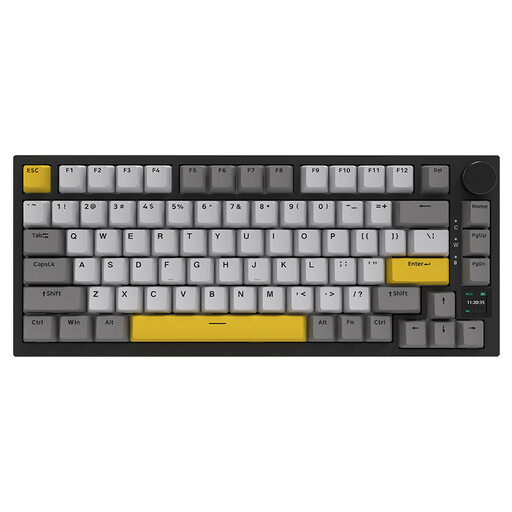
Why this product suits this profile: The combination of a 75% layout, three connection methods and customisable features is aimed at users with multiple devices and different places of use.
Connectivity is not limited to Bluetooth: according to the product specifications, USB-C, Bluetooth 5.1 and 2.4 GHz are available.
TFT display, 4,000-mAh battery, hot-swap, gasket-mount construction, PBT keycaps, RGB and volume control.

Why this product suits this profile: FPS and e-sports players who are happy with a US layout and want to configure actuation distance and Rapid Trigger get a 68-key model tailored to this use case.
The product specifications state an adjustable actuation range of 0.2 to 4.0 mm and Rapid Trigger. This makes the feature more concrete than a purely promotional claim.
Hall-effect switches, 8,000-Hz polling rate, 68-key layout, RGB and detachable USB-C cable.
We have put together a complete, regularly updated list of products that fully meet these strict selection criteria and the safety regulations applicable in the EU.
For regular typing, a QWERTZ layout with German labelling is a sensible choice. A 75% keyboard or TKL keyboard retains important function keys while taking up less space than a Full-Size model.
Lifespan depends on the switches, keycaps, usage and care. Manufacturers state that some models can provide up to 50 million keystrokes, for example. This is a technical specification for the switching component and is not a guarantee of the lifespan of the entire keyboard.
Wired models draw their power via USB. With wireless variants, RGB brightness, wireless standard and battery capacity affect battery life. Reducing or switching off the lighting can lower energy consumption when running on battery power.