Media server with a few wired devices
If you want to connect your router, media server and a few other devices on a small desk, a simple, fanless Gigabit switch could be a good fit. TP-Link, D-Link and Zyxel list these features for selected models.


If your media server and other devices use no more than Gigabit Ethernet, a compact, fanless unmanaged Gigabit switch is a sensible starting point. 2.5 Gbit/s is only worthwhile if the devices and connections involved support it too. Factor in the connection to your router and any potential expansion, and choose managed features or PoE only if you have a specific need. The features mentioned are manufacturer specifications, not measured transfer speeds.
If you want to connect your router, media server and a few other devices on a small desk, a simple, fanless Gigabit switch could be a good fit. TP-Link, D-Link and Zyxel list these features for selected models.
For faster local transfers, both the media server and the device involved need suitable 2.5-Gbit/s ports. TP-Link and QNAP offer switches with five 2.5-Gbit/s ports.
If you’re planning to add more wired devices or need specific network features, consider spare ports, management features or PoE. NETGEAR, Zyxel and TP-Link describe these features for selected models.
First, count your devices, including the connection to your router. Then check whether Gigabit is enough or whether the devices involved can use 2.5 Gbit/s.
| What to consider | What to look for | Who should prioritise it? |
|---|---|---|
| Quiet operation and compact size | Check the fan specification and dimensions of the specific model. | If the switch is going right next to my workspace, quiet operation and a suitable size matter to me. Around 33% of consumers put a simple, quiet connection first. |
| Local transfer speed | Compare the Ethernet ports on your media server and device, as well as the cabling along the transfer path. | If I’m transferring large files locally, I check that both devices and the connection support 2.5 Gbit/s. Around 27% of consumers prioritise fast local file transfers. |
| Spare ports | Count your router, media server, PC and planned devices. If space is tight, compare the dimensions too. | If I’m planning to add more wired devices, I want to keep some ports free without overlooking the space available. Around 20% of consumers put extra ports first. |
| Management features | Check whether the model has the specific feature you need and whether your setup uses it. | If my home network needs specific settings, I check for features such as VLANs or IGMP snooping. Around 13% of consumers prioritise managing their network. |
| PoE for additional devices | Check that the PoE standard and power requirements of your devices match the per-port ratings and total power budget of the switch. | If I want to power an additional access point or another compatible device through the network cable, the available PoE budget matters to me. Around 7% of consumers put PoE power for another network device first. |
Your router needs a port on the switch too. That leaves fewer ports for your media server, PC and other devices than the total might suggest.
List all the wired devices you plan to connect before choosing a switch, and include the router connection in your count.
If you run out of ports later, you may need to switch to a model with more.
The devices involved and the transfer path also affect connection speed. A faster switch port alone doesn’t guarantee that files will transfer at the same rate.
Before upgrading, check the network ports on your media server and device, as well as the cabling used for that particular connection.
For the TP-Link TL-SG105PE, the manufacturer specifies up to 30 W per PoE port, but a total budget of 65 W across all PoE ports.
Compare the power requirements of all the PoE devices you plan to connect with the standard and total power budget of the specific switch.
Depending on your needs, you may require a different switch model or a separate power supply.
The model ranges mentioned include compact Gigabit and 2.5-Gbit/s switches, as well as an Easy Smart switch with PoE.
The GS105 and GS305E are models with five Gigabit ports; the GS305E also offers Easy Smart features.
The DGS-105 is a compact, unmanaged Gigabit option for your desk.
The GS-100 series includes relevant five- and eight-port Gigabit models, while the GS1200 series offers web management.
The QSW-1105-5T is a five-port switch with 2.5 GbE for compatible local connections.
This selection from Joybuy includes Gigabit switches for media servers and other wired devices, including models with PoE or management features.
 No image available
A good fit if you want to power compatible devices over PoE as well as connect them to your network.
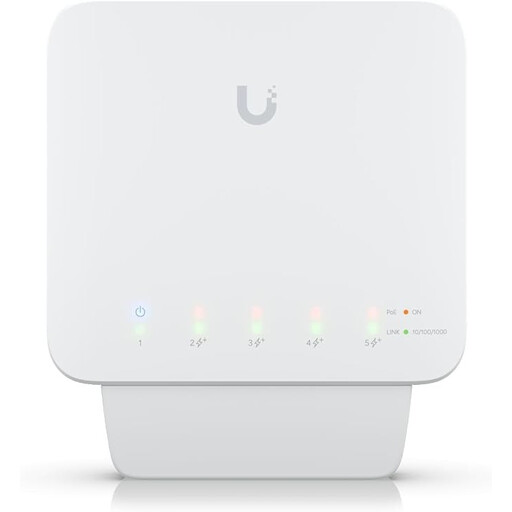
Five Gigabit ports, including four PoE+ outputs. Available PoE power depends on the power source: up to 46 W with a PoE++/60-W input, 20 W with PoE+ or 8 W with PoE. You’ll need a compatible PoE++ switch or PoE adapter to power the switch; this isn’t included.
 No image available
An option if you want to connect several Gigabit devices and use management features.
Five 10/100/1000-Mbit/s ports; stated dimensions: 107,16 × 70,15 × 21,17 mm. Powered by USB-C or 802.3af/at PoE. PoE is an input here and doesn’t power connected devices.
 No image available
Suitable if you need PoE for other compatible devices as well as your media server.
Four PoE+ ports, with up to 30 W per port and a shared total budget of 60 W. The switch is described as fanless.
 No image available
A good fit if you want to connect more wired devices and manage specific network features.
Ten ports in total: eight Gigabit RJ45 ports and two SFP slots. Features include web management, IGMP snooping and VLAN. The casing is listed as fanless.
 No image available
An option if you’re planning to add more Gigabit connections and PoE for compatible network devices.
Eight Gigabit Ethernet ports, including four PoE ports with a shared budget of 55 W. Unmanaged operation and fanless desktop use are listed.
It may be, as long as there are ports left for your media server, PC and other planned devices after you connect the router. Five refers to the total number of ports, not five extra ports in addition to the one used by the router.
First, check the physical connection between the media server and the network device. The next steps will depend on your network setup and the devices involved.
Not just to connect your media server. PoE is relevant if you want to power a compatible connected device through the network cable. If so, check its power requirements, along with the switch’s PoE standard and total power budget.
The German Federal Network Agency lists the CE marking, product identification and correct manufacturer information among the things it checks when monitoring the market. A CE marking doesn’t mean the product was made in the European Economic Area.