What should you consider when choosing?
First decide whether you’ll speak from one spot, move around as you guide the meditation, connect to equipment you already own or record without a computer.
| Requirement |
What to check before buying |
Who is this important to? |
| Clear speech despite room reverberation |
Check the polar pattern and the side you speak into. Record a test from your intended position and listen back on headphones for echo and background noise. |
If I speak quietly from one spot, I want to record my voice up close and assess the room sound. Around 39% of consumers prioritise a clear, isolated voice. |
| Freedom of movement |
Check the area you need to move around in, cable length and how the microphone attaches; make sure the connection is compatible with your recording device. |
If I stand up or move around while guiding the meditation, I want the microphone to move with me without the cable pulling tight. Around 23% of consumers put freedom of movement first. |
| Connecting to equipment you already own |
Check your available inputs and recording app against the specific USB or XLR connection; make sure you have the right cables and a suitable stand or mount. |
If I want to keep using my existing recording equipment, the connection needs to work with it. Around 23% of consumers say easy connectivity is their top priority. |
| Recording without a computer |
Check where you’ll place the device and listen back to a test recording. Check the specific device’s power, storage and playback options. |
If I want to record the meditation directly in the hall without bringing a computer, I need a suitable standalone recording option. Around 15% of consumers prioritise recording without a computer. |
Microphones and recording devices at Joybuy
These Joybuy products cover fixed speaking positions, recordings on the move and standalone recording options.
 No image available
FIFINE K688CTW with boom arm, USB/XLR, White
For a fixed speaking position at close range, if the USB or XLR recording connection works with your equipment.
The product name specifies a boom arm. According to the product details, an XLR cable isn’t included; the microphone buttons only work in USB mode. The recommended speaking distance is 2–6 inches, and the desk clamp is described as suitable for surfaces under 2 inches thick.
View at Joybuy
 No image available
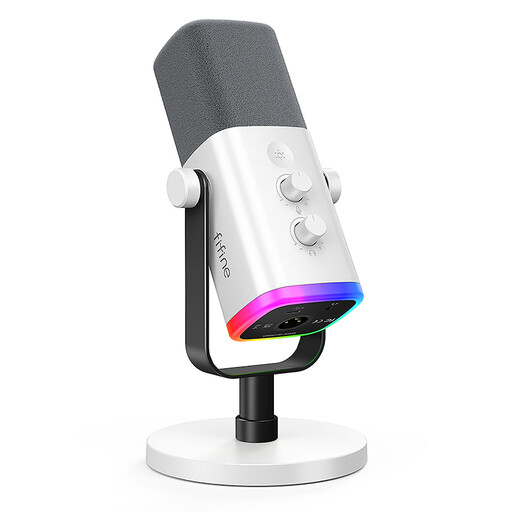
FIFINE AM8 White, dynamic USB-C/XLR microphone
For a fixed speaking position, if you’ve checked that the USB-C or XLR connection suits your recording setup.
The product name lists USB/XLR, a headphone socket, RGB lighting, a volume control and a mute button. According to the product details, the XLR cable and boom arm aren’t included; the recommended speaking distance is 2–6 inches.
View at Joybuy
 No image available
DJI Mic Mini 2S, 2 TX + 1 RX + Charging Case
For a speaker who moves around, provided the set is compatible with your recording device.
The product name lists two transmitters, one receiver and a charging case. Before using the wireless system, check which frequency bands and operating conditions are permitted in Germany.
View at Joybuy
 No image available
Digital voice recorder, 64 GB, with transcription function
For a standalone recording setup, if a recorder suits your needs better than a microphone connected to a computer.
The product name lists 64 GB of storage and a transcription function. Check where you’ll place it and listen back to a test recording before relying on it to record in the community hall.
View at Joybuy
 No image available
Moman M1CXT, wireless USB-C lavalier microphone system, 2TX + 1RX
For a speaker who moves around, if your recording device supports the USB-C receiver.
The product name lists two transmitters, one receiver and a range of 150 m. Before using the wireless system, check which frequency bands and operating conditions are permitted in Germany.
View at Joybuy
Frequently asked questions
Is a directional microphone enough to eliminate echo in a community hall?
No. Recording less sound from the sides or rear doesn’t mean the room echo will disappear. Point the microphone towards your voice and listen back to a test recording made from your intended position. RØDE recommends a speaking distance of around 5–10 cm for the PodMic USB.
Can I connect an XLR microphone directly to my laptop via USB?
Only if the specific model also has a USB output, as the ATR2100x-USB and PodMic USB do. For the Sennheiser MK 4, which connects via XLR only, you’ll need a suitable XLR recording setup.
What should I test before making a longer recording?
Record a quiet passage in your usual position and listen back to the saved file. Check the microphone position, background noise and connection. If you’re using a lavalier microphone, also check the cable routing and listen for any rustling against your clothing.
What accessories should I check before buying?
For the exact model variant, check whether the cables, tripod, mount and a suitable recording device are included or already available. Audio-Technica lists cables and a desktop tripod stand as included with the ATR2100x-USB; RØDE describes the PodMic USB as being mounted on a microphone stand or arm.
Can I record other participants’ voices without asking?
Section 201(1) of the German Criminal Code (StGB) covers the unauthorised recording of another person’s private spoken words. Whether a particular statement is private and whether you have permission to record it depends on the circumstances. Discuss any planned recordings of other people before you begin; the German Data Protection Conference explains the requirements for consent to be freely given and informed under data protection law.


