Which microphone is right for you?

Solo speakers at a busy desk

If you’re recording a meditation on your own, can position the microphone close in front of you and occasionally hear noise at your workspace, placement and a test recording in the actual space are important. Audio-Technica, RØDE and Samson describe directional microphones for speech recording, but positioning alone can’t replace a quiet recording environment.

Soft-spoken narrators

If you speak softly and leave long pauses, you’ll want to monitor the recording and its levels through headphones. This helps you keep quiet passages audible without distorting emphasised words. Shure and Sennheiser list monitoring or level controls as features on selected models.

Those with a changing setup

If you regularly need to clear the shared desk or might want to use an interface later, check how the microphone is mounted, what’s included with the specific version and which connections it has. Audio-Technica, RØDE, Samson and Sennheiser list different connection and mounting options for their respective models.

What should you look for when buying?

Buying priority What to check Who is this important to?
Make your voice stand out from room noise Polar pattern and speaking side; whether you can position it within reach of your mouth If I mainly want to record my voice at a shared desk, I’ll pay attention to positioning and speaking close to the microphone. This is a priority for around 36 % of people who are most concerned about room noise.
Monitor quiet speech and pauses Adjustable recording level; headphone monitoring on the specific model If I speak softly and alternate between quiet sentences and emphasised words, I want to be able to check the recording straight away. Around 29 % of people prioritise being able to monitor levels and their voice.
Set up and put away the microphone What’s included with the version; space for a desk stand or a compatible boom arm If I need to clear the desk after recording, a suitable setup that’s easy to repeat matters to me. Around 21 % of people say desk organisation is their main priority.
Start recording straight away or upgrade later USB, XLR or dual connections; any interface and cables required If I want to start by recording directly to my computer but keep the option to upgrade later, I’ll check the connections on the exact version. Around 14 % of people prioritise the option to expand their setup.

Avoid common buying mistakes

  • Assuming “dynamic” or “noise reduction” guarantees that voices at the next table won’t be picked up

    A directional pickup pattern and a short speaking distance can make positioning easier, but they won’t reliably block out other voices or individual noises. Noise reduction is better suited to steady background noise than one-off sounds.

    Test the microphone with the actual noises in your space and, if possible, schedule important recordings for a quieter time.

    Unwanted noise can mean re-recording and extra editing work.

  • Planning to use an XLR-only microphone as if it were a USB model you can plug straight in

    To record to a computer over XLR, you’ll need a suitable additional signal chain. The connection and preamp you need depend on the specific microphone and the interface you already have.

    Before choosing an XLR model, check the complete setup, including the interface or suitable mixer, cable and mounting.

    Your setup may need an interface or mixer, compatible cables and a suitable mount.

  • Assuming similarly named models and differently equipped bundles are the same

    The Elgato Wave:3 is available in different generations. The Sennheiser Profile USB bundles also differ in features such as the desk stand and boom arm.

    Check the full model name, generation and what’s included against the specific product page.

    Depending on the bundle, you may need to add a desk stand or boom arm separately.

Brands to consider

Audio-Technica

The ATR2100x-USB is a dynamic USB/XLR microphone for speech; the ATR2500x-USB is a separate condenser option.

  • Audio-Technica lists direct headphone monitoring and USB and XLR outputs for the ATR2100x-USB.
  • For dynamic recording, it’s still important to speak close to the microphone and face it directly.

Samson

The dynamic Q2U has USB and XLR connections and is described as coming with a desk stand, windscreen and cables.

  • Samson lists a cardioid pickup pattern, headphone output and a switch.
  • The manufacturer’s description of the microphone as suitable for untreated rooms doesn’t mean it will block out other people’s voices at the same table.

RØDE

The dynamic PodMic USB has USB and XLR connections and is designed to be mounted on a suitable stand or boom arm.

  • RØDE says the model has headphone monitoring, as well as built-in and supplied external pop protection.
  • RØDE recommends speaking around 5–10 cm from the PodMic USB. A desk stand isn’t listed among the described items included.

Shure

The MV7+ is a dynamic USB-C/XLR option; the SM7B is a separate microphone with XLR-only connectivity.

  • Shure promotes automatic level adjustment and digital noise processing on the MV7+.
  • Don’t assume the processing will produce a particular result at your desk. The SM7B needs a suitable XLR signal chain; the MV7+ features aren’t available on this model.

Sennheiser

The Profile USB is a condenser alternative with a cardioid pickup pattern, intended for a genuinely quiet recording space.

  • Sennheiser says it has gain, mix and headphone controls.
  • Test how room noise comes through in your recording. The standard bundle lists a desk stand, while the Streaming Set includes a boom arm instead.

Microphones at Joybuy

This selection includes desk microphones for speech recording, as well as a wireless lavalier system for recording with a camera.

FIFINE AM8 dynamic USB/XLR microphone with desk stand

FIFINE AM8 USB/XLR Microphone

An option for recording speech at your desk if you want to use USB or XLR.

The product title mentions a desk stand, mute button and headphone socket. According to the product information, an XLR cable isn’t included.

View at Joybuy

FIFINE K688CTW USB/XLR microphone with boom arm, white

FIFINE K688CTW USB/XLR Microphone with Boom Arm

The included boom arm is designed to let you adjust the microphone’s position at your desk.

The product title mentions a mute button, volume control and headphone socket. According to the product information, an XLR cable isn’t included; the desk clamp is designed for desks less than 2 inches thick.

View at Joybuy

USB condenser microphone with RGB lighting, mute button and accessories kit

USB Condenser Microphone with RGB Lighting, 7-Piece Set

A USB option for computer recording if you can test the microphone in your actual recording space.

The product title mentions RGB lighting, a mute button, a Type-C adapter and a 7-piece set.

View at Joybuy
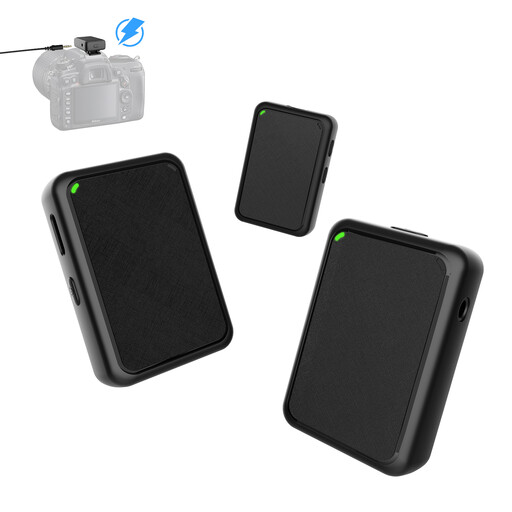
Moman MB1X(M) wireless lavalier microphone system with two transmitters and one receiver

Moman MB1X(M) Wireless Lavalier Microphone

According to the product title, this set is designed for wireless camera recording, making it different from a fixed desk microphone.

The product title mentions two transmitters and one receiver.

View at Joybuy

JBL Quantum Stream Studio USB-C condenser microphone

JBL Quantum Stream Studio USB-C

A USB-C condenser option for recording if you want to check the recording modes on offer and how it sits on your own desk.

The product title mentions a flexible tube design, mute control and a monitoring mode.

View at Joybuy

Frequently asked questions

How should I test a microphone before recording a longer meditation?

Record a short test in the place you plan to use, including quiet sentences, emphasised words and silent pauses. Listen back through headphones and lower the recording level if louder sections distort. Also check whether you can still hear noises from the shared desk.

Can noise reduction reliably remove conversations at the next table?

You shouldn’t rely on it to do that. Audacity describes its noise reduction as suitable for steady background noise, not individual sounds. If possible, plan to record at a quieter time and test the microphone’s position.

Do I need an audio interface for a USB microphone?

For direct recording through the USB output on a compatible computer, you generally don’t need a separate audio interface. An XLR-only microphone, however, needs a suitable connection for digital recording, such as an interface or a mixer with a built-in interface.

Can I record other people’s conversations at a shared desk?

Under § 201 StGB, recording another person’s non-public spoken words without authorisation is a criminal offence; using or making such a recording accessible to others is also covered. Make sure your recording setup is legally permitted rather than treating noise reduction as a substitute for permission.

Can I add any music I like to a meditation I’ve published?

No. Check the rights to the specific piece of music and the way you plan to publish it. GEMA describes a tariff for using its repertoire in podcasts; whether it applies to an individual meditation or another online offering depends on the specific circumstances.