What should you consider when choosing?
The right choice depends on what matters most to you: controlling room echo, getting started without a separate microphone, expanding your setup later or preparing for a long recording session.
Recorder with built-in microphones
A good fit if: You want to record on your own and get started without a separate microphone.
Consider: You may not be able to position the built-in microphones as freely as an external one. A test recording in the actual location is still important.
Recorder with an external microphone
A good fit if: You want to position a compatible microphone closer to where you’ll be speaking, or connect an XLR microphone you already own.
Consider: A microphone, cable and mount add to the setup. This option won’t make the room soundproof either.
Recorder with directional control or internal storage
A good fit if: You sometimes want to record ambience as well as speech, or would rather get started without a separate memory card.
Consider: A wider recording can also pick up more room sound in an echoey space. This feature is no substitute for a test recording.
| Priority |
What to check before buying |
Who it matters to |
| Record a clear voice despite room echo |
Microphone distance and a stable position; plan to listen back to a short test recording with headphones. |
If I want to record a close, clear solo voice in an untreated room, I’ll focus first on position and distance. Around 36% of consumers make controlling room echo their main priority. |
| Simple solo setup |
Check for built-in microphones, straightforward controls and a mono option, if you need one. |
If I’m speaking alone and don’t want to wire up a separate microphone before recording, an easy start matters to me. Around 29% of consumers make a simple solo setup their main priority. |
| Connect external microphones |
Check that the connection type and number of tracks you need are compatible with the microphone you own or plan to buy. |
If I want to position the microphone independently of the recorder or use additional sound sources later, I’ll need the right inputs. Around 21% of consumers make expandability with external microphones their main priority. |
| Prepare for a long recording |
Check the storage medium and power supply, and make a short test recording before your speaking session. |
If I want to record a longer meditation script without unnecessary interruptions, I’ll want to sort out the storage and recording process in advance. Around 14% of consumers make preparing for a long speaking session their main priority. |
Joybuy products for solo recording
The Joybuy products below are voice recorders with built-in microphones, so you can record on your own without a separate microphone. Built-in microphones won’t eliminate room echo on their own, so check your recording in the location you plan to use.
 No image available
PLAUD Note Pro Voice Recorder, 64 GB, Black
The built-in microphones let you record without a separate microphone.
64 GB storage; 30 hours of recording, according to the product description.
View at Joybuy
 No image available
Mobvoi TicNote Lite AI Voice Recorder, 4 GB, Black
The integrated triple-microphone system lets you record without a separate microphone.
4 GB storage; according to the product description, you can start and stop recording using the device controls.
View at Joybuy
 No image available
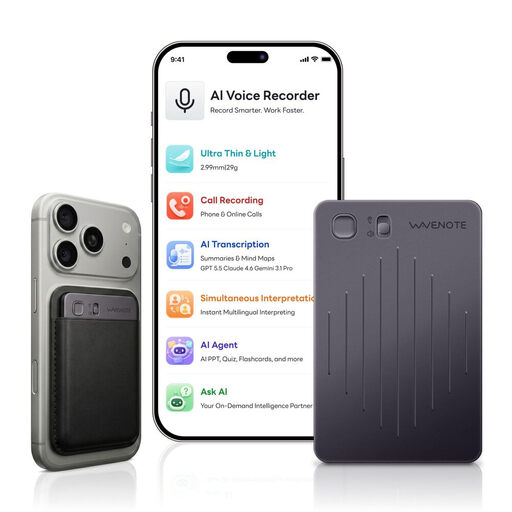
WaveNote AI Voice Recorder, 64 GB, Black Grey
The built-in microphones let you record speech without a separate microphone.
64 GB storage; up to 42 hours of recording, according to the product description.
View at Joybuy
 No image available
AI Voice Recorder with 32 GB Storage and Case, Black
The described in-room mode and microphones let you record without a separate microphone. Check the sound in your own room.
32 GB storage; 30 hours of recording and one-button recording, according to the product description.
View at Joybuy
 No image available
Rexsun 64GB Portable Digital Voice Recorder, L15
The built-in omnidirectional microphones pick up sound from many directions, which may include room ambience in an echoey space.
Supplied 64 GB card; up to 22 hours of recording and one-click recording, according to the product description.
View at Joybuy
Frequently asked questions
Does 32-bit float remove room echo?
No. The recording format won’t eliminate room echo. Shure explains that a microphone can’t separate direct sound from reflected sound after recording. So, focus first on where you position the recorder and how far the microphone is from you.
What should I set up before recording a long meditation script?
Place the recorder on a stable surface, speak a short passage in both your normal and quieter voice, then listen back to the file. According to the Zoom H1essential user manual, a microSD card must be inserted for recording and playback to work.
Who should I contact if my recorder is faulty?
For a consumer purchase from a business seller, you generally have a legal guarantee of at least two years from the date you receive the goods. Your Europe explains this EU-wide minimum period; the seller is your point of contact. This is separate from any voluntary manufacturer’s warranty.
Can I record other people during a meditation without asking?
Don’t assume you can do so without the proper authorisation: Section 201 of the German Criminal Code (StGB) covers the unauthorised recording of another person’s private spoken words. The provision concerns other people’s voices, not the specific question of recording only your own voice.
Can I use someone else’s music under a meditation I publish?
Before publishing, check that you have the rights to use the specific music in the way you intend to distribute it. Germany’s Federal Ministry of Justice explains that creators have the right to make their works available to the public. According to GEMA, certain steps must be taken in advance to obtain a licence for GEMA repertoire without paying a fee.


