For reliable downloads across three floors, first check your broadband connection, Wi-Fi reception where you read, and the link between your mesh units separately. If your current router is suitable for your connection, a compatible extender may be enough. If several areas have poor coverage, a mesh system with multiple units could be a better option. Use existing network cables to connect the units if they support Ethernet backhaul; Wi-Fi and Powerline performance depend on the conditions in your home.
Who this guide is for
Readers with Wi-Fi dead spots on several floors
If you download digital editions in different places around your home, consider both the reception in those spots and the connection between the mesh units. The F.A.Z. Kaufkompass mesh test and TP-Link’s information about the Deco X50 cover these factors.
Homes with existing network sockets
If you have usable LAN connections between floors, check whether you can connect the mesh units by cable rather than relying solely on a wireless backhaul. TP-Link lists Ethernet backhaul as a supported option for the Deco X50.
Homes with a suitable existing router
If your router already provides your internet connection, a compatible Wi-Fi extender could be an alternative to replacing it. FRITZ! explains how to add compatible repeaters to a FRITZ!Box mesh, while the Verbraucherzentrale points out that any replacement router must be suitable for your connection.
What to look for when buying
First work out whether the bottleneck is your internet connection, reception where you read, or the backhaul between floors. Then you can decide more easily whether to extend your existing router and which connection between the units is right for your home.
| Priority |
What to check when buying |
Who it matters most to |
| Reception where you read |
How many units you need and their wireless connection at the planned locations. |
If you download on several floors, reception on your tablet matters just as much as the connection between the units. Around 36% of consumers are likely to prioritise coverage. |
| Backhaul between floors |
Support for Ethernet backhaul and usable LAN sockets. |
If your tablet has a good Wi-Fi connection but downloads still stall, check the link between the units and the rest of your network. Around 29% of consumers are likely to prioritise the backhaul above all. |
| Connecting to your router |
Compatibility with your existing mesh, and the right access point or router mode. |
If your router already provides your internet connection, you may want to extend your Wi-Fi without replacing the device too soon. Around 21% of consumers are likely to prioritise integration with their existing router. |
| System size and upkeep |
Pack size, as well as update and management features. |
If you want to avoid unnecessary devices and extra admin, weigh up how many units you need against the work involved in managing your home network. Around 14% of consumers are likely to place particular importance on system size and upkeep. |
Common buying mistakes
-
Comparing only the advertised top Wi-Fi speed
The stated wireless data rate alone does not tell you how quickly a download will run where you read across several floors.
Check your internet connection, reception where you read and the link between the units separately before paying for a higher Wi-Fi class.
-
Placing a unit directly in a Wi-Fi dead spot
A mesh unit still needs a usable connection to the rest of your network if it is connected wirelessly.
Choose a location with adequate reception, or check whether you can use Ethernet backhaul and an existing LAN connection.
-
Confusing a single unit with a multi-unit pack
The pack contents determine how many areas you can cover with units straight away.
Check the stated number of units against the locations you have planned.
-
Assuming Powerline is a guaranteed substitute for a LAN connection
A Wi-Fi system that uses your home’s electrical wiring does not confirm that your wiring is suitable or that it will work with older adapters.
Check the connection at the sockets you need and compare your existing adapters with the product ranges explicitly listed as compatible. Devolo notes that Magic 2 WiFi next is not compatible with adapters from the older dLAN range.
Brands to consider
TP-Link
Deco systems are an option if you want a standalone mesh network. TP-Link lists Ethernet backhaul, router mode and access point mode for the Deco X50.
- Ethernet backhaul and both operating modes are documented for the Deco X50.
- Information about modes and ports does not apply to every Deco model. The manufacturer’s coverage claims do not confirm reception in specific reading spots.
FRITZ!
FRITZ!Repeaters are worth considering if you already have a compatible FRITZ!Box. According to FRITZ!, the FRITZ!Repeater 3000 AX supports LAN bridge mode and has two Gigabit LAN ports.
- A compatible FRITZ!Box may allow you to add the repeater to your existing mesh.
- Mesh settings and integration depend on your FRITZ!Box and its configuration. A repeater cannot replace a router that is unsuitable for your internet connection.
eero
eero offers mesh systems managed through an app. According to eero, the eero 6+ can act as a gateway or extend an existing eero network, and has two Gigabit Ethernet ports.
- The eero 6+ is listed as having two Gigabit Ethernet ports.
- According to eero, setting up and managing the eero 6+ requires an Android or iOS app. Models without an Ethernet port, including the eero 6 Extender, do not offer wired backhaul.
devolo
Magic Wi-Fi multi-room kits are a Powerline alternative to consider if you do not have LAN connections and the wireless link between floors is unreliable.
- According to devolo, Magic kits combine Powerline with Wi-Fi units.
- The manufacturer’s information does not confirm how well the connection will work over your home’s electrical wiring. According to devolo, Magic 2 WiFi next is not compatible with adapters from the older dLAN range.
Joybuy products for multiple areas of your home
The following Joybuy products are mesh systems designed to cover multiple areas of your home. Pack sizes range from a single unit to multi-unit sets; the pack size alone does not tell you whether reception will be strong enough across all three floors.
 No image available
TP-Link Deco M4 AC1200, 3-pack
This three-unit set could be a good fit if you want mesh coverage in several areas of your home; you should still check the connection at your planned locations.
Dual-band, seamless roaming and Gigabit ports are listed. The set is described as AC1200 and comes as a 3-pack.
View at Joybuy
 No image available
TP-Link Deco X1500, Wi-Fi 6, 2-pack
This set could suit several areas that need coverage if two units are enough for your planned locations; also check the backhaul between them.
Described as an AX1500 dual-band system with Gigabit ports and app control.
View at Joybuy
 No image available
MERCUSYS Halo H3000X, Wi-Fi 6, 2-pack
This two-unit set could work for several areas if the planned positions and connection between the units suit your home.
Described as an AX3000 dual-band system; according to the product name, each unit has three Gigabit ports.
View at Joybuy
 No image available
MERCUSYS Halo H25BE, Wi-Fi 7, 2-pack
This set could be a good fit if two mesh units are enough for the areas you have in mind; check beforehand that their locations will have a usable backhaul.
Described as a BE3600 dual-band system; according to the product name, each unit has three Gigabit ports.
View at Joybuy
 No image available
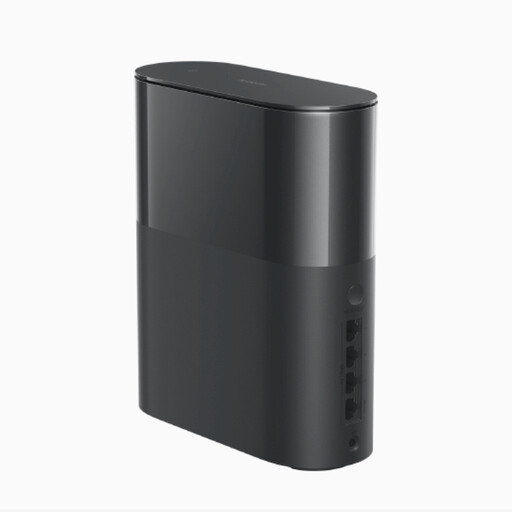
Xiaomi Mesh System BE3600 Pro, 1-pack
This unit could work as a starting point for a mesh setup, with more units added if needed; you cannot assume it will provide coverage across several floors on its own.
The product name identifies the BE3600 Pro as a 1-pack.
View at Joybuy
Frequently asked questions
How can I tell whether my internet connection or Wi-Fi is slowing down downloads?
Check your internet connection, reception in the exact spot where you read, and the connection between the mesh units separately. The Bundesnetzagentur broadband measurement tool compares your connection’s actual data rate with the rate agreed in your contract; on its own, it does not show how well Wi-Fi works on each floor.
Do I need a mesh unit on every floor?
No. The number and position you need depend on where you read and on the connection between the units. Don’t place a wirelessly connected unit somewhere it cannot get a strong enough connection itself.
What should I do regularly after setup?
Install available updates for your router and other network devices. The Verbraucherzentrale recommends installing updates as soon as they become available.
What extra tasks might come with choosing a system?
Depending on your home, you may need extra units or cabling. The Verbraucherzentrale also notes that if you replace your internet router, you will be responsible for setup and updates yourself. Compare this extra work with keeping a suitable router and extending only your Wi-Fi.


