
Lieferung heute & morgen

Qualitätsgarantie

Willkommens-Angebote freischalten: KOSTENLOSE Lieferung | Bis zu 80 % RABATT | Kostenlose 30-Tage-JoyPlus-Testphase
App herunterladen
Choosing the right PC case is more than a matter of aesthetics; it's the foundation for your entire system's performance, cooling, and longevity. The Micro ATX panoramic case, in particular, is enjoying immense popularity as it combines stunning visuals with a compact form factor. However, the market is flooded with models that, while impressive at first glance, can quickly lead to frustration in practice. Before you make a decision, it's crucial to understand the common pitfalls that often lurk behind a shiny glass facade.
To avoid these problems, you should focus on a few key, objective parameters. These define whether a case just looks good or is also functionally superior.
An effective compact gaming case needs to breathe. Look for models that, despite glass panels, feature generous mesh grilles on the top, bottom, or side. The number and position of pre-installed fans are also critical. A dual-chamber case offers a structural advantage here: it thermally separates the power supply and hard drives from the main components (CPU and GPU), which optimises airflow in the main chamber and simplifies cable management.
Before buying, always check the maximum dimensions specified by the manufacturer. The three most important values are:
Two trends are currently shaping the market for aesthetic PC builds. A case for back-connect motherboards (like MSI Project Zero) is designed to accommodate motherboards whose connectors are on the rear. This allows for an extremely clean interior with no visible cables on the front. Additionally, many cases now come equipped with a PC case with ARGB fans and an integrated controller. This not only saves money but also ensures easy synchronisation of the lighting.
Here are a few models that represent a considered choice for specific user profiles, based on their technical specifications and design.
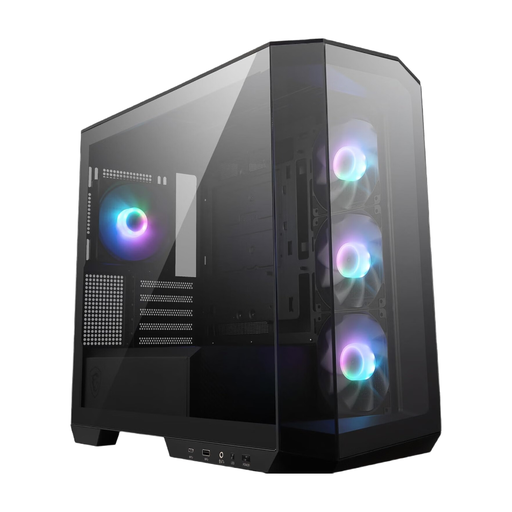
Why This Fits Their Persona: Ideal for users who want an immaculate, cable-free look. The combination of 270-degree panoramic glass and support for back-connect motherboards makes this case the perfect stage for carefully selected components.
Directly addresses "cable chaos" with its native back-connect compatibility. Heat buildup is actively countered by four pre-installed ARGB fans and side air intakes.
Support for back-connect motherboards for an extremely clean look. Four 120mm ARGB fans and a controller are already included.
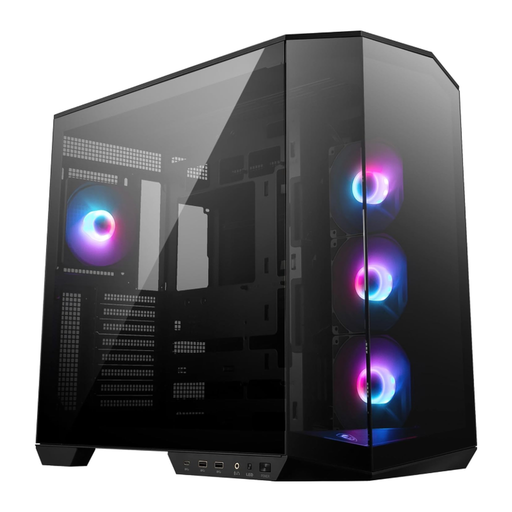
Why This Fits Their Persona: For users who are planning a Micro-ATX system but want to keep the option open for a future upgrade to a larger ATX board. This case offers the panoramic aesthetic in a more spacious format.
The dual-chamber case design solves the problems of heat buildup and cable management by banishing the PSU and drives to a separate chamber. This creates ample space for components and clean airflow.
Supports ATX and Micro-ATX motherboards (including back-connect). Offers a vertical GPU mount and excellent cooling options for demanding builds.
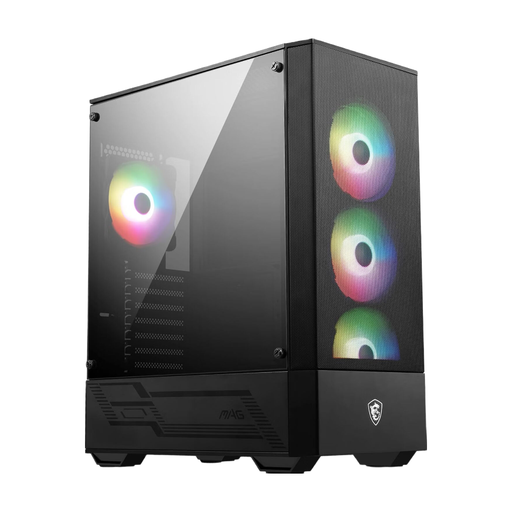
Why This Fits Their Persona: A pragmatic choice for anyone looking for a stylish case with a glass side panel and ARGB fans, but who doesn't have the budget for a true panoramic model. It provides a solid foundation for a Micro-ATX system.
Although it's not a panoramic case, it bypasses the heat buildup pitfall of many budget glass cases by featuring a large mesh front panel, which ensures unrestricted airflow for the four pre-installed ARGB fans.
Focus on airflow thanks to the mesh front. Four ARGB fans and an ARGB hub are already included, representing excellent value for money.
We have compiled a complete, up-to-date list of products that fully meet these strict selection criteria and German safety regulations.
No, this is a common misconception. Although the Micro-ATX standard defines the motherboard size, the case depth varies considerably. Always check the maximum GPU length specified by the case manufacturer and compare it with the specifications of your desired GPU. High-end models, in particular, are often very long and will not fit in every compact case.
A dual-chamber case divides the interior into two compartments. The main chamber houses the heat-intensive components like the motherboard, CPU, and graphics card. The second chamber, often hidden behind the motherboard tray, accommodates the power supply and storage drives. This has two key advantages: the waste heat from the PSU does not affect the main components, which improves cooling performance. Additionally, the second chamber provides ample space to route cables cleanly, leading to a tidy appearance.
Yes, to take full advantage of the feature, you need a motherboard with rear-facing connectors (e.g., from the MSI Project Zero or ASUS BTF series). This is the only way to connect the power, fan, and data cables on the back and achieve the cable-free aesthetic on the front. However, these cases are usually also compatible with standard motherboards; in that scenario, the wiring is done on the front as usual.