What to look for when buying
When choosing a microphone for an audio diary in a small booth, focus on what will make the biggest difference to your recording routine.
| What matters |
What to check before buying |
Who it matters most to |
| Capture clear speech despite the sound of the booth |
Check the polar pattern and possible positioning in front of your mouth; make a test recording with the ventilation running. |
If I can hear reflections or fan noise in a small booth, I want to find a suitable speaking position first. Around 42% of consumers put reducing room sound and background noise first. |
| Record without a complicated setup |
Check for a USB connection on your recording device, as well as a compatible operating system and any required software. |
If I want to start recording individual entries directly on a compatible device, the connection needs to fit my routine without a separate interface. Around 25% of consumers prioritise a straightforward connection. |
| Position the microphone in a small space |
Check the dimensions, what’s included and the mounting options against your desk edge and seating position. |
If there’s very little room on my desk, I need to be able to position or mount the microphone so it points towards my voice. Around 17% of consumers focus first on the space it takes up. |
| Monitor the recording as you go |
Check the headphone socket, controls and monitoring behaviour of the specific model. |
If I want to hear whether I need to record an entry again before moving on, monitoring the audio directly is essential. Around 16% of consumers prioritise checking the sound while recording. |
Microphones for recording speech in a small booth
This selection includes microphones for USB or USB/XLR speech recording, as well as a directional microphone for a smartphone or camera. Before buying, check that the connection and positioning will work in your booth.
 No image available
FIFINE K688CTW dynamic USB/XLR microphone with boom arm
A good fit if you record solo speech, want to position the microphone close to you and monitor your recording directly when using USB.
Dynamic microphone with USB and XLR connections, plus headphone monitoring when using USB. An XLR cable is not included; the controls are inactive when using XLR.
View at Joybuy
 No image available
FIFINE AM8 USB/XLR dynamic microphone with desktop stand
A suitable option if you want to use the desktop stand for a simple setup and monitor your speech recording over USB.
Dynamic microphone with USB and XLR connections, plus headphone monitoring when using USB. The boom arm and XLR cable are not included; the function buttons are inactive when using XLR.
View at Joybuy
 No image available
USB condenser microphone with RGB lighting, Type-C adapter and 7-piece set
For a straightforward USB setup on a PC, if you want to monitor your recording through headphones.
Condenser microphone with a USB connection, headphone socket, real-time monitoring and mute button. The listing title also mentions a Type-C adapter and a 7-piece set.
View at Joybuy
 No image available
USB condenser microphone with cardioid polar pattern and microphone arm
Worth considering if you want to position a USB microphone with a cardioid polar pattern and monitor your recording through headphones.
The listing title mentions a cardioid polar pattern; the product description lists a microphone arm and a headphone socket with monitoring.
View at Joybuy
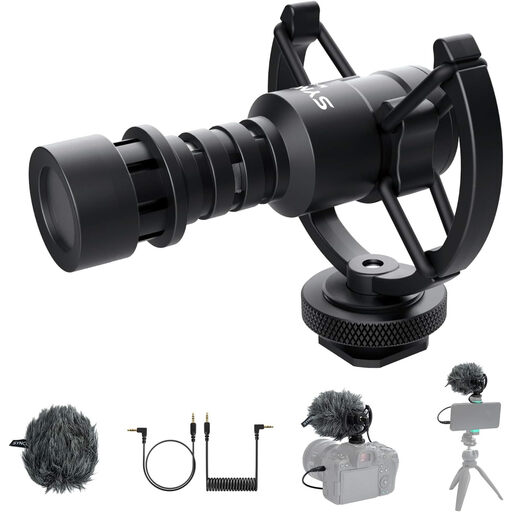 No image available
SYNCO M1S directional microphone for camera and smartphone
Suitable for a recording setup with a supported smartphone, tablet or laptop; check that the connection matches your device first.
Directional microphone with a cardioid polar pattern. The product description lists TRS and TRRS cables, as well as a shock mount; the connection needs to match your recording device.
View at Joybuy
Frequently asked questions
Can a microphone remove echo in a small booth?
No, a microphone type alone won’t remove echo. Shure explains that moving a microphone closer can make your voice more prominent relative to reflections and background noise. So listen to a test recording made in your actual booth before relying on noise processing.
Do I need an audio interface for a solo audio diary?
You don’t generally need a separate audio interface to use a compatible USB microphone with a computer. To connect an XLR microphone to a computer, however, you’ll need a suitable interface as part of your setup. Check the connections and system requirements for the specific model.
What should I check before recording an entry?
Point the microphone towards your voice, select the right input and listen to a short test recording. If you want to monitor your voice directly, check the model’s headphone socket and level controls; Audio-Technica specifically lists both for the ATR2100x-USB.
Can I record other people in Germany without their knowledge?
Section 201 of the German Criminal Code (StGB) makes it a criminal offence to record another person’s non-public spoken words without authorisation. If other people will be speaking, make sure you get their agreement before recording.
What should I look for in a microphone sold in Germany?
For electrical and electronic equipment, the Federal Network Agency lists requirements for retailers including correct CE marking, product identification, manufacturer details and German-language instructions for non-commercial users. Check these details on the specific listing; a brand name alone doesn’t confirm that they’re present.


