What to consider when choosing
First, check how much echo you can hear in your recording space, then choose based on connectivity and how you plan to work. A test recording with different character voices will show whether the distance, pop filter and level controls suit your routine.
| What you need |
What to check before buying |
Who should pay particular attention |
| Echo and background noise |
Polar pattern and speaking direction; a mount to keep the distance consistent. |
If my room sounds echoey, I want to limit how much of the room is picked up and take my recording space into account. That’s why around 36% of consumers put room acoustics first. |
| Connectivity and monitoring |
USB, XLR or both; for XLR, check that you have a compatible interface, headphone output and the cables you need. |
For recording straight to my computer, I want to get started without a separate XLR interface and hear my voice as I speak. That’s why around 29% of consumers prioritise easy connectivity. |
| Changing volume and plosive sounds |
Pop filter and level-control options; test-record both quiet and loud character voices. |
If I switch between quiet speech and forceful exclamations, I want to control the distance and recording level. Around 21% of consumers put this control first. |
| Subtle vocal nuances |
Make a test recording to check whether the space is quiet enough and has few enough reflections; if choosing an XLR model, consider the recording equipment you’ll need. |
If subtle vocal nuances are essential to my characters, I want to capture them without the room sound taking over. Around 14% of consumers prioritise this. |
Joybuy products at a glance
The Joybuy products below range from dynamic USB/XLR microphones to condenser and wireless kits. Choose based on your room, connection and preferred setup, not just the number of features.
 No image available
FIFINE K688CTW dynamic USB/XLR microphone with boom arm
An option if you’re looking for a dynamic microphone with both USB and XLR connections.
The product name lists a boom arm, mute button, volume control and headphone output. An XLR cable isn’t included; according to the product information, the function buttons only work over USB.
View at Joybuy
 No image available
FIFINE AM8 dynamic USB/XLR microphone
A potential choice if you’re looking for a dynamic microphone with USB and XLR connections for your recording space.
The product name lists a headphone output and desktop stand. The boom arm and XLR cable aren’t included; according to the product information, RGB lighting and function buttons are inactive when using the XLR connection.
View at Joybuy
 No image available
Yinkaer G10-P17-P17 podcast kit with two microphones
This kit may suit you if you specifically want two microphones and a mixer; the product information describes the microphones as condenser models.
The product name lists two 3.5 mm microphones and an audio mixer. Before buying, check that this setup is compatible with your computer or mobile device and the connection you plan to use.
View at Joybuy
 No image available
Yinkaer G10-P17 podcast kit with condenser microphone
An option if you’re looking for a kit with a condenser microphone and mixer.
The product name lists a 3.5 mm microphone. Check that the kit’s connection is compatible with your recording device and that a condenser microphone is suitable for the acoustics of your recording space.
View at Joybuy
 No image available
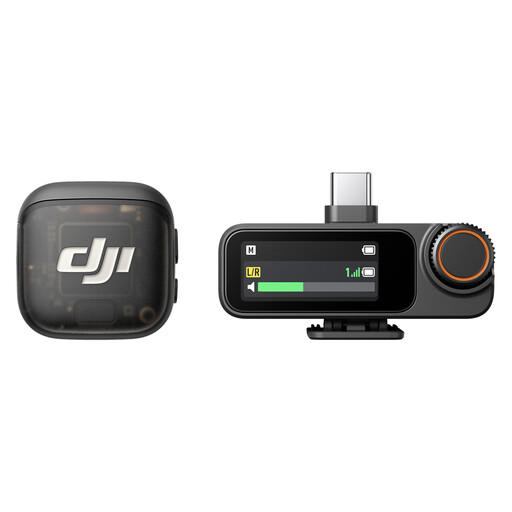
DJI Mic 3 – 2 TX + 1 RX + Charging Case
This wireless kit may suit you if you specifically want two transmitters and one receiver.
The product name lists a charging case. Check that the kit’s connection is compatible with your planned speaking position and recording device.
View at Joybuy
Frequently asked questions
Can a microphone remove echo from a room?
You shouldn’t rely on it to. Choose the quietest recording space you can, reduce reflections with suitable curtains, blankets or rugs, for example, and position the microphone to suit your voice. A directional microphone is just one part of the solution.
What do I need to use a standard XLR microphone with a computer?
You’ll need suitable equipment to convert the analogue microphone signal into a digital one for your computer, such as an audio interface or a suitably equipped mixer. Also check whether the cables and any other accessories you need are included with the specific model.
How can I make different character voices sound as consistent as possible?
Position the microphone similarly for each character, keep the distance consistent and listen back to test recordings at both quiet and loud volumes. With directional microphones, the bass response can change with distance; a pop filter is also worth considering when recording strong consonants.
What should I do if an item develops a fault after purchase in Germany?
For a consumer purchase of new goods, your statutory rights are generally enforced against the seller. The Verbraucherzentrale (German consumer advice centre) states that the period is two years from delivery. These statutory rights are separate from any voluntary manufacturer’s or retailer’s guarantee.
Can I secretly record someone else’s voice?
Not without permission: Section 201 of the German Criminal Code makes it a criminal offence to record another person speaking in private without authorisation. Make sure you have permission before recording someone else’s voice.


